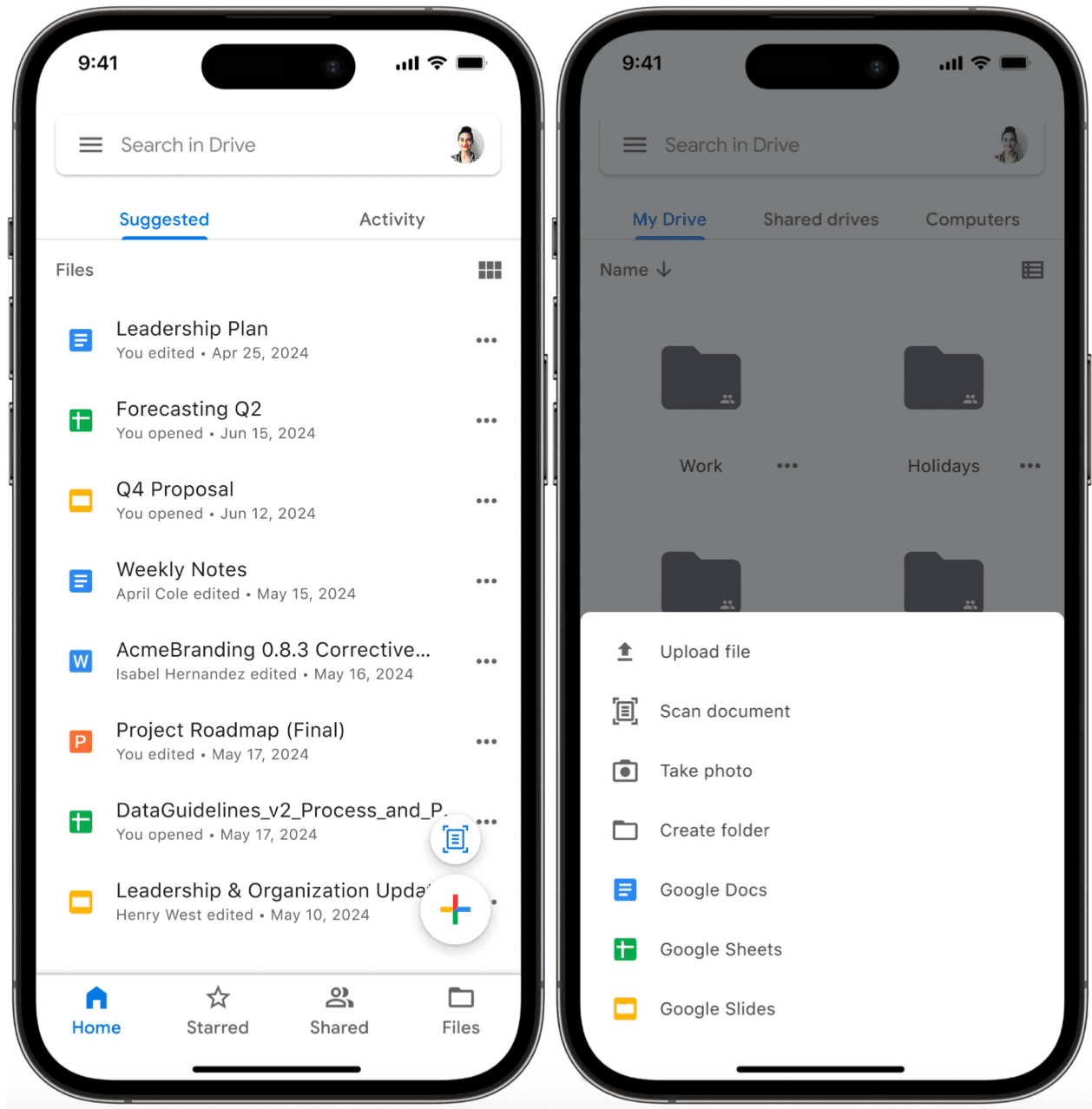
Cloud storage has become fundamental to how we work with files across devices. Services such as Google Drive, Dropbox, Microsoft OneDrive, and Apple iCloud have revolutionized file management by seamlessly integrating cloud storage into everyday workflows. In this chapter, we'll explore the design of a Google Drive mobile client.
Figure 1 illustrates the Google Drive mobile interface, showing how these complex requirements translate into a clean, user-friendly experience.
Here's how the conversation with the interviewer might unfold:
Candidate: Let's begin by defining the core functionality of the Google Drive mobile client. I think the essential features include uploading and downloading files, with options to cancel these operations if needed. Users should also be able to create and delete folders to organize their content. Since Google Drive handles common file types like photos, videos, and documents, we'll also need to support those formats. Does that sound like a good starting point?
Interviewer: Yes, that covers the basics. Since this is a mobile app, network reliability can be an issue. Let's make uploads resumable so users can pick up where they left off if a connection drops.
Candidate: That makes sense! Resumable uploads are especially useful for larger files or unreliable networks. Speaking of file sizes, is there a maximum limit we should design for?
Interviewer: Let's set it at 10 GB.
Candidate: Got it. Users might upload the same file multiple times with updates. Should we include file versioning so they can track changes and restore previous versions of files?
Interviewer: Yes, file versioning is a valuable feature for cloud storage.
Candidate: Great. Next, since users often access Google Drive from multiple devices, we should ensure files sync seamlessly across them. Are we designing for a single user with multiple devices, or do we need to consider multi-user scenarios such as file sharing?
Interviewer: Let's focus on a single user with multiple devices for simplicity. We'll exclude sharing and permission management for now.
Candidate: For non-functional requirements, I assume we need scalability for a large user base and data durability for reliable file access, even in poor network conditions. Does that align with your expectations?
Interviewer: Exactly. For scale, plan for about 10 million daily active users.
Candidate: Noted. One last thing, Google Drive offers real-time editing and collaboration on Docs and Sheets. Should we include those features?
Interviewer: For this design, treat Docs and Sheets as standard files, leaving out real-time editing and collaboration.
Based on our discussions, let's outline the core functionality needed for our Google Drive app.
For non-functional requirements, our system must ensure:
To keep our design focused, the following features are out of scope:
Figure 2 shows the core screens of our Google Drive app:
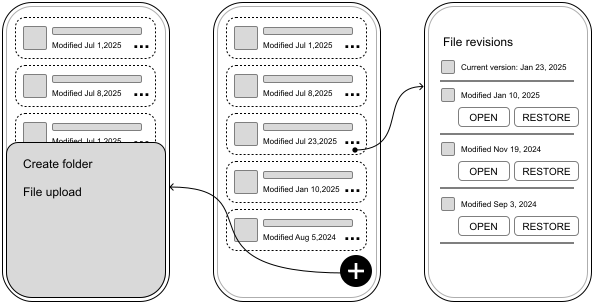
With the app's requirements and UI sketch defined, we now turn to designing the API that connects the mobile client to the backend.
The Google Drive app primarily involves client-driven actions such as uploading files, downloading content, or organizing folders. For these, HTTP with REST APIs offers a straightforward and widely adopted solution.
However, to handle real-time notifications, such as when a shared file is updated, we'll complement REST with either WebSockets or Server-Sent Events (SSE). Since these notifications primarily signal changes rather than transfer actual file content, either approach can effectively handle these lightweight updates.
📝 Note:
While we're using REST in this design, gRPC with Protocol Buffers would also be a strong choice for the Google Drive app, given our scale requirements. gRPC offers several advantages that align well with our needs:
Binary encoding for improved performance.
Strong type safety to ensure API reliability.
Efficient bidirectional streaming for real-time file updates.
If you're experienced with gRPC and Protocol Buffers, feel free to adapt the API design accordingly. The patterns we discuss remain relevant regardless of the protocol choice.
Next, let's outline the core API endpoints and their data structures, starting with the essentials: files and folders.
Since folders in Google Drive behave like files with a special type, we'll unify their management under a single set of endpoints for consistency.
List files
GET /v1/files?parentId={fileId}&page={page}&limit={limit}
Response: 200 OK with GetFilesResponse. Optional query parameters:
parentId (String): ID of the parent folder. Defaults to the root if absent.
Get file details
GET /v1/files/{fileId}
Response: 200 OK with File.
Download file
GET {downloadUrl} (provided in the File object)
Create file or folder
POST /v1/files
Body: Metadata (e.g., name, mimeType, parentId).
Delete file or folder
DELETE /v1/files/{fileId}
Update file or folder metadata
PATCH /v1/files/{fileId}
| Kotlin | Swift |
|---|---|
| data class GetFilesResponse files: List<File> pagination: PaginationMetadata | struct GetFilesResponse files: [File] pagination: PaginationMetadata |
| data class File id: String name: String mimeType: String size: Long downloadUrl: String? checksum: String? ... | struct File id: String name: String mimeType: String size: Int64 downloadUrl: String? checksum: String? ... |
📝 Note: These endpoints follow standard REST conventions. All requests require:
Authentication via a JWT bearer token in the Authorization header.
JSON content type (application/json).
Like any REST API, these endpoints may return 4xx status codes for client errors such as invalid authentication, missing resources, and malformed requests, and 5xx status codes for server errors.
Having covered file management, let's shift to versioning—a key feature for tracking changes and restoring past states.
To enable users to view and revert file history, we'll add revision-specific endpoints tied to each file.
List revisions
GET /v1/files/{fileId}/revisions?page={page}&limit={limit}
Get revision details
GET /v1/files/{fileId}/revisions/{revisionId}
Restore revision
POST /v1/files/{fileId}/revisions/{revisionId}/restore
The FileRevision data model is defined as follows:
| Kotlin | Swift |
|---|---|
| data class FileRevision revisionId: String fileId: String mimeType: String size: Long modifiedAt: String downloadUrl: String checksum: String | struct FileRevision revisionId: String fileId: String mimeType: String size: Int64 modifiedAt: String downloadUrl: String checksum: String |
This configuration allows the client to easily view and revert to previous versions of the document.
Having defined the API structure, let's shift our focus to the mobile client's architecture. The goal is to create a modular and scalable design that supports the app's features while remaining adaptable for future growth.
We'll outline the key components and their interactions, as illustrated in Figure 3, starting with the external dependencies and then diving into the client itself.
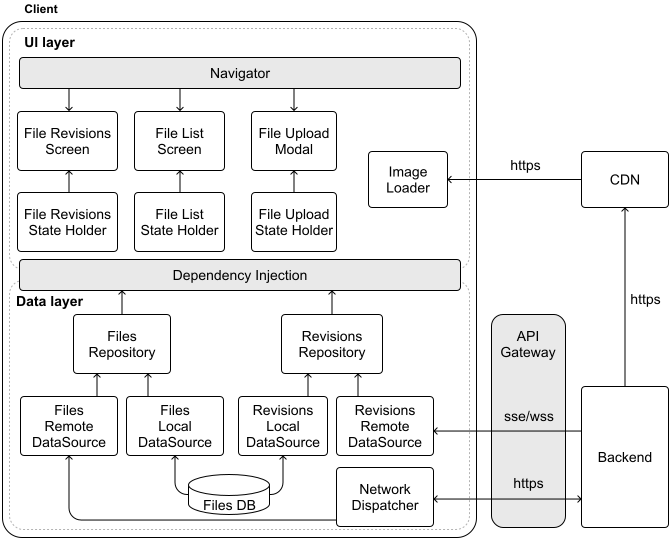
To set the stage, let's first consider the external services the client relies on:
Now, let's explore the client side, which splits into two core layers: the UI layer and the Data layer. This separation keeps the code clean, testable, and maintainable.
The UI layer consists of three main screens: a File List Screen for browsing content, a File Upload Modal for adding new files, and a File Revisions Screen for viewing file history.
The data layer manages the core functionality through Files and Revisions repositories. They work together with the Network Dispatcher to handle HTTP communication with the backend, while the Revisions Remote Data Source listens for real-time updates through SSE or WebSockets.
This architecture provides a solid foundation for our Google Drive app. Now, let's dig deeper into some of the system's more complex aspects.
Some unique aspects of the Google Drive system deserve special attention. Let's take a closer look at data storage, resumable file uploads, version history, and data encryption.
Efficient data management is key in a cloud storage app like Google Drive, where the mobile client must handle metadata (e.g., file names, folder hierarchies, version info) and downloaded file content. Let's break down how each is stored locally for optimal performance and security.
Our app needs to efficiently handle several types of data as users interact with their files:
This metadata requires frequent querying and updates. For managing this, a relational database proves ideal because:
The File and FileRevision data models map naturally to database tables since they have well-defined structures. This makes it straightforward to perform complex queries across the file hierarchy, track relationships between files and their revision history, and maintain data consistency as files change.
Figure 4 shows how we've updated our architecture to reflect this design, with separate Data Access Object (DAO) components for each database table.
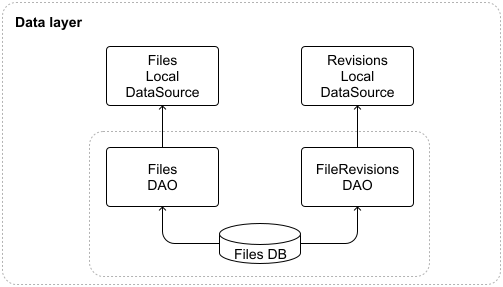
To balance speed and storage, we'll cap the metadata database at a configurable size, such as 200MB, using an LRU (Least Recently Used) eviction policy. This keeps recently accessed metadata on-device while clearing out older entries. Since each metadata record is small, we can cache a large number of entries with minimal storage impact.
For offline access, users can download files, which need secure and practical local storage.
The app's private internal storage, sandboxed by iOS and Android, is ideal because:
Files are stored in a specific folder (e.g., /data/user/0/com.google.android.apps.drive/files/downloads/<fileId> on Android), using their fileId as a unique file name to avoid conflicts.
Before downloading, the app checks available space and alerts users if it's low, ensuring smooth operation even with large files.
🔍 Industry insights:
Box Drive allows users to mark folders for offline access. When selected, content is automatically downloaded in the background and stored locally for offline use [1].
Resumable uploads are a cornerstone of a mobile cloud storage app, especially for managing large files and coping with unreliable networks. They deliver key benefits: users can pause and resume uploads without needing to restart, recover from interruptions seamlessly, and manage uploads based on network or battery conditions, which enhances both efficiency and the user experience.
Many popular apps use resumable uploads to efficiently handle large files. This includes cloud storage services such as Google Photos [2], X (formerly Twitter) [3], Box [4], Dropbox [5], Microsoft OneDrive [6].
Google Drive [7], for example, offers three distinct upload methods according to its documentation [8]:
Let's explore how to implement file uploads in our Google Drive mobile client. Since simple upload is straightforward, let's focus on resumable uploads.

Companies implement these steps differently, primarily varying in how they structure the endpoints:
Single unified endpoint: Companies like X (formerly Twitter) and Google (Drive and Photos) handle everything through a single endpoint. They manage metadata either through headers or query parameters. For example, Google Photos takes the following approach with its resumable uploads endpoint:
X-Goog-Upload-Command=[start|upload, finalize]
X-Goog-Upload-Offset={bytes\_offset}
{uploadId}Multiple endpoints. Companies such as Dropbox and Box split the functionality across different endpoints, with each endpoint handling a specific step of the process. For example, Dropbox exposes the following endpoints:
Both approaches can work. In this explanation, we will look more closely at implementing multiple endpoints to handle resumable uploads.
Let's explore the different endpoints and data models we need to handle resumable uploads.
POST /v1/upload?uploadType=resumable
| Kotlin | Swift |
|---|---|
| data class UploadRequest requestId: String name: String mimeType: String parentId: String size: Long | struct UploadRequest requestId: String name: String mimeType: String parentId: String size: Int64 |
| data class UploadResponse uploadId: String totalChunks: Int chunksProcessed: Int chunkSize: Long uploadUrl: String uploadExpiresAt: String | struct UploadResponse uploadId: String totalChunks: Int chunksProcessed: Int chunkSize: Int64 uploadUrl: String uploadExpiresAt: String |
The UploadResponse file guides file uploads by tracking how files are split, what has already been uploaded, and where new parts should be added. This helps the client manage uploads smoothly, whether starting new ones or resuming interrupted uploads.
Content-Range: bytes start-end/total
PUT /v1/upload/`{uploadId}`/chunk
  Body: Raw binary data for a particular chunk.
  Response: 201 Created if this was the final chunk, or 308 Resume Incomplete if more chunks remain. Payload of type UploadResponse.
The Content-Range header manages the upload process by telling the backend which part of the file is being sent. When the last piece arrives, the backend assembles everything and sends a completion confirmation. The client can then verify the upload was successful based on the backend's successful response code.
GET /v1/upload/`{uploadId}`
  Description: Returns information about an upload session.
  Body: Empty.
  Response: 200 OK. Payload of type UploadResponse.
The client can then continue uploading the remaining chunks, starting with the next chunk after chunksProcessed. If too much time has passed and the upload session has expired, the client will need to initiate a new upload from the beginning.
DELETE /v1/upload/`{uploadId}`
Allows clients to abort uploads and free server resources.
When implementing resumable uploads in mobile apps, we need to carefully consider several platform-specific challenges. Let's explore these challenges and their solutions.
Mobile apps should handle file uploads in the background to avoid blocking the main UI thread and provide a better user experience. However, mobile operating systems may terminate background tasks at any time. To prevent losing upload progress when this happens, we need to save the pending UploadResponse objects to disk. This lets us resume uploads later when the app is running again, ensuring files still get uploaded even if they were interrupted.
During app launch, we check for partially completed uploads and resume the jobs while monitoring system conditions such as battery and network changes.
When handling file uploads, we need to consider two key device constraints: storage space and file access permissions.
For storage, we temporarily cache files before upload. Since mobile devices have limited space, we need a strategy for handling low storage scenarios. The app should monitor available space and provide clear options when storage runs low, such as letting users clear the upload cache, removing previously downloaded files, or showing storage usage statistics.
For file access, we can use the system file picker, which provides temporary read access to selected files or requests direct storage permissions from the user. If users deny storage permissions, the app should disable upload functionality and provide clear guidance on enabling permissions through system settings.
While the backend handles most of the complexity around chunks, such as determining chunkSize and tracking progress, the client still needs to handle errors gracefully. Let's look at some common error scenarios and how to handle them:
To avoid overwhelming the servers with retry attempts, implement exponential backoff, gradually increasing the delay between retry attempts. This helps manage server load while still ensuring that uploads are eventually complete.
Users should always know how their upload is progressing, even if they restart the app. To keep users informed throughout the entire upload process, clients can:
Let's update our architecture diagram to reflect the new components we've discussed. Figure 6 shows how we've enhanced both layers of our system. In the UI layer, we've added the File Picker and File Permissions Helper components to handle user interactions with the device's file system. The data layer now includes the File Splitter for breaking down large files, as well as the File Uploader Repository and File Uploader Service to manage the upload process in the background.
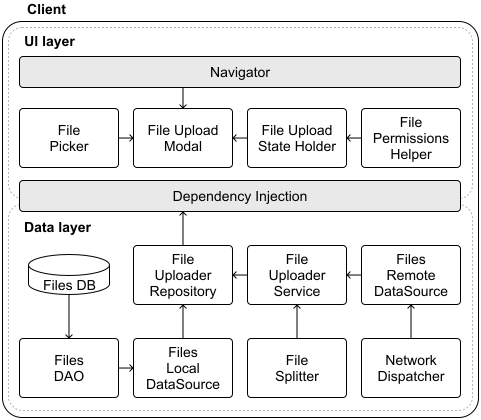
architecture diagram
Version history is essential for tracking file changes in cloud storage, letting users revert to earlier versions when needed. In this section, we'll cover how new file versions are uploaded and how conflicts are handled when changes overlap, striking a balance between usability and technical precision.
When users modify a file and upload it, the app must handle the new version efficiently. Two methods dominate this process: full copy upload and block-level sync. Each approach affects storage, bandwidth, and app complexity differently.
This method uploads the entire updated file every time a change is made.
Many cloud drive providers including Google Drive, Box, OneDrive, and iCloud use this approach [9] because of its simplicity and reliability.
Block-level sync [10] takes a more sophisticated approach by uploading only the changed parts of a file, not the entire file.
Dropbox pioneered this approach using their Broccoli [11] encoding system and block sync protocol. For a better comparison between these approaches, refer to the following block-level sync resource [12].
File conflicts occur when multiple devices modify the same file concurrently, leading to inconsistencies across versions. This can happen in scenarios such as:
To handle these challenges effectively, the client and server need to work together to detect and resolve conflicts. Cloud storage systems typically approach this problem in two parts: conflict detection, which identifies when changes overlap, and conflict resolution, which determines how to handle competing versions.
Let's explore these aspects in more detail, focusing on a widely-used detection approach called optimistic concurrency control and common resolution strategies such as Last-Write-Wins (LWW) and version forking.
Optimistic concurrency control [13] is a widely used technique to detect conflicts by validating changes against the current file version before committing updates. It assumes conflicts are rare and checks for them only during the update process. This approach is employed by cloud storage providers such as Box, which uses HTTP headers for version validation [14].
At a high level, it works as follows.
Process:
{fileId}.Advantages:
Disadvantages:
Cloud storage systems such as Google Drive often adopt an eventual consistency model to prioritize availability and allow updates to proceed without immediate synchronization across all devices.
In this model, conflicts are detected after updates are accepted, and resolution is handled through specific strategies. Two common resolution strategies are:
The choice of conflict resolution strategy depends on your app's specific requirements. Cloud storage providers handle conflicts in different ways:
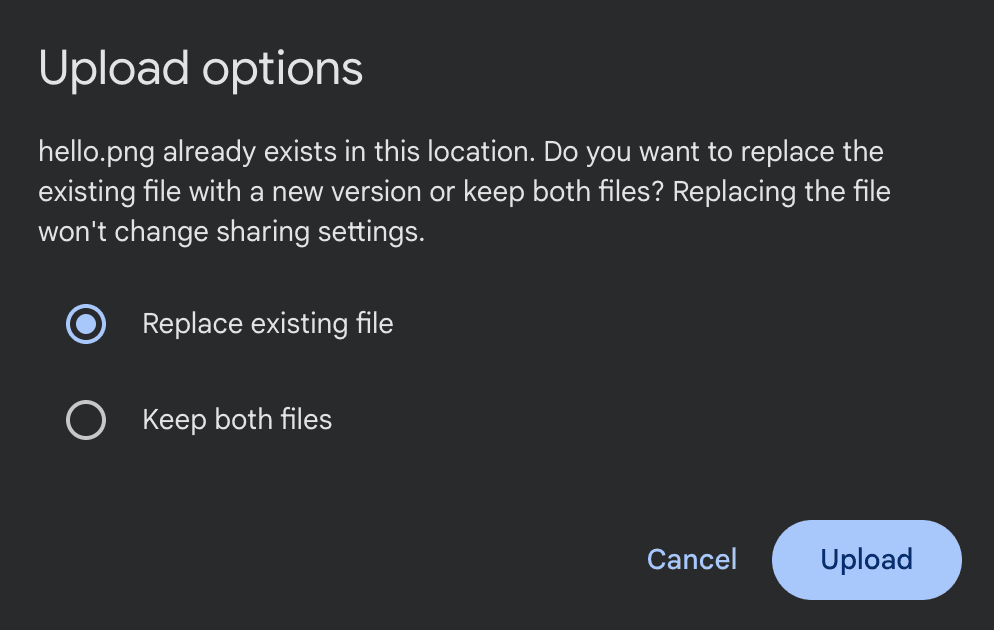
whose name already exists in the folder
Dropbox's public API provides support for both strategies we discussed to give more flexibility to clients. Through two key parameters (strict_conflict and mode) in their upload API [15], they give developers precise control:
The interviewer may sometimes add extra requirements to the problem. For example, what if they ask you to support enterprise customers who need files stored on devices to be encrypted? What would you do?
Without encryption, a lost or compromised device could expose sensitive files if an attacker mounts its storage. To counter this, we'll use AES-256 [16], a strong, industry-standard encryption algorithm that balances security and performance on mobile hardware. We'd use it for:
This approach ensures that even if the device's storage is accessed, the data remains unintelligible without the decryption key.
To enable offline file access, encryption keys must be stored locally rather than relying solely on server-side solutions. We leverage platform-specific security features to store these keys securely:
For added protection, we can derive the key from the user's login credentials using PBKDF2 [19], a key derivation function, ensuring only authenticated users can unlock it. This ties the encryption tightly to user identity.
While encryption provides essential security, it comes with unique challenges on mobile devices. Let's explore how to balance strong security with smooth performance.
Encryption operations can be CPU-intensive, especially for large files. To maintain a responsive app, the encryption/decryption work happens on background threads to keep the UI smooth. Also, we should take into account that encrypted files take up slightly more space due to padding and metadata overhead and the app memory consumption when keeping encrypted and decrypted files in memory.
Careful memory handling is crucial when working with decrypted data. We should consider implementing timeouts to automatically clear decrypted content and release cached decrypted data when memory runs low. Additionally, developers should watch for potential memory leaks in encryption/decryption cycles.
A robust encryption system needs clear paths for handling issues. We must implement appropriate fallback behaviors when encryption keys become corrupted or inaccessible or when encryption/decryption operations fail. The app needs to inform the user and prompt them to take the right actions.
Since encrypted files are tied to device-specific keys, they require special handling for backups. We should exclude encrypted files from system backups by default. If backups are needed, implement custom logic to re-encrypt data with backup-specific keys.
Not all devices offer the same level of security features. In our logic, we must check for secure hardware availability during app initialization, and fall back gracefully to app sandbox storage on older devices. Additionally, we should inform users that we're operating with reduced security capabilities.
Throughout this chapter, we've designed a Google Drive client that addresses key challenges in cloud storage apps. Our solution enables users to securely store, access, and sync their files while maintaining a complete version history. We built the system around a robust REST API for core operations, complemented by SSE or WebSockets to deliver real-time updates when files change.
The architecture we developed tackles several complex challenges head-on. By carefully structuring our client components and defining clear backend interactions, we created a system that handles everything from basic file operations to more intricate features such as resumable uploads and file versioning.
If you have additional time during your interview or want to explore more advanced features, here are some compelling extensions to consider:
[1] How Box Drive designed Mark for Offline: https://blog.box.com/how-we-designed-mark-offline-box-drive
[2] Google Photos resumable uploads: https://developers.google.com/photos/library/guides/resumable-uploads
[3] X (formerly Twitter) resumable uploads: https://developer.x.com/en/docs/x-api/v1/media/upload-media/uploading-media/chunked-media-upload
[4] Box chunked uploads: https://developer.box.com/guides/uploads/chunked/
[5] Dropbox resumable uploads: https://www.dropbox.com/developers/documentation/http/documentation\#files-upload\_session-start
[6] Microsoft OneDrive resumable uploads: https://learn.microsoft.com/en-us/graph/api/driveitem-createuploadsession
[7] Google Drive resumable uploads: https://developers.google.com/workspace/drive/api/guides/manage-uploads#resumable
[8] Google Drive upload types: https://developers.google.com/drive/api/guides/manage-uploads
[9] Google Drive uploads entire files: https://www.pcworld.com/article/2020862/google-drive-review.html
[10] Block-level storage: https://en.wikipedia.org/wiki/Block-level\_storage
[11] Dropbox's Broccoli encoding and block sync protocol: https://dropbox.tech/infrastructure/-broccoli--syncing-faster-by-syncing-less
[12] Block-level sync vs full copy comparison: https://www.cloudwards.net/block-level-file-copying/
[13] Optimistic concurrency control: https://en.wikipedia.org/wiki/Optimistic\_concurrency\_control
[14] Box optimistic concurrency implementation: https://developer.box.com/guides/api-calls/ensure-consistency
[15] Dropbox strict conflict strategy: https://www.dropbox.com/developers/documentation/http/documentation\#files-upload
[16] Advanced Encryption Standard (AES): https://en.wikipedia.org/wiki/Advanced\_Encryption\_Standard
[17] Android Keystore: https://developer.android.com/privacy-and-security/keystore
[18] iOS Keychain: https://developer.apple.com/documentation/security/keychains
[19] PBKDF2: https://en.wikipedia.org/wiki/PBKDF2
[20] Brotli: Google's lossless data compression algorithm: https://en.wikipedia.org/wiki/Brotli