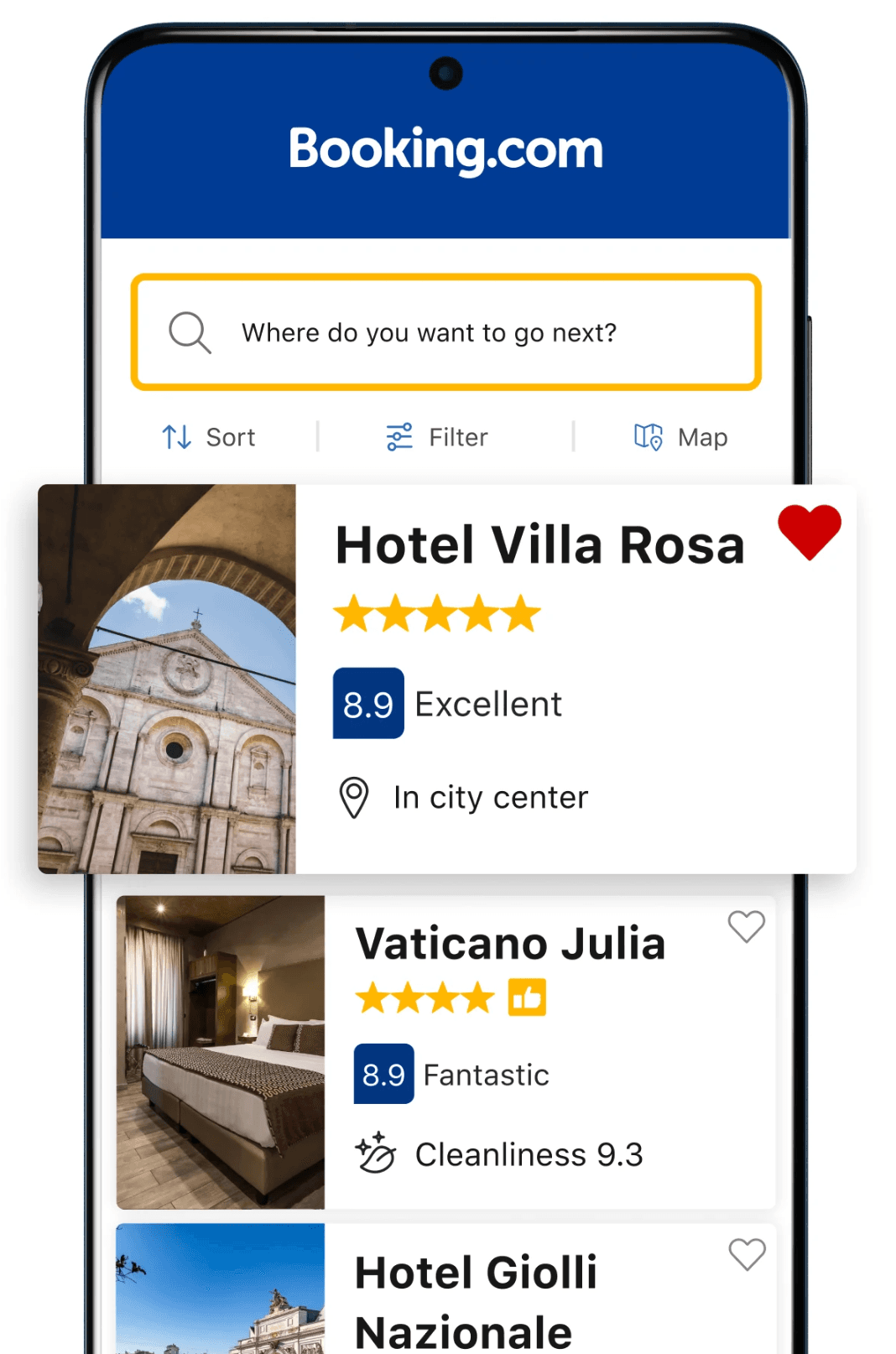
In this chapter, we will design a hotel reservation system that empowers users to search, compare, and book hotels. Platforms like Booking.com and Hotels.com have transformed travel planning by integrating robust search capabilities and instant booking features into mobile applications. These systems must manage real-time room availability, prevent double bookings, and deliver accurate pricing.
The architectural patterns we explore here are applicable to other booking systems as well, such as property rentals, flight reservations, or event ticketing.
Before diving into the design, we must first define its requirements and boundaries. Imagine we are discussing this with an interviewer to clarify the system's focus:
Candidate: I'd like to understand the scope first. Are we focusing on a single hotel chain, or is this an aggregator platform, like Booking.com, that pulls together options from multiple providers?
Interviewer: We're aiming for an aggregator model, where users can browse and book hotels from various sources.
Candidate: That gives us a solid starting point. For the core features, I'd suggest users should be able to search for hotels by location or destination, view details such as room types and pricing, and finalize bookings within the app. Should we also consider real-time updates to reflect room availability as others book during a user's search?
Interviewer: Those features work well as a foundation, but let's hold off on real-time updates for simplicity. While searching for hotels, we should include autocomplete suggestions. Another key requirement, though, is setting a time limit for users to complete their booking once they start entering payment details.
Candidate: Great. That helps clarify the booking flow. Building on that, let's explore the feature set further. Will users need options such as canceling reservations or checking in through the app? And should we plan for authentication flows or push notifications, such as reminders for upcoming trips?
Interviewer: Let's keep it focused. Assume users are already logged in, so no authentication flows. We'll also exclude cancellations and check-ins. For payments, include support for credit cards and third-party options such as PayPal. Push notifications aren't needed either.
Candidate: Got it. To guide our technical choices, could you share the system's expected scale? What's the monthly active user base we're designing for?
Interviewer: We're currently at around 5 million monthly active users worldwide, but the system should handle growth beyond that over time.
The conversation can continue, covering other topics we might consider interesting and relevant to the app. Let's summarize what we're building in this chapter.
Based on our discussions, we're designing a hotel reservation app with the following functional requirements:
As for non-functional requirements, we need to build a system that ensures:
To visualize how users will interact with the system, Figure 2 presents the core screens of our hotel reservation app:
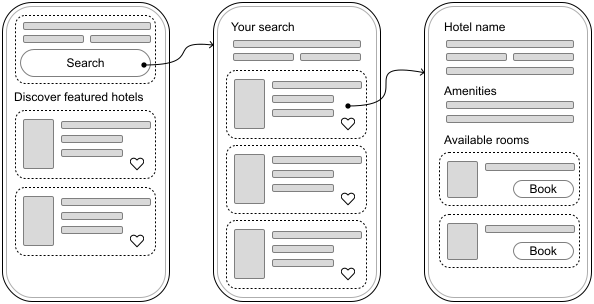
With a clear understanding of the requirements and user interface in place, let's transition to designing the API that will facilitate communication between the mobile client and the backend server.
Since the system does not require real-time updates or push notifications, most interactions will be client-initiated. We will adopt HTTP with REST APIs for client-backend communication, using JSON as the data format.
Let's examine the RESTful endpoints our backend will expose. We'll focus on the most important endpoints and data models. Others can be explored in more detail if the interviewer requests.
💡 Pro tip! During the interview, concentrate on defining endpoints and data models for the most critical requirements that typically align with the main user flows in the app.
While you should acknowledge that other functionality exists, you can describe it at a high level to show awareness without going into implementation details. This demonstrates you're considering the full scope while consciously prioritizing the most important aspects.
Hotels are the cornerstone of the app, and users need intuitive ways to find and explore them. Here are the primary endpoints to enable this:
{page}&limit={limit} &latitude={x}&longitude={y}&other_query_parameters| Kotlin | Swift |
|---|---|
| data class HotelSearchResponse hotels: List<HotelPreview> paging: PaginationMetadata | struct HotelSearchResponse hotels: [HotelPreview] paging: PaginationMetadata |
| data class HotelPreview id: String name: String location: String price: BigDecimal lowResImageUrl: String ... | struct HotelPreview id: String name: String location: String price: Decimal lowResImageUrl: String ... |
🛠️ Platform implementation details
Throughout this book, we present API responses as Kotlin and Swift data models rather than raw JSON. In practice, these JSON payloads get converted to platform-specific data structures within the network layer (specifically in the network data sources shown in our architecture diagrams).
On Android, developers often rely on libraries such as kotlinx.serialization, or Moshi for JSON serialization and deserialization.
On iOS, Swift's built-in Codable protocol handles this elegantly, mapping JSON fields to Swift struct properties.
{id}?query_parameters| Kotlin | Swift |
|---|---|
| data class HotelDetailsResponse hotel: HotelDetails | struct HotelDetailsResponse hotel: HotelDetails |
| data class HotelDetails id: String name: String location: String imagesUrls: List<String> amenities: List<Amenity> curatedRooms: List<RoomSummary> price: BigDecimal ... | struct HotelDetails id: String name: String location: String imagesUrls: [String] amenities: [Amenity] curatedRooms: [RoomSummary] price: Decimal ... |
| data class Amenity name: String iconUrl: String category: String | struct Amenity name: String iconUrl: String category: String |
| data class RoomSummary id: String name: String description: String? imageUrl: String maxOccupancy: Int ... | data class RoomSummary id: String name: String description: String? imageUrl: String maxOccupancy: Int ... |
Booking a hotel is the natural next step, and we need endpoints to handle this process efficiently:
| Kotlin | Swift |
|---|---|
| data class ReservationRequest requestId: String hotelId: String roomIds: List<String> checkInDate: String checkOutDate: String guests: Int | struct ReservationRequest requestId: String hotelId: String roomIds: [String] checkInDate: String checkOutDate: String guests: Int |
| data class ReservationResponse reservationId: String hotelId: String status: ReservationStatus ... | struct ReservationResponse reservationId: String hotelId: String status: ReservationStatus ... |
The ReservationRequest model includes the requestId field, which acts as an idempotency key. This prevents accidental duplicate bookings if network issues cause the same request to be sent multiple times.
When the backend processes a reservation request, it responds with a ReservationResponse model. This response contains all the original request information, plus several additional fields:
📌 Remember: Adding idempotency keys to POST requests helps the backend de-duplicate client requests.
In the hotel booking system, this is critical. The requestId field in ReservationRequest prevents double-booking rooms.
GET /v1/reservations/{id}
returns the details of a reservation and its status
PUT /v1/reservations/{id}
updates an existing reservation with personal details, payment details, etc.
Endpoint-specific errors:
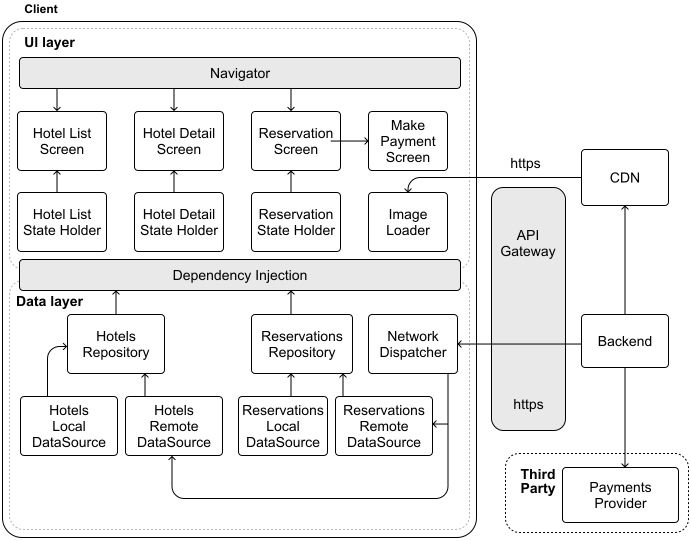
With the API design in place, let's shift our attention to the client-side architecture. Figure 3 sketches out the architecture of our hotel reservation app.
Let's explore how the key components of our architecture work together.
Our system relies on several external services:
The client architecture follows a similar layered approach to our previous designs, with distinct UI and data layers working together to create a seamless hotel booking experience.
In the UI layer, we have three main screens: Hotel List, Hotel Detail, and Reservation, each with its own dedicated state holder that manages the screen's logic and data presentation. We've also introduced a Make Payment Screen component to handle payments flexibly, supporting both direct credit card processing and integration with third-party payment providers.
The Data layer orchestrates the core business logic through specialized repositories that manage our primary data types: hotels and reservations. Each repository works with both local and remote data sources to ensure efficient data handling. All network communications flow through a central Network Dispatcher component, which coordinates backend interactions and manages access control.
This architecture provides a solid foundation for our hotel booking system. Let's explore some of its key aspects in more detail.
With the high-level architecture in place, let's examine some key aspects of our system in more detail.
In designing our hotel reservation app, we face the critical task of managing how long users can hold a room before finalizing their booking. This mechanism, often termed "reservation holds" in the industry, ensures that our system balances user convenience with the need to keep room inventory available for others.
Let's break down how this feature should work.
Our reservation hold feature revolves around several key behaviors:
This combination of user-facing transparency and system-driven management maintains an equitable booking process while preserving the platform's responsiveness and accuracy.
Ensuring that the client and backend remain synchronized in tracking reservation time is a pivotal challenge. Mobile devices complicate timer management because:
Relying on the device's clock alone won't work. We need a better approach that has the backend as the source of truth. Thus, the backend communicates the reservation expiration UTC timestamp to the client.
To display the most accurate representation of the remaining reservation time to the user on the client, regardless of device or network conditions, we use the device uptime.
The device's uptime ensures that timers remain accurate during app suspension (e.g., when the app is minimized or the phone locks) and is immune to user clock changes, unlike standard wall clock time, which can be manipulated.
🛠️ Platform implementation details
Both iOS and Android provide native APIs to handle time tracking and countdowns:
On iOS, use ProcessInfo.processInfo.systemUptime to get system uptime, and create timers using the Timer class.
On Android, get system uptime via SystemClock.elapsedRealtime(), and implement countdowns with CountDownTimer.
This choice ensures precision from the server while accommodating mobile-specific interruptions.
✅ Decisions made!
Backend timestamps serve as the single source of truth for tracking reservation holds.
Client displays the countdown by combining the backend's expiration timestamp with local device uptime measurements.
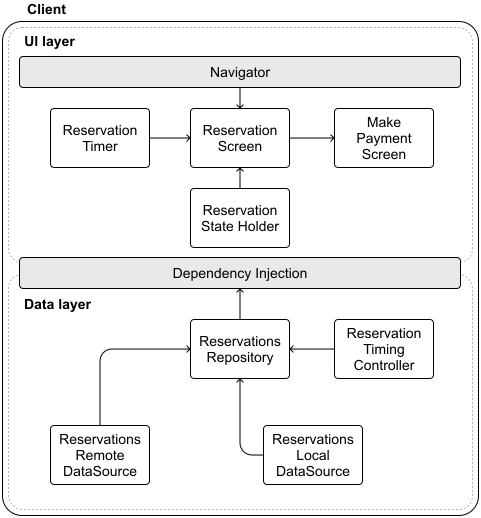
The addition of separate components in different layers of the Architecture follows the Separation of Concerns principle (Figure 4). It creates clear responsibility boundaries, making the system more maintainable and testable. These components work together to keep users informed of their remaining reservation time.
🔍 Industry insights:
Expedia's API explicitly supports a two-step booking: a client can put a room “on hold” (no charge) and then confirm the booking within a given time window [1].
To explore how to design the backend system, check out the "Hotel Reservation System" chapter of the System Design Interview Volume 2 book [2].
Autocomplete is a popular feature in mobile design interviews, especially for hotel booking apps. It helps users quickly find cities, destinations, or hotels as they type, but implementing it on mobile comes with technical challenges.
While autocomplete can get complex with advanced algorithms, personalization, and scalability, we'll keep it simple by focusing on efficiently loading autocomplete data.
Currently, our app relies on a basic search mechanism: users enter a query, press "Search," and the client retrieves results via a GET /v1/hotels/search request to the backend. While this approach works, it lacks the dynamic interactivity that modern mobile users expect.
Autocomplete makes things easier by showing suggestions as people type. However, to achieve this effectively, we must address several performance considerations:
With these considerations in mind, let's explore how we can effectively implement autocomplete within our app.
To deliver meaningful autocomplete suggestions, our app must anticipate user intent, offering relevant matches for countries, cities, and hotels as queries take shape. Table 1 explores multiple strategies for sourcing this data, each with its own merits and drawbacks:
| Option | Description | Advantages | Disadvantages |
|---|---|---|---|
| Local static dataset | Embed all autocomplete data within the app. | Works offline. Eliminates network delays. Ensures stable performance. | Expands app size. Demands updates for freshness. Impractical for evolving data. |
| Real-time remote API fetching | Retrieve suggestions from the backend with each keystroke. | Provides current data. Requires no local storage. Highly adaptable. | Latency can disrupt UX. Increases data usage. Needs strong error handling. |
| Third-party services | Leverage external APIs (e.g., Google Places) for suggestions. | Access to rich, curated datasets. Reduces maintenance burden. | May incur costs. Raises privacy concerns over data sharing. Ties us to external providers. |
| Pre-fetch popular data | Load common search terms (e.g., top cities, hotels) in advance. | Speeds up frequent queries. Optimizes network use. | Risks of storing unused data. Requires periodic refreshes. |
| On-demand data loading | Retrieve suggestions from the backend after users complete their search. | Conserves resources. Delivers tailored results. Keeps storage lean. | Offers limited initial suggestions. It may feel sparse for new searches. |
Table 1: Trade-offs for providing autocomplete data
As you can see, each approach has its pros and cons. For this exercise, we'll go with a hybrid solution: pre-fetching popular data combined with on-demand loading for user-specific searches. This method finds a middle ground, and here's why it works well:
This strategy assumes that users often search within popular regions, starting with broad suggestions that become more personalized over time. By preloading commonly searched terms and incrementally updating the cache based on user interaction, we achieve immediate responsiveness while maintaining flexibility and relevance.
Our autocomplete system operates through a three-step process:
Next, let's consider how to store this data effectively.
For autocomplete to shine, we need a storage system optimized for rapid text retrieval. Given our focus on names and locations, Full-Text Search (FTS) [3] proves ideal, offering:
While FTS demands extra storage for indexes and adds some complexity, its benefits to the user experience might justify the investment. SQLite with FTS extensions emerges as our choice, leveraging its strengths across platforms.
🛠️ Platform implementation details
Both Android and iOS can implement Full-text search (FTS) through SQLite.
On Android, the Jetpack Room persistence library provides built-in FTS support [4], making implementation straightforward. Room handles the complexity of FTS configuration and query optimization, allowing you to focus on your search functionality.
iOS developers have a few options, as Core Data doesn't natively support FTS. You can either work directly with SQLite to implement FTS capabilities or use wrapper libraries such as GRDB [5] that simplify SQLite integration while maintaining full FTS functionality.
While autocomplete significantly enhances usability, it also introduces complexities we must carefully address:
To recap, our autocomplete storage implementation leverages FTS via SQLite, offering robust performance optimized for fast queries. This setup, complemented by intelligent caching and synchronization strategies, ensures a responsive and intuitive user experience across mobile clients.
🔍 Industry insights:
If you're interested in how other companies solved this problem, you can read how:
Traveloka.com supports multiple languages and incorporates geographic location awareness to improve search relevance and reduce typos [6].
Tiket.com developed a machine learning model that improved the quality of autocomplete ranking results by 4% to 7.5% [7].
Handling payments securely is an essential aspect of hotel reservation apps. Designing a payment integration requires careful consideration of user experience, data security, compliance with industry regulations, and reliable interaction with external services.
Our hotel reservation app supports two primary payment methods:
In this section, we will focus on integrating these payment methods within the mobile app.
When processing credit card payments, security must remain a top priority. Integrating credit card payments securely into our app involves specific considerations:
With tokenization, we can maintain minimal client-side storage for saved payment methods by retaining only a unique id that references the card securely, and the last four digits of the card number to help users quickly identify saved payment methods without exposing sensitive details.
Once the credit card information is sent to the server as part of the PUT /v1/reservations/{id} endpoint, we face two viable paths:
⚠️ Important security note:
Directly handling credit card data and communicating with Payment Processors requires extensive security measures. This approach demands significant investment in infrastructure and ongoing maintenance to comply with PCI DSS standards [11].
For most applications, it's safer and more practical to use established Payment Service Providers that already handle these security requirements.
Recognizing the complexity of direct integration, we've chosen to collaborate with trusted PSPs. This decision simplifies our development efforts and reinforces user trust by aligning with recognized payment experts, setting a solid foundation as we explore broader integration options.
Integrating third-party Payment Service Providers (PSPs) enables secure, user-friendly payment processing. Modern PSPs, such as Stripe or PayPal, handle not only basic card payments but also offer comprehensive solutions, including digital wallets and alternative payment methods (e.g., Klarna).
When integrating PSPs into mobile apps, one key architectural choice we must consider is whether to route payments directly from the client or channel them through our backend server. Table 2 explores different approaches that come with unique benefits and trade-offs.
| Aspect | Backend integration | Client-side integration |
|---|---|---|
| Implementation | Backend orchestrates PSP interactions. | Clients engage PSPs directly, managing payment interfaces. |
| Performance | Additional latency from backend processing. | Lower latency. Faster payments due to direct client–PSP communication. |
| Security | Sensitive data is handled exclusively server-side, improving overall security. | Sensitive data managed client-side, increasing complexity in securing client apps. |
| Maintenance | Easier PSP integration management. Changes are centralized. | Multiple platform-specific integrations. Requires client updates for PSP changes. |
| User Experience | Uniform user experience across platforms, limited by backend implementation. | Richer, more native experience with full PSP features such as biometric authentication. |
| Development | Increased backend complexity. Simpler client-side implementation. | Increased client complexity due to direct PSP SDK integration. |
Table 2: Trade-offs for integrating with PSPs
After evaluating these trade-offs, integrating PSPs directly on the client provides users with a richer, native payment experience and access to advanced payment options, including device-specific biometric authentication methods. Although this adds complexity in client-side management, it aligns with the expectations of a high-quality, modern mobile experience.
✅ Decisions made!
The hotel reservation system processes all payment transactions from the client UI through third-party Payment Service Providers.
Integrating payments into the mobile architecture (Figure 5) requires minimal adjustments to the architecture diagram:
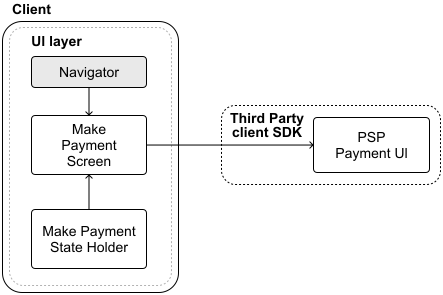
These additions to our architecture clearly delineate payment responsibilities, improving maintainability and ensuring secure and reliable handling of sensitive user transactions.
To understand how payment data travels through our system, consider the following end-to-end flow when a user books a hotel room, as illustrated in Figure 6.
After the initial reservation, when the client sends a POST /v1/reservations request with booking details and the server returns a successful response with a reservationId, the following steps take place:
{id} with tokenized transaction identifiers provided by the PSP (step 2).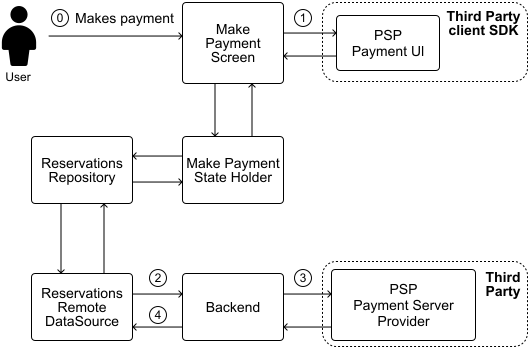
📝 Note:
Payment Service Providers (PSPs) typically handle transactions in two steps:
Authorization: Reserve the funds in the customer's account.
Capture: Move the money when the transaction is confirmed.
This process makes payments more reliable. If something goes wrong before the transaction is confirmed, the money is still in the customer's account, since it has only been reserved, not taken.
When using a PSP's SDK, to ensure everything stays in sync, the backend should always verify the reservation before capturing the payment.
Popular PSPs such as Stripe, PayPal, or Apple Pay offer extensive SDKs, making client-side integration more straightforward.
When integrating PSP SDKs into our app, we should carefully handle common mobile-specific payment implementation challenges, including:
Addressing these considerations enhances overall reliability, resulting in a secure, transparent, and user-friendly payment experience.
🔍 Industry insights:
If you're interested in how other companies solved this problem, you can read how:
Expedia migrated to a cloud-based microservices payment platform for flexibility and speed [12].
Stripe explains payment tokenisation [13] and handles fraud prevention with 3D Secure [14].
Throughout this chapter, we've designed a comprehensive hotel reservation system from the ground up. At its core, our system enables seamless hotel search, browsing, and booking. We took special care to address critical aspects such as managing booking timeouts, optimizing search performance, and ensuring smooth payment flows.
If you have extra time in your interview or want to explore more advanced features, consider these additional requirements:
[1] Expedia booking hold and resume APIs: https://developers.expediagroup.com/docs/products/rapid/lodging/booking/hold-resume
[2] System Design Interview – An Insider's Guide: Volume 2 by Alex Xu and Sahn Lam: https://www.amazon.com/dp/1736049119/ref=sspa_dk_hqp_detail_aax_0?psc=1&sp_csd=d2lkZ2V0TmFtZT1zcF9ocXBfc2hhcmVk
[3] Full-text search: https://en.wikipedia.org/wiki/Full-text\_search
[4] Google's Room library FTS support: https://developer.android.com/training/data-storage/room/defining-data
[5] iOS GRDB library: https://github.com/groue/GRDB.swift
[6] Traveloka autocomplete search: https://medium.com/traveloka-engineering/high-quality-autocomplete-search-part-1-fcc1b0a4baa6
[7] Tiket.com autocomplete search ML model: https://medium.com/tiket-com/algorithm-behind-search-in-tiket-com-4bfaeb42980b
[8] Tokenization: https://en.wikipedia.org/wiki/Tokenization\_(data\_security)
[9] Payment Processor: https://en.wikipedia.org/wiki/Payment\_processor
[10] Payment Service Provider (PSP): https://en.wikipedia.org/wiki/Payment\_service\_provider
[11] Payment Card Industry Data Security Standard (PCI DSS): https://en.wikipedia.org/wiki/Payment\_Card\_Industry\_Data\_Security\_Standard
[12] Expedia vendor payment transactions: https://aws.amazon.com/solutions/case-studies/expedia-aurora-case-study/
[13] Stripe payment tokenisation: https://stripe.com/en-es/resources/more/payment-tokenization-101
[14] Stripe 3D secure fraud prevention: https://docs.stripe.com/issuing/3d-secure