In this chapter, we'll tackle the design of a chat app. Chat apps are so common that designing one has become a very common question in mobile system design interviews. Figure 1 showcases some of the most popular chat applications currently in the market.
Chat apps have evolved to meet a wide range of communication needs. They serve as platforms to host one-on-one conversations, help friend groups stay connected, allow families to share life updates and photos, and even enable gamers to strategize during online matches. With such a diversity of potential functions, it's crucial to define clearly the specific requirements for the chat app we're designing.
When tackling the design of a chat app, it's essential to first get on the same page as your interviewer. Here's how that conversation might play out:
Interviewer: Welcome to today's session! We'll be designing the mobile client app architecture and backend communication for a chat application.
Candidate: Thanks, I'm looking forward to this! Before we dive in, I'd like to clarify a few points about the app's functionality. Typically, chat apps allow users to send and receive messages in real time, view their conversation list, and access chat history offline. Are we focusing on one-on-one chats, group chats, or both? This could significantly impact our design approach.
Interviewer: Let's keep it simple and focus solely on one-on-one conversations. We'll leave group chats out of scope for now.
Candidate: Understood. Now, about the backend's role, some chat systems, such as WhatsApp [1], use the backend as a temporary message relay, holding messages until they're delivered to clients, without permanent storage. Is this the approach we're taking?
Interviewer: Yes, that's exactly the approach we'll use for this design.
Candidate: I see. Are we supporting only text messages, or should we consider attachments and reactions, as well?
Interviewer: Let's keep it simple and focus on text messages only for now.
Candidate: Alright. What about common chat features such as push notifications for new messages, typing indicators, and online status updates? Should we include these in our design?
Interviewer: Yes, let's incorporate those features.
Candidate: Great. Now, can you give me an idea of the app's scale? Are we designing for a startup or a large-scale, global application?
Interviewer: We're thinking big here. We're looking at about 30 million daily active users worldwide.
Candidate: That's a significant user base. For user registration and authentication, can we assume users are already authenticated when they access these features, and that their contact lists are pre-loaded when they open the app?
Interviewer: Yes, those are safe assumptions.
Candidate: Got it. And lastly, about security, we'll obviously secure the client–backend connection, but should we also consider encrypting messages stored on the device to protect against potential security breaches?
Interviewer: For now, let's keep message encryption on the device out of scope.
This back-and-forth helps us build a comprehensive picture of our design requirements. Let's take a moment to summarize what we've established so far.
💡 Pro tip!
When addressing a familiar interview question, take the lead by proposing both functional and non-functional requirements upfront. This proactive approach not only showcases your leadership skills but also helps your interview stand out.
Based on our discussions, we're designing a chat system with the following functional requirements:
For our non-functional requirements, we need to build a system that ensures:
💡 Pro tip!
When asking about Daily Active Users (DAU), you're doing more than just getting a number. The scale and geographic distribution of users directly influence your technical decisions. High DAU numbers often signal a need to focus more on topics such as performance optimization, resource efficiency, scalable architecture patterns, and the right network protocol choice.
Always connect scale requirements to your technical choices during the interview. This demonstrates thoughtful system design and shows you understand how business requirements shape architecture decisions.
To keep our design focused, we'll consider the following features out of scope:
As we move forward, it's important to remember that the scale of our system will significantly influence our design decisions. We'll need to consider carefully how each choice affects our ability to efficiently manage a large user base and high message volume.
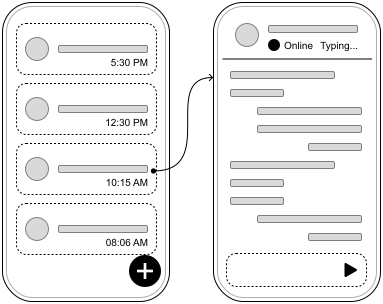
Figure 2 shows the basic layout of our chat app. On the left, the Chat List screen displays recent conversations and a button to start a new chat. Tapping a conversation opens the Conversation screen, which shows recent messages, the other user's online and typing statuses, and a text field to send new messages.
Now that we've established our requirements, let's dive into the API design. This step is crucial for understanding how the client and backend will communicate. In this section, we'll look at:
In a chat system, clients don't communicate directly with each other. Instead, they connect to a backend that acts as a mediator. When a client sends a message, it goes to the backend. The backend then identifies the intended recipient and forwards the message. If the recipient isn't online, the backend holds on to the message until they connect.
Figure 3 illustrates the interactions between clients and the chat backend service, showing how messages flow through the system.

Let's examine how our client app and backend need to communicate. There are two distinct types of interactions we need to handle:
While push notifications can help inform users about new messages or events when the app isn't active, they aren't enough for an active chat session. Real-time features like message delivery, read receipts, and online status updates require something more immediate and reliable than push notifications, which can be slow and inconsistent. Given how sensitive chat apps are to latency, we need a more robust solution that can deliver a seamless, real-time experience.
Over time, developers have created several techniques to support server-initiated connections. These include polling, long polling, Server-Sent Events (SSE), WebSockets, and other solutions built on top of HTTP/2 such as gRPC.
These approaches frequently come up in mobile system design interviews, so it's important to understand them. Let's explore the key methods that have shaped how mobile apps communicate with servers.
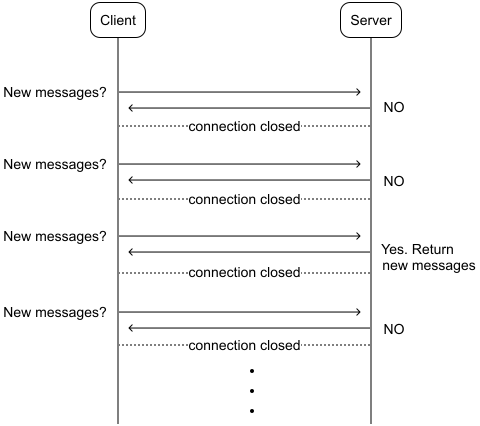
Polling (or short polling) is a basic technique whereby the client repeatedly asks the server, "Do you have any new messages for me?". As shown in Figure 4, the process works like this: The client asks for new data; the server responds with or without new information; the client waits briefly, then asks again.
While easy to implement, polling can be wasteful. It often leads to many unnecessary requests, especially when there's no new data to report. This constant back-and-forth can burden both the client and the server, consuming extra network resources and processing power.
Long polling emerged as an improvement by addressing some of the inefficiencies of traditional polling. Let's take a closer look at how it works in Figure 5.
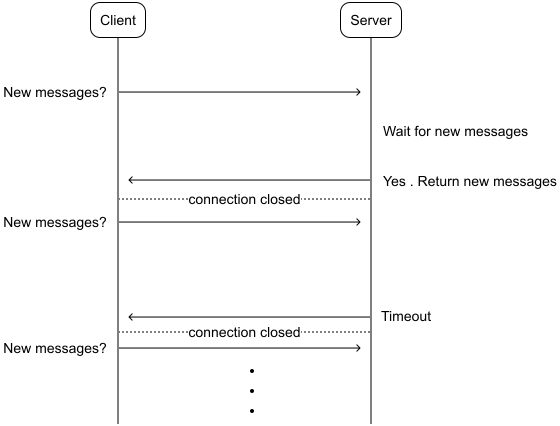
With HTTP long polling, the client asks the server for updates and waits. Unlike short polling, the server holds the connection open until there's new data or a timeout occurs. Once the client gets a response, it immediately asks again.
While better than short polling, long polling has some issues too:
Server-Sent Events (SSE) offer a way for servers to push updates to clients over a single HTTP connection. This approach, illustrated in Figure 6, differs from traditional request–response models.
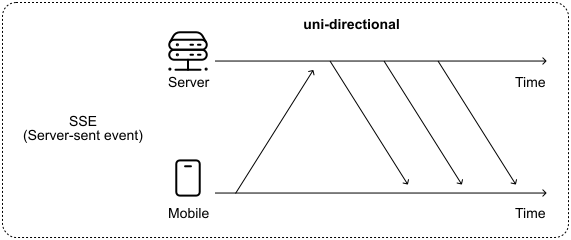
At its core, SSE maintains an open HTTP connection between the client and server. To prevent the connection from timing out due to inactivity, the server may periodically send a colon-prefixed comment line. This simple technique keeps the connection alive, even when there's no actual data to transmit.
📝 Note! This is how SSE works under the hood:
The client sends an HTTP GET request to the SSE server endpoint, setting the Accept header to text/event-stream.
The server replies with a 200 OK status and sets the Content-Type to text/event-stream. It then keeps the connection open, ready to push updates.
The server sends events in a simple text format, continuously updating the client.
If the connection drops, the client typically reconnects automatically. To avoid missing events, it can include a Last-Event-ID header in its reconnection request, allowing the server to send only the events that occurred since the last received event.
SSE is far more efficient than polling methods. By establishing a single, persistent connection and pushing updates only when necessary, SSE significantly reduces network traffic and server load. This makes it a more resource-friendly option for real-time communication.
In the context of our chat app, we could leverage SSE for server-initiated events while using standard HTTP requests for client-initiated actions. This hybrid approach would allow us to receive messages and other events through the SSE connection, while sending user messages via separate HTTP requests.
Although SSE presents a viable solution, there's another alternative to consider: WebSockets.
The WebSocket (WS) protocol has one of the most common solutions for real-time, bidirectional communication between clients and servers. Figure 7 shows how it works.
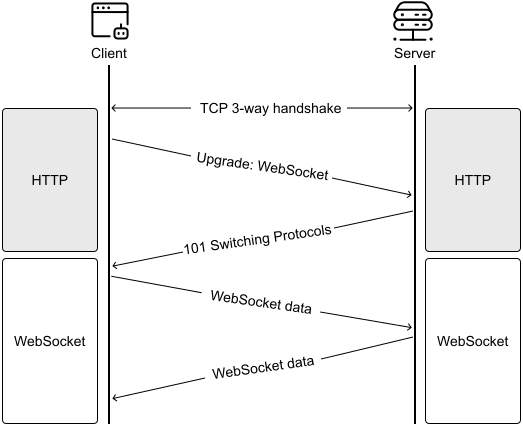
WebSocket connections begin their life as standard HTTP connections that are then "upgraded" to WebSocket connections through a well-defined protocol. This approach allows WebSockets to operate seamlessly even in the presence of firewalls, as they utilize the same ports (80 and 443) as HTTP and HTTPS traffic.
Once established, this two-way channel enables both client and server to freely exchange messages. WebSockets don't impose restrictions on data formats; they accommodate everything from plain text to binary data. This flexibility has contributed to their widespread adoption.
WebSockets are built on top of TCP (Transmission Control Protocol) and provide a reliable connection for data transfer. TCP establishes and maintains a connection throughout the session, ensuring data packets are delivered in order and without errors. It handles error-checking, acknowledges received packets, and resends lost ones.
In contrast, UDP (User Datagram Protocol) doesn't establish a connection first before sending data. It sends each packet independently, which means it can't guarantee delivery, order, or error-free transmission. While this approach lacks TCP's reliability, it has less overhead, making it faster for certain applications.
Over the years, developers have created various real-time messaging protocols designed for specific use cases. These protocols are typically built on either TCP or UDP, depending on their needs. Some notable examples include:
In summary, Table 1 compares the network protocols that can be used for server-initiated connections to meet the system's real-time requirements.
| Option | Advantages | Disadvantages |
|---|---|---|
| Short polling | Simple implementation. Works with standard HTTP infrastructure and wide compatibility across platforms. | Inefficient with excessive requests. High bandwidth usage occurs when many requests return no new data |
| Long polling | Near real-time updates with fewer requests than short polling. Good for non-critical updates. | Complex timeout handling. Doesn't scale well with many clients as it's resource-intensive on servers. |
| Server-Sent Events (SSE) | Single open HTTP connection for server-to-client messages. Built-in reconnection support and works well over HTTP/2. | Unidirectional (server to client only) so it requires a separate mechanism for client-to-server communication. Resource-intensive with many connections. |
| WebSocket | True bidirectional communication. Low-latency message delivery and reduced overhead without repeated request/response cycles. | More complex to implement as it requires more infrastructure support (e.g., load balancers). Scaling persistent connections is challenging. |
Table 1: Trade-offs for choosing the network protocol for real-time features
After evaluating the different options, we chose a hybrid approach for the chat app:
While implementing two protocols adds some complexity, this creates a more maintainable system as the app grows. By using WebSocket only for real-time features rather than all communication, including sending messages, we avoid common scaling issues that typically emerge in production environments.
⚠️ Careful!
Scaling WebSocket services in production requires careful consideration. Some key challenges include:
Managing persistent connections consumes significant server resources.
Load balancing WebSocket connections is more complex than standard HTTP traffic.
Connection recovery and state management need thorough handling.
Monitoring and debugging WebSocket services require specialized tooling.
By limiting WebSocket usage to just real-time features rather than all communication, we can better manage these scaling challenges.
We chose WebSockets over SSE for our chat application primarily because they offer better performance in chat scenarios. WebSockets provide lower latency and reduced header overhead, which is crucial when sending frequent small messages such as typing indicators and read receipts. While SSE could handle one-way server updates, WebSockets have more consistent support across mobile platforms and come with mature tooling for managing connections. This includes built-in capabilities for reconnection strategies and keep-alive mechanisms.
This hybrid approach, which combines HTTP and WebSockets, has been widely adopted in the industry. For example, Slack uses HTTP for most write operations through their Web API [11], while leveraging WebSocket for real-time events through their Real-Time Messaging (RTM) API [12]. Discord follows a similar pattern [13], demonstrating how well this architecture works at scale.
The client establishes the WebSocket connection for real-time updates when the app starts, and it remains active until either the client or server terminates it. Figure 8 demonstrates how clients and servers would interact with HTTP for client-initiated requests and WebSockets for real-time updates in our system.

✅ Decisions made!
HTTP with REST APIs for sending messages and other client-initiated operations.
WebSocket for real-time features, where the server needs to push updates to clients.
Careful scope limitation of WebSocket usage to manage scaling complexity.
Now that we've chosen our communication protocol and data format, let's dive into the specific endpoints and data models we'll need.
For sending messages, we can define the following endpoint:
Authentication: Bearer <token>
POST /v1/messages
  Body: NewMessageRequest
  Response: 201 Created. Payload of type NewMessageResponse
| Kotlin | Swift |
|---|---|
| data class NewMessageRequest requestId: Long toUserId: Long content: String createdAt: String | struct NewMessageRequest requestId: Int64 toUserId: Int64 content: String createdAt: String |
| data class NewMessageResponse message: Message fromMessageRequestId: Long? | struct NewMessageResponse message: Message fromMessageRequestId: Int64? |
The requestId field in NewMessageRequest acts as an idempotency key to allow the backend to de-duplicate requests when the same request is accidentally sent multiple times, and the optional fromMessageRequestId field in NewMessageResponse helps match a Message with the corresponding NewMessageRequest.
We could also define another endpoint for syncing new messages when the app initializes:
Authentication: Bearer <token>
GET /v1/messages?lastSyncedMessage=`{messageId}`&limit=`{limit}`
  Body: empty
  Response: 200 OK. Payload of type SyncMessagesResponse
The main application data model in our system is the Message. Here's what it looks like:
| Kotlin | Swift |
|---|---|
| data class Message messageId: Long fromUserId: Long toUserId: Long content: String status: MessageStatus createdAt: String | struct Message messageId: Int64 fromUserId: Int64 toUserId: Int64 content: String status: MessageStatus createdAt: String |
| enum class MessageStatus PENDING, SYNCED, DELIVERED, READ | enum MessageStatus case pending, synced, delivered, read |
The status field drives what message indicator the UI displays on the screen and contains the following values:
Another key data model is the ConversationPreview, which represents what users see in the Chat list screen. It's worth noting that the following data models related to client app screens are private to the client. The backend doesn't concern itself with how the client displays messages.
| Kotlin | Swift |
|---|---|
| data class ConversationPreview contact: User lastMessageSummary: String lastMessageTimestamp: String unreadCount: Int | struct ConversationPreview contact: User lastMessageSummary: String lastMessageTimestamp: String unreadCount: Int |
| data class User id: Long name: String avatarUrl: String lastConnectedAt: String | struct User id: Int64 name: String avatarUrl: String lastConnectedAt: String |
The ConversationPreview is a lightweight model containing just enough information to display a conversation in the Chats list. When a user taps on one of these items, it opens the Conversation screen with that user. Since we can only have one conversation per user, the User's id serves as a unique identifier for each conversation.
When the user opens the Conversation screen, the app loads the full Conversation data type, which contains more detailed information about the chat:
| Kotlin | Swift |
|---|---|
| data class Conversation contact: User contactInfo: ContactInfo? unreadCount: Int messages: List<Message> | struct Conversation contact: User contactInfo: ContactInfo? unreadCount: Int messages: [Message] |
| data class ContactInfo onlineStatus: String typing: Boolean | struct ContactInfo onlineStatus: String typing: Bool |
For the real-time features powered by WebSocket, we use a Uniform Resource Identifier (URI) format similar to HTTP URLs. While HTTP URLs begin with http:// or https://, WebSocket URIs start with ws:// for standard connections or wss:// for secure, encrypted ones. For our chat backend service, we'll use the following URI: wss://my-api.chat.com/v1/socket/updates.
📌 Remember!
We include versions in our API endpoints for good reasons. This practice gives us the flexibility to introduce breaking changes or major new features in newer versions while keeping older versions stable. It also allows us to deprecate outdated APIs in a controlled manner. For a deeper dive into API versioning, refer back to Chapter 10: Mobile System Design Building Blocks.
When sending data over the Websocket, we use JSON in the following format:
{
  "type": "message_type",
  "payload": {}
}
Each event consists of two main parts: a type field that specifies the event type (as defined earlier), and a payload field containing the actual event data as a JSON object. The content of the payload varies depending on the message type.
Once the WebSocket connection is established, the backend can send real-time updates like the following:
Now that we've established the API design, let's explore the high-level client architecture. We'll focus on:
Figure 9 shows the high-level architecture of the chat system.
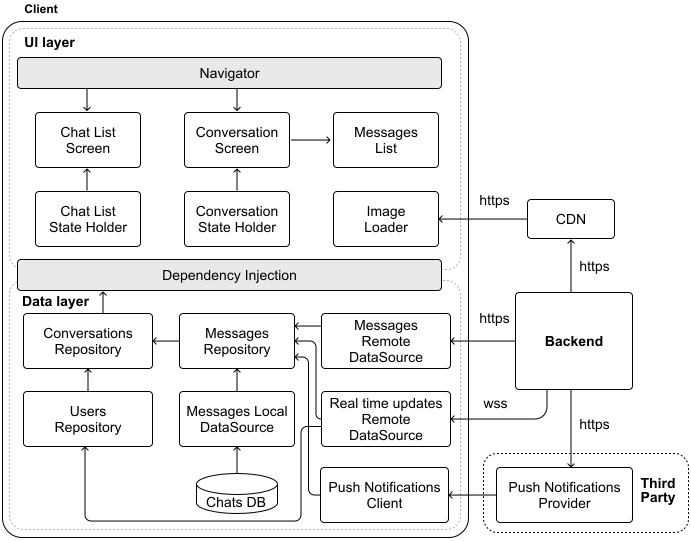
📝 Note: The components identified in the chat system don't differ much from those identified in the previous chapter when designing a News Feed. Thus, we'll go through this section quickly. If you have questions, revisit Chapter 3: Design a News Feed App.
Our system relies on the Backend, CDN, and the Push Notifications Provider components.
The third-party Push Notifications Provider allows us to reach users even when they're not actively using the app, handling the complex infrastructure needed for reliable notification delivery. We'll explore push notifications in more depth during our deep dive section.
Building on the foundation laid in previous chapters, we choose a layered architecture that follows Unidirectional Data Flow (UDF), reactive programming, and other key principles, such as separation of concerns, to ensure our app is robust, performant, and scalable.
The Message is the central type of application data in the chat app. To handle this effectively, we've incorporated various data layer components, with the Messages Repository at the core, managing all read and write operations. Similarly, we've included a Users Repository to handle user-related information such as names and profile images.
The Messages Repository works with both local and remote data sources. While client-initiated requests flow through traditional HTTP endpoints via the Messages Local DataSource component, the dedicated Real time updates Remote DataSource component maintains a persistent WebSocket connection to receive real-time updates from the backend. This dual approach ensures that the system stays responsive to both user actions and server events.
The Push Notifications Client component serves as a listener for notifications from the external provider.
The UI layer is built around the app's main screens: the Chat List and Conversation. To optimize performance, we have centralized image loading into a single Image Loader component, which fetches data from the content delivery network (CDN).
The Message List is a key component. It displays all messages of a conversation in chronological order, including those that failed to send or are still pending. Failed messages are indicated on the UI, and a resend option is provided for each message.
Let's explore the best way to store messages in the chat app. While mobile platforms offer simple storage options such as SharedPreferences on Android and UserDefaults on iOS, these key-value stores aren't the right fit for our needs. They work well for small pieces of data such as user preferences, but they weren't designed to handle growing message histories or the complex relationships between messages, conversations, and users. As message volume increases, these simple storage solutions would slow down and make it difficult to search through conversations effectively.
A relational database is a good choice for our chat app. Messages are naturally structured data: each message belongs to a conversation, has an author, and follows a clear format.
📝 Note: For a deeper dive into comparing different storage alternatives, refer to the Data Storage section in Chapter 10: Mobile System Design Building Blocks.
Relational databases excel at managing these relationships while providing three crucial benefits:
These capabilities make relational databases ideal for handling the complex, growing, and interconnected nature of chat message data. While they may require more initial setup than simpler solutions, they provide the robust foundation we need for a reliable chat application.
Managing local storage is crucial for our chat app since all conversations are stored on the device. While we could automatically manage storage through eviction policies or time-based deletion, putting users in control often provides a better experience. Popular messaging apps take different approaches: WhatsApp alerts users when storage runs low and guides them through freeing up space [14], while Slack automatically removes messages older than 90 days or a year for their free tier[15].
Similarly, we could implement one of the following options:
💡 Pro tip!
When designing mobile systems, certain decisions, such as how to handle message storage under memory constraints, often involve product teams. While you can propose different approaches and analyze their trade-offs during the interview, it's wise to first check with you interviewer on whether these product-level decisions are within scope before diving into implementation details.
For our chat app, we can suggest a user-centric storage management strategy if the interviewer is okay with that decision. Our strategy works as follows:
By giving users visibility and control over storage management, we help them make informed decisions about their chat history while preventing the app from consuming too much space.
✅ Decisions made!
We choose a relational database to persist message data on disk.
We alert users when storage runs low.
Now that we've established the client-backend communication protocol and outlined the client architecture, it's time to dive deeper into some key areas. We'll concentrate on the following five critical areas:
Message ordering is fundamental to chat apps. It's what makes conversations feel natural and easy to follow. When messages appear in the wrong order, users can quickly become confused and frustrated. What seems like a simple requirement, showing messages in chronological order, actually involves several challenging edge cases on mobile devices:
Let's explore how messages flow through our system to make a better decision on screen message ordering. Figure 10 illustrates this process:
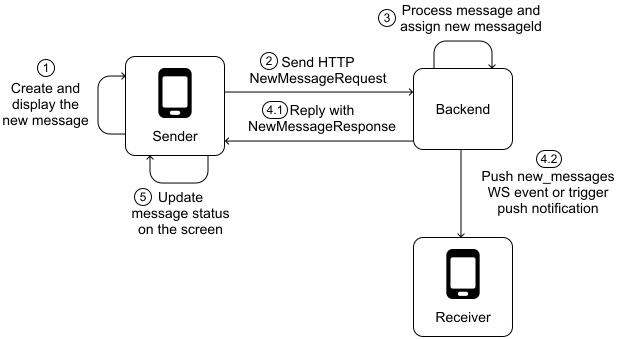
In steps 1 and 5 of Figure 10, the client needs to display the message on the screen. To implement reliable message ordering in our client app, we need to make a key design decision: what field should we use to sort messages on the conversation screen?
The Message data model provides two potential fields for ordering: the messageId assigned by the server when the message is processed and the createdAt timestamp set by the client when the message is created. Table 2 explores trade-offs between different approaches.
| Trade-offs for ordering messages in the client | ||
|---|---|---|
| Order by | Advantages | Disadvantages |
| messageId | A server-generated ID ensures consistent ordering across clients. Backend remains the source of truth. | The client doesn't have the messageId until the backend generates it. Doesn't support offline messaging effectively. |
| createdAt timestamp | Low latency. Immediate message display without waiting for the backend. Supports offline messaging. | Vulnerable to inconsistencies from device clock differences. Susceptible to client-side manipulation. |
| createdAt timestamp with client-backend clock synchronization | Combines timestamp benefits with improved reliability. Reduces ordering issues through synchronization, for example, via WebSocket events or Meta's Simple Precision Time Protocol [16]. | Clock drift between devices can still cause problems. Complex to implement accurately across diverse networks. |
Table 2: Trade-offs for ordering messages in the client
While synchronizing client and backend clocks could work, it would add significant complexity and cost to our system. Instead, we can mitigate the downsides of messageId and createdAt approaches by combining them:
Most popular chat apps use a server-assigned ID to sort messages on the client side. While some apps publish detailed documentation about it, such as Discord's Snowflake [17] id approach [18], others, such as WhatsApp with its id field [19], Facebook Messenger with mid [20] or Slack with ts [21], are more opaque about their specifics. How to order pending messages is a product decision, and apps might decide to implement it in different ways.
✅ Decisions made!
The Conversation screen uses a hybrid approach to order messages on the screen:
Messages that have been successfully sent to and acknowledged by the server are ordered based on a server-generated messageId.
Messages that are still waiting to be sent or are in progress are ordered based on the client-generated createdAt timestamp and always appear at the end of the message list.
In our system, the messageId plays a crucial role in maintaining the correct order of messages. They're designed to be sortable by time, ensuring that newer messages always have higher IDs than older ones. The backend is the source of truth for generating these IDs to ensure data integrity, reliable delivery, and consistent message ordering.
While this might seem straightforward, creating these IDs correctly can be tricky, especially for a large-scale system. That's why we typically delegate this responsibility to the backend. Servers are better suited to quickly and accurately generate unique, time-ordered IDs for millions of messages.
Sending messages reliably in a mobile app isn't always straightforward. Network issues can prevent messages from reaching their destination. To handle this challenge, we need a way of tracking different message states: messages not yet sent, messages in transit, and messages that failed to send.
The data layer can model those states with the following MessageRequest data model. Just before sending the message, the remote data source maps this into a NewMessageRequest object. This approach helps us handle various message scenarios and implement retry mechanisms if needed.
| Kotlin | Swift |
|---|---|
| data class MessageRequest requestId: Long toUserId: Long content: String status: MessageRequestStatus lastModifiedAt: String lastSentAt: String? failCount: Int? | struct MessageRequest requestId: Int64 toUserId: Int64 content: String status: MessageRequestStatus lastModifiedAt: String lastSentAt: String? failCount: Int? |
| enum class MessageRequestStatus DRAFT, PENDING, SENT, FAILED | enum MessageRequestStatus case draft, pending, sent, failed |
The status field tracks the message's current state:
📝 Note: You might notice there's no SUCCEEDED status in our MessageRequest model. This is by design. When the server acknowledges a message's delivery, we don't simply update the status. Instead, we remove the MessageRequest entirely and create a new Message object with a RECEIVED status. The NewMessageResponse model contains the information we need for this conversion, including the backend-generated messageId and the fromMessageRequestId.
Similarly, you'll never see a Message with a PENDING status in our local data source. The PENDING state is exclusive to message requests. When displaying messages in the UI, we combine both message requests and processed messages.
Let's explore how data flows through the system when a message is sent successfully. We already saw Figure 10 with the high-level process; Figure 11 illustrates the detailed data flow when the backend confirms message delivery:
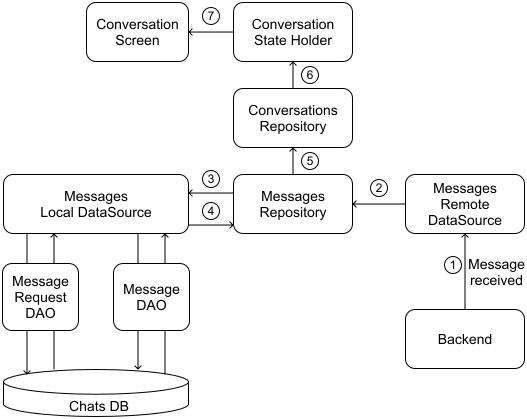
The process works similarly for read receipts. When someone reads a message:
While our previous example showed a successful message delivery, real-world scenarios aren't always smooth. Sometimes, we might never receive a response for a particular NewMessageRequest. This can happen due to unstable network connections or other unforeseen issues.
When a request fails or times out, we don't give up immediately. Instead, we update the MessageRequest status to FAILED and increment its failCount. This tracking allows us to decide whether to keep retrying with exponential backoff or stop retrying completely after a certain number of failed attempts.
📌 Remember!
Exponential backoff is a retry strategy whereby the delay between attempts is progressively increased. For instance, if we start with a one-second delay, the next retry might wait two seconds, then four seconds, and so on. This approach avoids overwhelming our system with rapid-fire retries and gives the network a chance to recover.
We don't want to retry forever, so we set a maximum retry limit. If a message fails too many times, we automatically stop trying, mark it as permanently failed, and notify the user, offering them options to retry manually or delete the message.
✅ Decision made! We use an exponential backoff algorithm to retry failed messages.
The new functionality we've introduced to handle failures, reconnections, and message requests has significantly impacted our client architecture. Figure 12 illustrates these changes in the updated data layer.
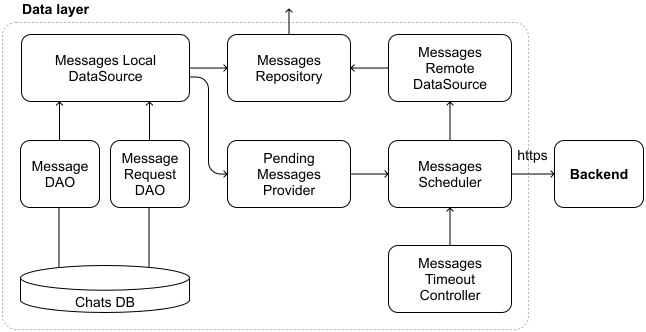
To streamline the Messages remote data source and prevent it from becoming overburdened, we've introduced several new components, each with specific responsibilities:
By introducing more components and reducing the complexity of the Messages Remote Data Source, we enhance the overall readability and maintainability of the system.
🔍 Industry insights:
Airbnb developed a message synchronization mechanism to reduce network requests and data inconsistencies, resulting in faster inbox loading and an improved user experience, particularly in areas with slow network connections [22].
Facebook Messenger's clients handle offline messaging through an orchestrated sync service. In the Messenger “Lightspeed” rebuild, Facebook introduced a module called MSYS (Messenger SYnc System) to manage local data and tasks [23].
When it comes to implementing our database, SQLite stands out as an excellent choice for mobile devices. It's a lightweight yet powerful relational database system that can be easily embedded into mobile operating systems. SQLite's support for complex queries and transactions makes it well-suited for our chat application's needs.
🛠️ Platform implementation details
Apple's CoreData can use SQLite as its underlying storage mechanism. You might also want to consider other open source alternatives such as SQLite.swift [24] or FMDB [25]. On Android, the most popular choices are Google's Jetpack Room [26] and Square's SQLDelight [27].
To maximize performance, we'll need to carefully structure our data models. This means optimizing our entity-relationship models to better align with how SQLite operates. We'll store regular messages in the Messages table and unsynced message requests in the MessageRequests table. This separation is important because unsynced requests don't have a Message id yet.
Here are the instructions to define the tables in SQLite:
CREATE TABLE Users (
  id INTEGER PRIMARY KEY,
  name TEXT NOT NULL,
  avatar_url TEXT,
  last_connected_at TEXT,
)
CREATE TABLE Messages (
  id INTEGER PRIMARY KEY,
  from_user_id INTEGER NOT NULL,
  to_user_id INTEGER NOT NULL,
  content TEXT NOT NULL,
  status TEXT NOT NULL,
  created_at TEXT NOT NULL,
  FOREIGN KEY (from_user_id) REFERENCES Users(id),
  FOREIGN KEY (to_user_id) REFERENCES Users(id)
);
CREATE TABLE MessageRequests (
  request_id INTEGER PRIMARY KEY,
  to_user_id INTEGER NOT NULL,
  content TEXT NOT NULL,
  status TEXT NOT NULL,
  last_modified_at TEXT NOT NULL,
  last_sent_at TEXT,
  fail_count INTEGER,
  FOREIGN KEY (to_user_id) REFERENCES Users(id)
)
📝 Note: For the data model's IDs, we use an INTEGER in the SQLite statement even if that's represented as a Long in Kotlin or Int64 in Swift.
SQLite uses a dynamic type system based on type affinity, which means it associates storage classes with columns based on the declared data type. INTEGER is a type representing a signed integer, stored in 1, 2, 3, 4, 6, or 8 bytes. Any type name that contains the string "INT" (e.g., INT, INTEGER, BIGINT, SMALLINT) will have an INTEGER affinity.
Figure 13 illustrates the updates to our data layer design. We've represented the three newly created tables as distinct Data Access Object (DAO) components. To separate concerns, we split the different types of application data (messages and user information) into their own repositories.
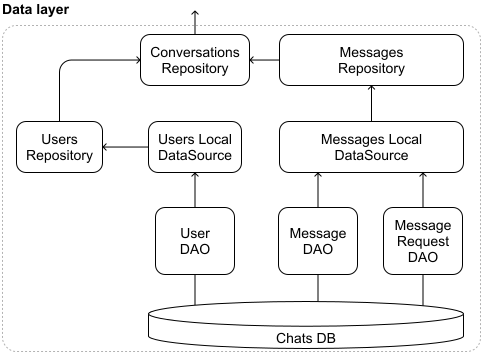
and local data sources-related components
It's important to note that while we've split our message storage across different tables, this shouldn't impact the overall data flow of the application. We hide the fact that messages are split across two tables behind the data layer. The repository merges data from Messages and MessageRequests, so higher layers of the app see a unified conversation list and don’t need to know about the split.
Storing messages locally on a device for a chat application sounds straightforward, but it comes with its own set of hurdles. Let's explore these challenges and discuss practical solutions:
When working with multiple SQL statements, whether they're included in the same or different SQL script files, the execution order matters. The Users table must be created before other tables since they depend on it. Keeping all these CREATE TABLE statements in a single SQL script file helps prevent execution order issues and makes the database setup more reliable.
For simplicity, consistency, and data integrity, we've chosen to consolidate all three tables (Users, Messages, and MessageRequests) within a single SQLite database file named chats.db.
While separating Users into its own database may promote modularity or support future cross-app reuse, this approach introduces several complications:
By keeping all tables in a single chats.db database file, we've opted for simplicity and reliability in our current scenario. This choice allows us to focus on other aspects of the system design without introducing unnecessary complexity in our database setup.
✅ Decisions made!
The Users, Messages, and MessageRequests tables are kept in the same chats.db database.
CREATE TABLE statements are part of the same SQL script file.
As your chat app grows, the database can become large and slow down app performance. Both Android and iOS have limits on efficient data storage and access.
To address these performance challenges, we could:
📌 Remember! Mobile clients should perform all database operations on a background thread to prevent blocking the UI thread and ensure a responsive user experience.
Our design requirements include implementing push notifications to alert users about new messages when they are offline. We've already outlined the key components for push notifications in our high-level architecture diagram. Figure 14 illustrates the various elements involved in the push notification system. Let's dive deeper into how these components interact and explore the platform-specific approaches for Android and iOS.
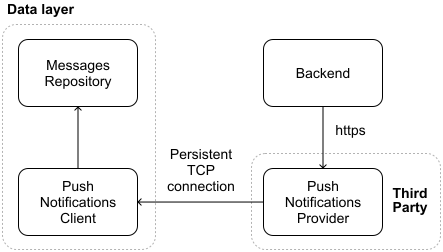
The backend triggers a push notification when a message is sent to an inactive user, that is, one without an active WebSocket connection to our servers. To deliver these notifications, the backend sends HTTPS requests to an external Push Notifications Provider. This provider is Firebase Cloud Messaging (FCM) for Android devices and Apple Push Notification Service (APNs) for iOS.
To correctly route notifications, the backend maintains a mapping between users and their devices. This mapping is created during the app installation process, where each device registers for push notifications in the background. The backend then stores a unique token for each user's device, allowing for targeted notification delivery.
📌 Remember!
There are many types of push notifications you can send from the backend, for example, alert notifications that immediately alert users; silent notifications that are processed in the background without letting the user know; and rich media notifications that can include images, videos, or other media.
In our case, we send alert notifications to keep the user informed regarding how many unread messages they have and the message content.
Android and iOS devices maintain a low-power, persistent TLS-encrypted TCP connection to FCM and APNS servers, respectively. This approach eliminates the need for individual apps to manage their own connections, which would be resource-intensive. When a notification arrives, the device either wakes up the relevant app or displays the notification if the app isn't running.
🛠️ Platform implementation details
On Android and iOS, the system maintains a persistent connection to handle push notifications efficiently. Android uses Google Play Services for this purpose, while iOS relies on a background service called the push notification daemon.
For Android developers, implementing push notifications involves creating a service that extends FirebaseMessagingService. iOS developers, on the other hand, work with the UNUserNotificationCenterDelegate protocol, typically integrating it into the app's UIApplicationDelegate.
The handling of notifications differs based on the app's state:
While push notifications are a powerful feature, they come with several challenges that developers need to navigate:
Given these potential pitfalls in message delivery, order, and overall complexity, our chat app uses push notifications primarily as a lightweight alert mechanism to notify users of new messages.
🔍 Industry insights:
Slack's server-side infrastructure decides when and what to push. Every message posted in Slack goes through Slack's event pipeline, and a background job is enqueued to handle potential notifications. Slack's job queue system processes over a billion jobs per day, including the fan-out of push notifications [28].
In this chapter, we've designed a chat system. We used HTTP for client-initiated requests and WebSockets for real-time updates, including read receipts and users' online statuses.
We outlined the client architecture, defined the backend HTTP and WebSocket endpoints, and created the necessary data models. We also took a closer look at message ordering on the screen, how the client sends messages, the database implementation, and push notifications.
If you have extra time in your interview or want to challenge yourself with different requirements, consider these additional topics:
[1] WhatsApp's message storage policy: https://www.whatsapp.com/legal/privacy-policy-eea
[2] WebSockets at Slack: https://api.slack.com/apis/connections/socket
[3] WebSockets at Slack: https://slack.engineering/rebuilding-slack-on-the-desktop/
[4] WebSockets at Uber: https://blog.bytebytego.com/p/how-uber-built-real-time-chat-to
[5] WebSockets at Uber: https://www.uber.com/blog/building-scalable-real-time-chat/
[6] WhatsApp uses a customized version of XMPP: https://en.wikipedia.org/wiki/WhatsApp
[7] Products using XMPP: https://xmpp.org/uses/instant-messaging/
[8] Facebook Messenger uses MQTT: https://engineering.fb.com/2011/08/12/android/building-facebook-messenger/
[9] Discord uses WebRTC: https://discord.com/blog/how-discord-handles-two-and-half-million-concurrent-voice-users-using-webrtc
[10] Mozilla uses IRC: https://developer.mozilla.org/en-US/docs/Glossary/IRC
[11] Slack Web API: https://api.slack.com/web
[12] Slack Socket Mode APIs: https://api.slack.com/apis/socket-mode
[13] Discord API: https://discord.com/developers/docs/events/gateway
[14] Whatsapp's policy on full device memory: https://faq.whatsapp.com/5503646096388294
[15] Slack's free version message storage policy: https://slack.com/trust/privacy/privacy-faq
[16] Simple Precision Time Protocol at Meta https://engineering.fb.com/2024/02/07/production-engineering/simple-precision-time-protocol-sptp-meta/
[17] Snowflake ID: https://en.wikipedia.org/wiki/Snowflake\_ID
[18] Discord's message API: https://discord.com/developers/docs/resources/message
[19] WhatsApp message API: https://developers.facebook.com/docs/whatsapp/cloud-api/reference/messages
[20] Facebook Messenger message API: https://developers.facebook.com/docs/messenger-platform/reference/webhook-events/messages\#messaging
[21] Slack message API: https://api.slack.com/events/message
[22] Messaging Sync — Scaling Mobile Messaging at Airbnb: https://medium.com/airbnb-engineering/messaging-sync-scaling-mobile-messaging-at-airbnb-659142036f06
[23] Facebook's Project LightSpeed: Rewriting the Messenger codebase:
htts://engineering.fb.com/2020/03/02/data-infrastructure/messenger
[24] SQLite.swift docs: https://github.com/stephencelis/SQLite.swift
[25] FMDB docs: https://github.com/ccgus/fmdb
[26] Google's Jetpack Room docs: https://developer.android.com/training/data-storage/room
[27] SQLDelight docs: https://github.com/sqldelight/sqldelight
[28] Scaling Slack's Job Queue: https://slack.engineering/scaling-slacks-job-queue
[29] Online status or Presence information: https://en.wikipedia.org/wiki/Presence\_information
[30] TCP half-open: https://en.wikipedia.org/wiki/TCP\_half-open
[31] Role-based access control: https://en.wikipedia.org/wiki/Role-based\_access\_control
[32] End-to-end encryption: https://faq.whatsapp.com/820124435853543
[33] Full-text search: https://en.wikipedia.org/wiki/Full-text\_search