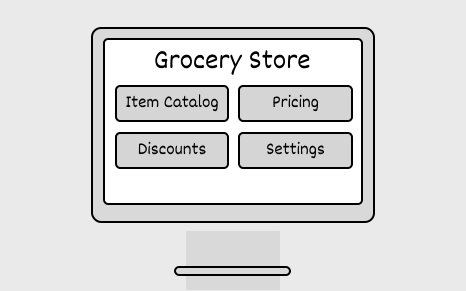
In this chapter, we will explore the design of a grocery store system. This system is tailored for grocery store workers to streamline operations like managing the item catalog, configuring pricing, and applying discounts.
New here? In plain terms, this is what we’re building and why — with an everyday analogy to anchor your intuition before the deep dive below.
A grocery system models the everyday shop: products on shelves, a cart you fill, and a register that rings you up while inventory ticks down. Giving each — product, cart, order, inventory — its own object keeps stock counts and receipts consistent as customers come and go.
Here is an example of a typical prompt an interviewer might give:
“Imagine you’re at a grocery store, filling your cart with fresh produce, snacks, and household essentials. At the checkout, the cashier scans each item, and the system instantly tracks the order, applies any discounts, and displays the final total. Behind the scenes, the system is seamlessly managing the item catalog, updating inventory as stock arrives or sells, and ensuring every transaction is smooth and accurate. Now, let’s design a grocery store system that does all this.”
Here is an example of how a conversation between a candidate and an interviewer might unfold:
Candidate: What are the primary operations the grocery store system needs to support?
Interviewer: The system should support store workers, including shipment handlers and cashiers, in managing the item catalog, tracking inventory, and processing customer checkouts with applicable discounts.
Candidate: I’d like to confirm my understanding of the checkout process. The cashier scans or enters a code for each item, and the system keeps track of the order. It calculates the subtotal, applies any discounts, and updates the total. Once all items are entered, the cashier sees the final amount, accepts payment, and provides change if needed. A receipt is then generated. Does this sound correct?
Interviewer: Yes, that’s an accurate understanding of the system.
Candidate: How should the system handle inventory management?
Interviewer: The system should track inventory for all items, increasing inventory when new stock arrives and automatically decreasing inventory during checkout for items sold.
Candidate: Should the system categorize items into different categories, such as food, beverages, etc.?
Interviewer: Yes, that’s a good idea.
Candidate: For discounts, can I assume it works this way? The system should track discount campaigns, which can apply to specific items or categories. If multiple discounts apply to the same item, the system should automatically apply the highest discount.
Interviewer: That sounds great.
This question has multiple requirements, so grouping similar ones makes it easier to manage and track. The requirements can be broken down into four groups.
Catalog management
Inventory management
Checkout process
Discount campaigns
Below are the non-functional requirements:
Before diving into the design, it’s important to enumerate the core objects.
Now that we know the core objects and their roles, the next step is to create classes and methods that turn the requirements into an easy-to-maintain system. Let’s take a closer look.
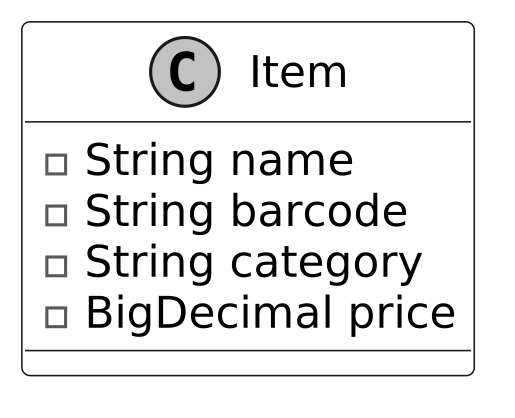
The first component in our class diagram is the Item class, which represents individual products in the store. It encapsulates attributes like name, barcode, category, and price.
Below is the representation of this class.
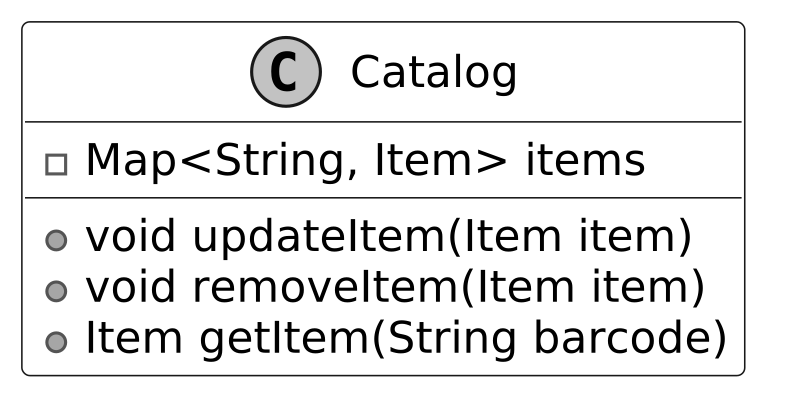
The Catalog class is responsible for maintaining a structured list of all available products, each uniquely identified by a barcode. It provides methods to add, update, remove, and retrieve items.
The UML diagram below illustrates this structure.
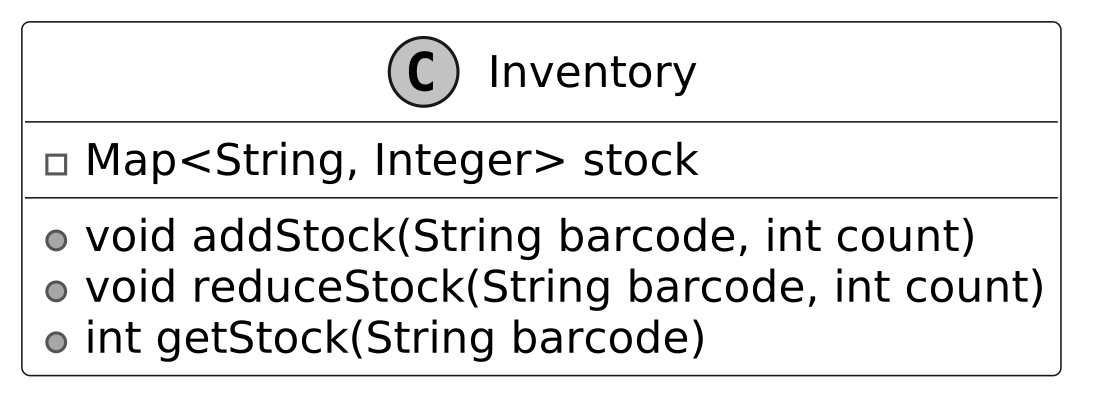
Building on the Catalog class, the Inventory class is a critical component of the grocery store system, responsible for managing stock levels of items. It maintains a mapping between each item's barcode and its corresponding stock quantity.
Here is the representation of this class.

Design choice: To ensure modularity and maintainability, we have deliberately separated static product details from dynamic stock levels: Static Data (Catalog): Product metadata, such as name, category, and price, is managed by the Catalog class. This allows consistent, centralized handling of product information that does not change frequently. Dynamic Data (Inventory): Stock levels, which change frequently due to operations like sales and shipments, are managed independently in the Inventory class.
This separation simplifies both classes and adheres to the Single Responsibility Principle, ensuring each class focuses on a distinct aspect of the system.
The DiscountCriteria interface encapsulates the logic to determine whether a discount applies to an item. It provides a flexible, extensible framework for defining applicability checks, such as item-based and category-based criteria, allowing the system to support diverse discount rules without modifying existing code.
The UML diagram below illustrates this structure.
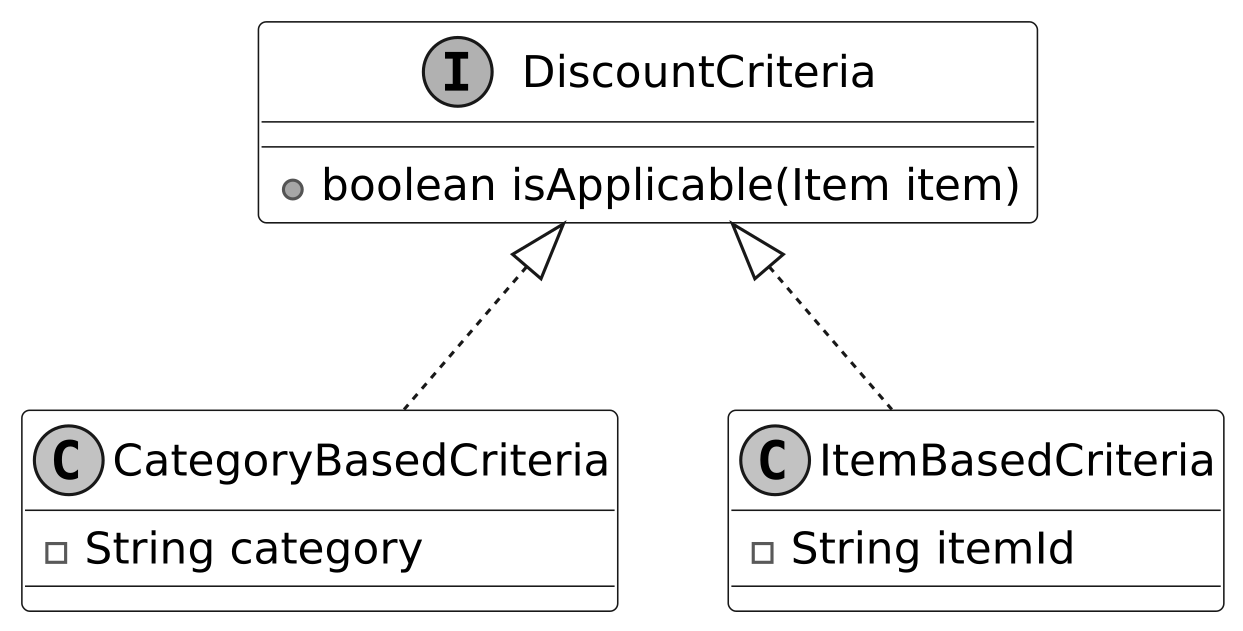
CategoryBasedCriteria: The CategoryBasedCriteria determines whether a discount is applicable by verifying if an item belongs to a specific category. For example, if the discount targets the "Beverages" category and the item's category is "Beverages," the discount is applicable. This approach is ideal for campaigns that focus on broad groups of products, such as category-wide promotions.
ItemBasedCriteria: The ItemBasedCriteria checks whether a discount applies to a specific item by matching its unique identifier. For instance, if the discount applies to an item with ID 12345 and the item's ID is 12345, the discount is considered applicable. This criterion is particularly useful for campaigns targeting specific products, such as special promotions or clearance discounts for individual items.
The DiscountCalculationStrategy interface encapsulates the logic for calculating discounts. It uses the Strategy Pattern to provide flexibility in applying a variety of discount types, such as fixed amount-based or percentage-based discounts.
Below is the representation of this interface.
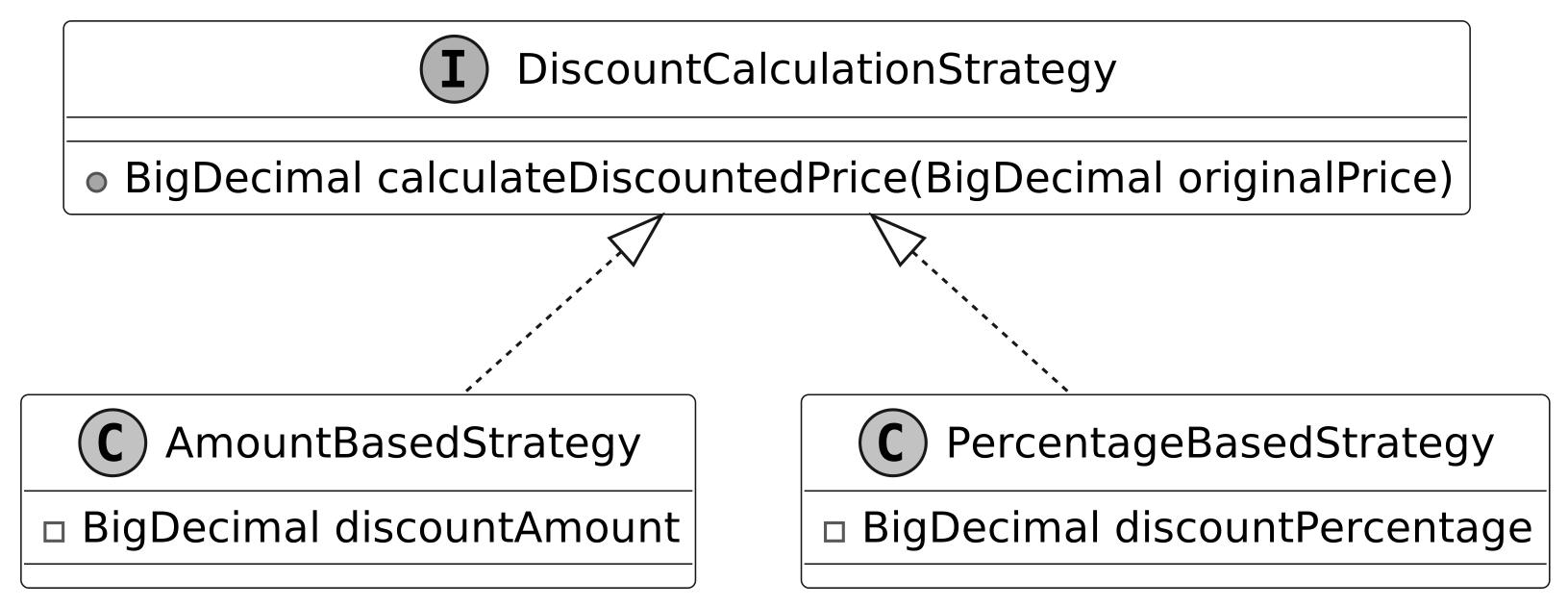
AmountBasedStrategy: This strategy applies a fixed discount amount to the original price. For example, if the original price is $100 and the discount amount is $20, the resulting price after the discount will be $80. This approach is straightforward and is ideal for campaigns offering a constant monetary reduction.
PercentageBasedStrategy: This strategy applies a percentage-based discount to the original price. For instance, if the original price is $100 and the discount percentage is 20%, the price after the discount will be $80. This strategy is particularly useful for campaigns offering proportional reductions, such as seasonal or category-based discounts.
Design choice: This design is highly extensible, as new discount strategies, such as tiered discounts or "Buy X Get Y Free," can be added seamlessly without modifying the existing implementation, adhering to the Open/Closed Principle.
Now, we design the DiscountCampaign class, which models active discount campaigns and is a key component for applying discounts. It leverages the Strategy Pattern to encapsulate different calculation strategies (e.g., percentage-based or fixed-amount discounts), ensuring flexibility in how discounts are computed. The class uses a DiscountCriteria interface to specify which items qualify for a discount, such as those in a particular category or with a specific barcode, allowing precise targeting of promotions while maintaining extensibility for new applicability rules.
The UML diagram below illustrates this structure.
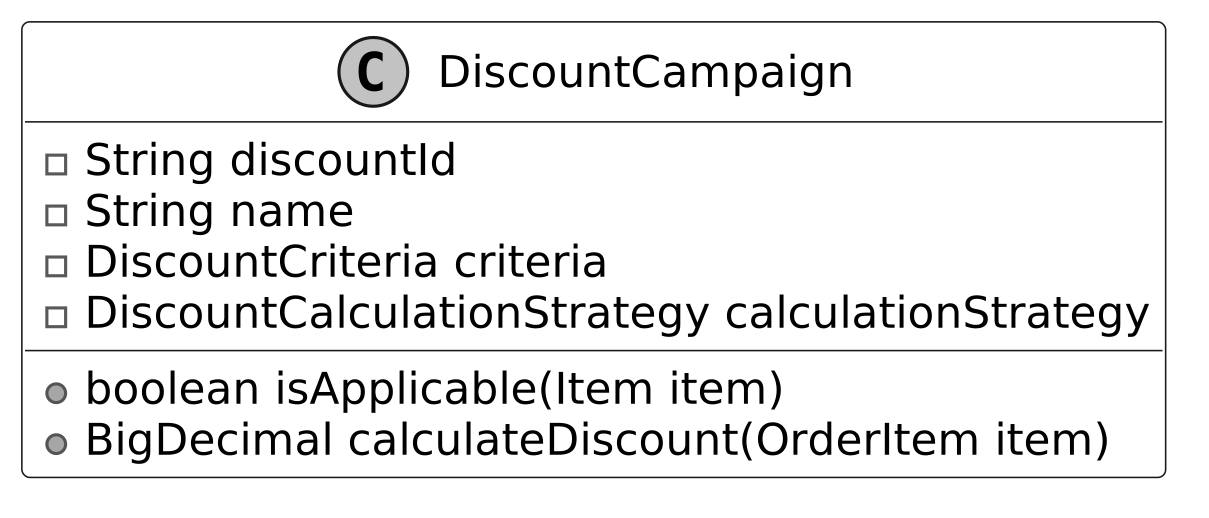
Design choice: By separating the applicability logic (criteria) from the calculation strategy, the class is more modular and easier to extend. New criteria types or calculation strategies can be added without modifying the existing implementation.
The next component is the OrderItem class, which represents a specific item in an order, along with its quantity. It encapsulates methods to calculate the total price for the item, based on its unit price and quantity.
Below is the representation of this class.
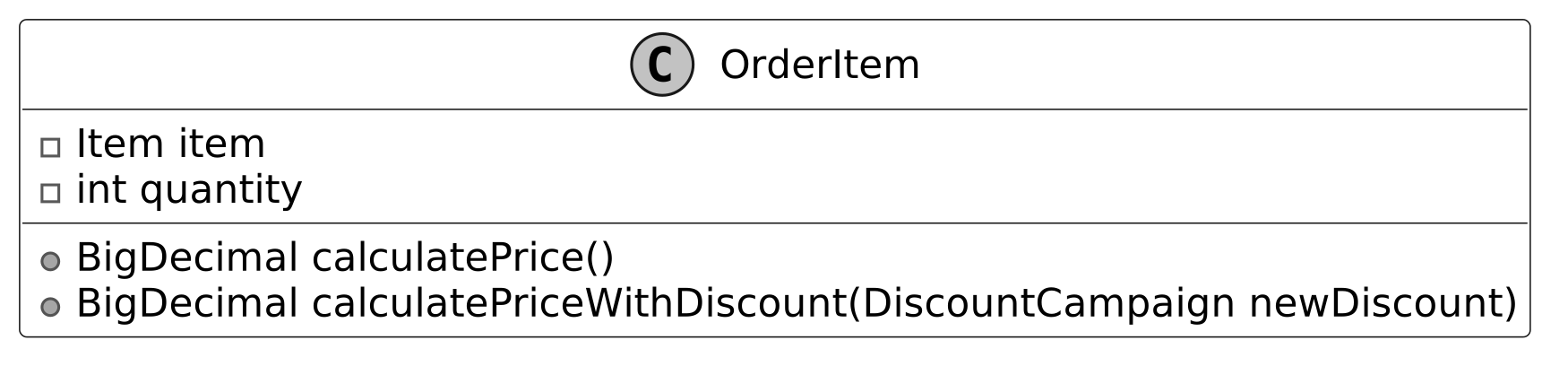
Design choice: The OrderItem class separates item-level details from the higher-level order. This ensures that each item's quantity and price logic are encapsulated, making the design modular and easier to maintain.
The Order class represents an active transaction during the checkout process. It tracks the list of items in order, along with any applied discounts. The class provides methods to calculate the subtotal (before discounts) and the total amount (after discounts).
Below is the representation of this class.
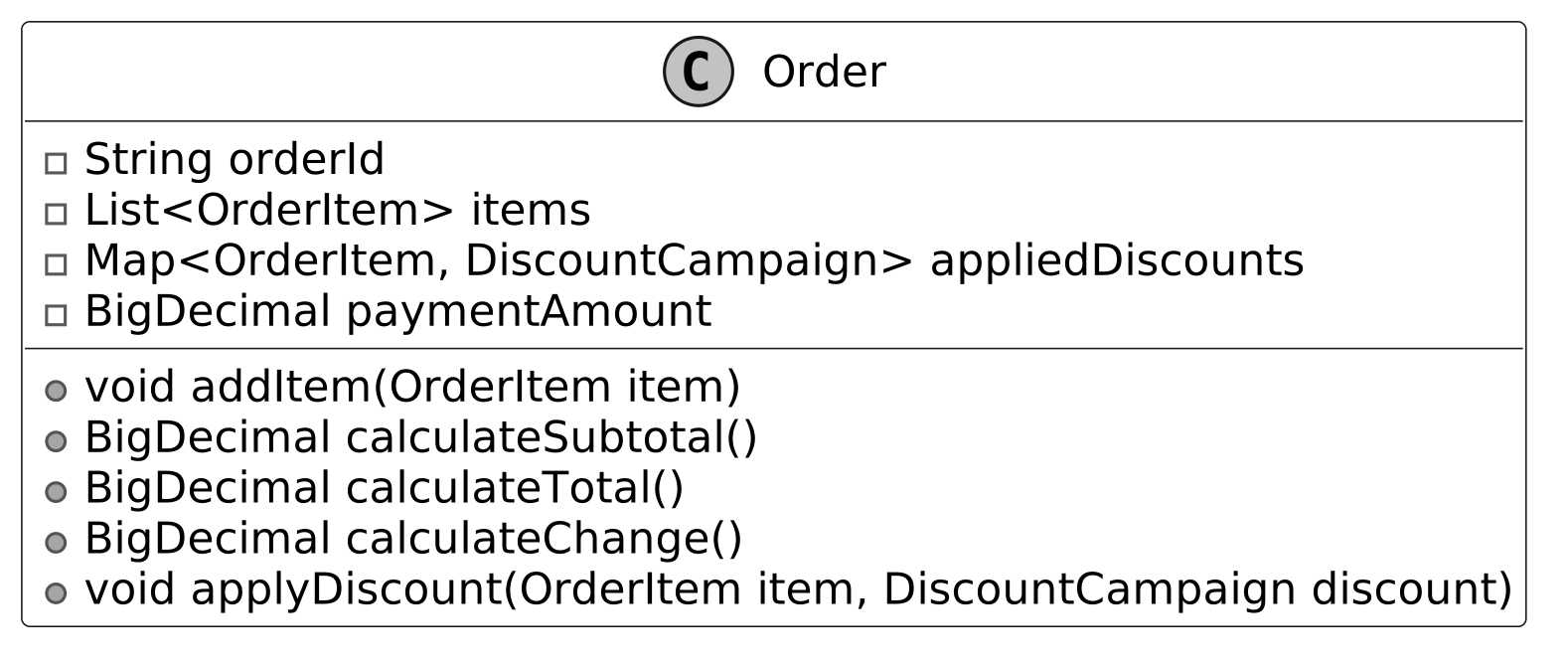
Design choice: The Order class focuses on managing transactional data for the checkout process. It delegates the handling of individual item quantities to the OrderItem class, ensuring a clean separation of responsibilities.
The Receipt class acts as the final record of a completed transaction, consolidating all relevant details into a formatted output for the customer. It includes essential transaction information such as the order summary, payment details, and any changes to be given to the customer.
Below is the representation of this class.
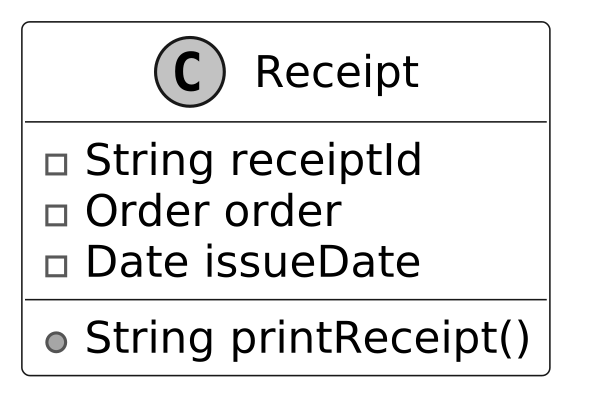
Design choice: The Receipt class focuses solely on presenting transaction data in a customer-friendly format. It delegates all business logic, such as order calculations and discount handling, to the Order and OrderItem classes. This ensures the receipt remains lightweight and dedicated to its role as a transaction summary.
Moving on to the Checkout class, which encapsulates the logic for handling the checkout process within the grocery store system. It maintains an active Order object to track the transaction details. Additionally, it applies active discount campaigns by determining their applicability and performing calculations.
Below is the representation of this class.
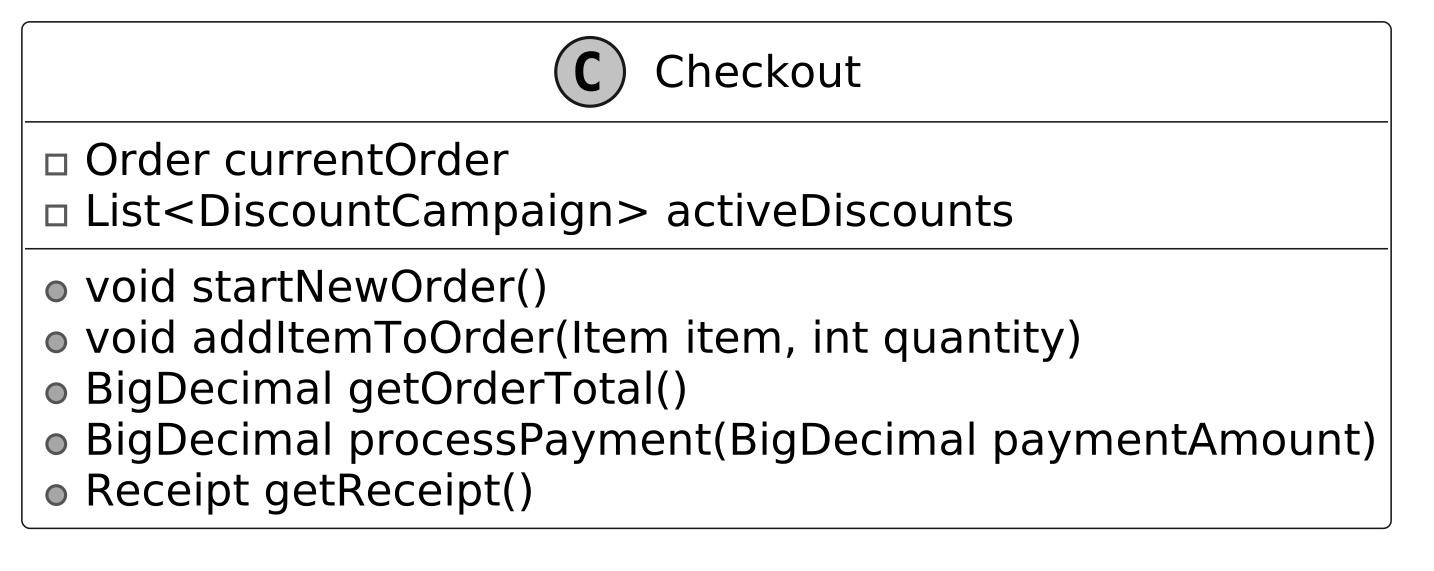
Design choice: Despite its central role, the Checkout class remains lightweight because the responsibilities for managing items, discounts, and calculations are delegated to well-separated components such as Order, DiscountCampaign, and the underlying strategy classes. This modular design ensures a clean separation of concerns and keeps the checkout logic manageable.
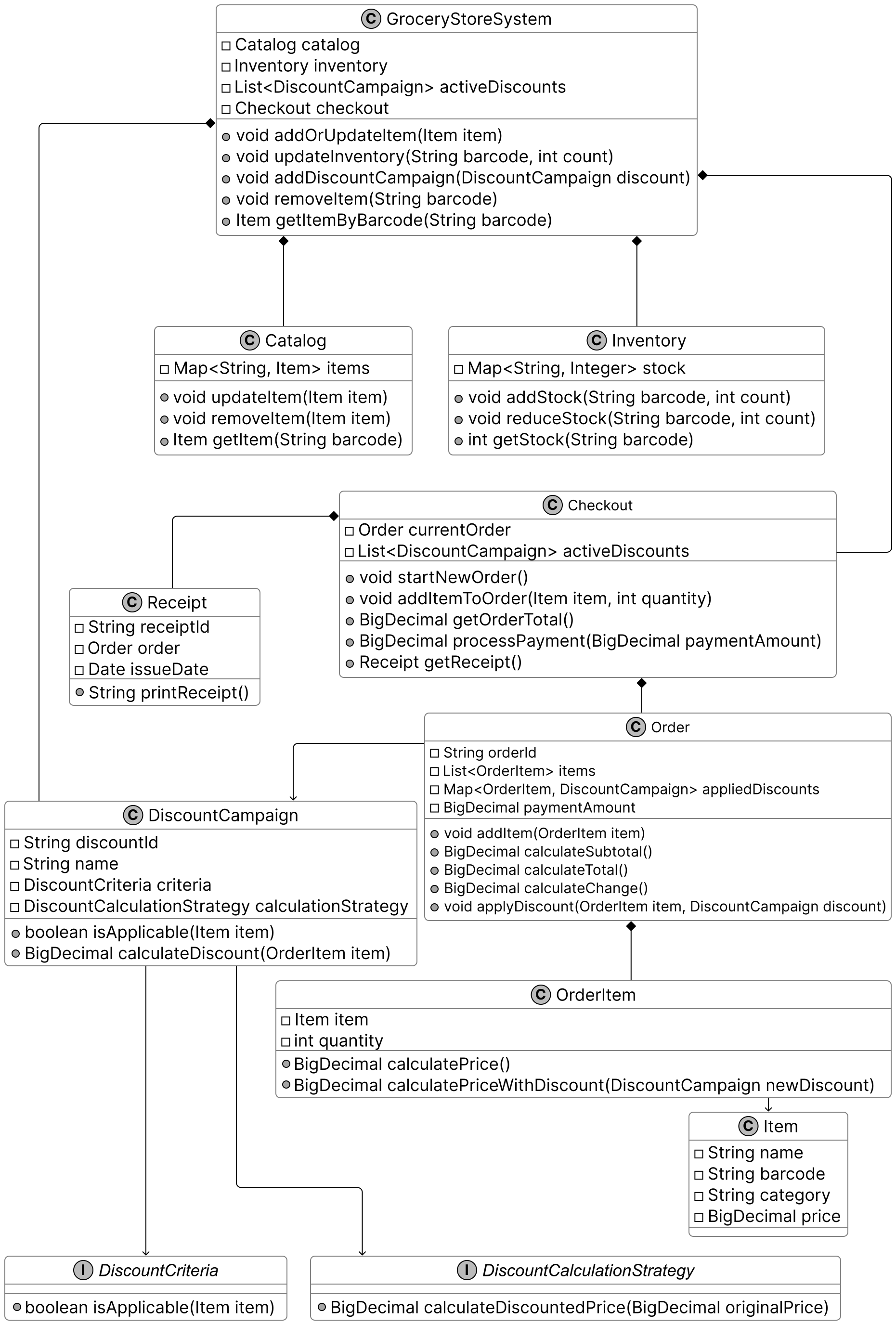
Finally, we design the GroceryStoreSystem class, which serves as a facade that simplifies interaction with the components of the system, such as the Catalog, Inventory, and Checkout. By providing a unified interface, it abstracts away the underlying complexity, making the system easier for clients to use. In an interview, this facade also allows us to validate that we have addressed the requirements by mapping them to the facade methods.
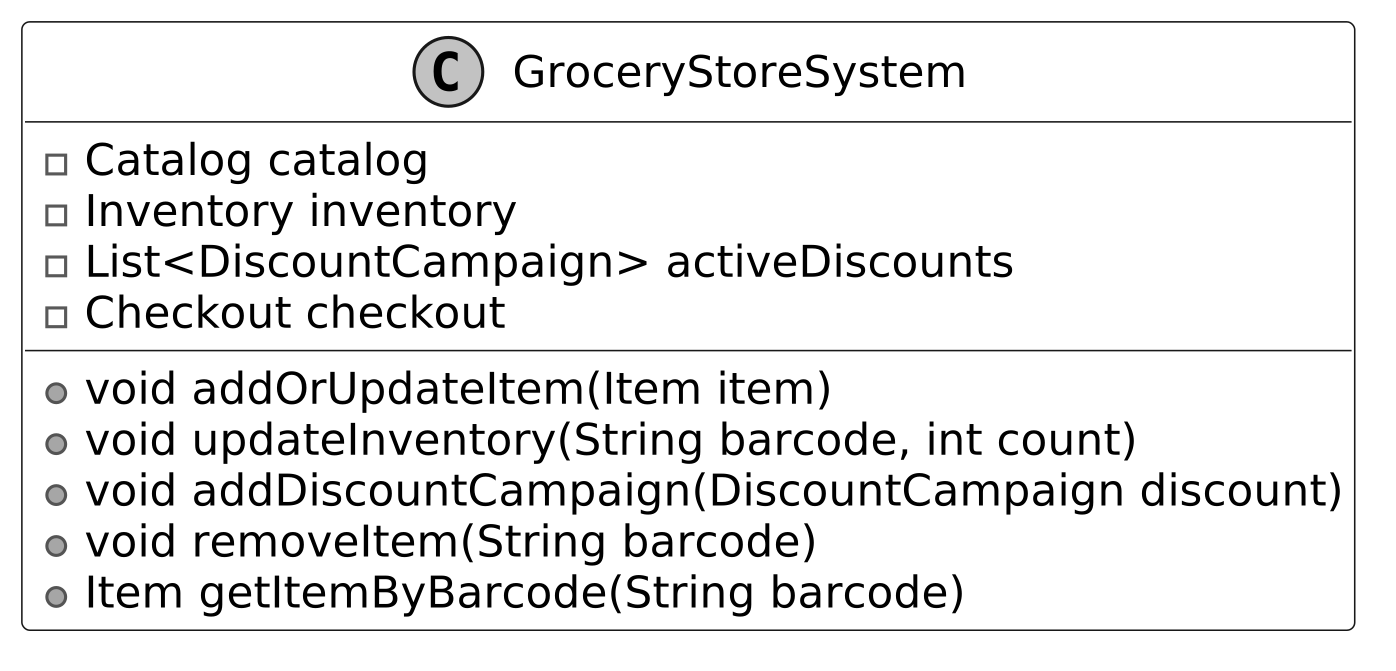
Below is the complete class diagram of our grocery store system. The detailed methods and attributes are skipped to make the diagram more readable.
In this section, we’ll implement the core functionality of the grocery store system, focusing on key areas such as managing products and inventory, and streamlining the checkout process, including discount handling.
We implement the Item class, which encapsulates product attributes, including the name, barcode, category, and price. It is designed as a simple data container with no business logic, making it easy to use and maintain.
Here is the implementation of this class.
public class Item {
    private final String name;
    private final String barcode;
    private final String category;
    private BigDecimal price;

    public Item(String name, String barcode, String category, BigDecimal price) {
        this.name = name;
        this.barcode = barcode;
        this.category = category;
        this.price = price;
    }

    // getter and setter methods are omitted for brevity
}
We define the Catalog class, which acts as the centralized repository for managing the store's item inventory. Below is the implementation of this class.
public class Catalog {
    // Map of barcodes to their corresponding items
    private final Map<String, Item> items = new HashMap<>();

    public void updateItem(Item item) {
        items.put(item.getBarcode(), item);
    }

    public void removeItem(String barcode) {
        items.remove(barcode);
    }

    public Item getItem(String barcode) {
        return items.get(barcode);
    }
}
Implementation note: The class uses a Map<String, Item> to store items, where the barcode serves as the key. The hash map ensures efficient lookups, updates, and deletions.
The Inventory class manages the stock levels of items, associating each item's barcode with its available quantity. It provides methods to handle stock operations, such as adding new stock, decreasing stock for sales, and querying the current stock levels for a specific item.
Here is the implementation of this class.
public class Inventory {
    // Map of barcodes to their stock quantities
    private final Map<String, Integer> stock = new HashMap<>();

    public void addStock(String barcode, int count) {
        stock.put(barcode, stock.getOrDefault(barcode, 0) + count);
    }

    public void reduceStock(String barcode, int count) {
        stock.put(barcode, stock.getOrDefault(barcode, 0) - count);
    }

    public int getStock(String barcode) {
        return stock.getOrDefault(barcode, 0);
    }
}
Implementation choice: The Inventory class uses a HashMap to map barcodes to stock quantities, enabling O(1) average-case time complexity for updates and queries. This supports efficient inventory management during sales and shipments, which is crucial for maintaining accurate stock levels in a busy store.
The DiscountCampaign class models promotional rules for applying discounts. It separates the logic for determining discount applicability (using DiscountCriteria) from the calculation of discount values (using DiscountCalculationStrategy). This design ensures flexibility and extensibility for various discount configurations.
Below is the implementation of this class.
public class DiscountCampaign {
    // Unique identifier for the discount campaign
    private final String discountId;
    // Name of the discount campaign
    private final String name;
    // Criteria that determines if the discount applies to an item or category
    private final DiscountCriteria criteria;
    // Strategy for calculating the discounted price
    private final DiscountCalculationStrategy calculationStrategy;

    // Creates a new discount campaign with the specified details
    public DiscountCampaign(
            String discountId,
            String name,
            DiscountCriteria criteria,
            DiscountCalculationStrategy calculationStrategy) {
        this.discountId = discountId;
        this.name = name;
        this.criteria = criteria;
        this.calculationStrategy = calculationStrategy;
    }

    // Checks if this discount applies to the given item
    public boolean isApplicable(Item item) {
        return criteria.isApplicable(item);
    }

    // Calculates the discounted price for the given order item
    public BigDecimal calculateDiscount(OrderItem item) {
        return calculationStrategy.calculateDiscountedPrice(item.calculatePrice());
    }
    // getter and setter methods are omitted for brevity
}
isApplicable(Item item): Check if the discount applies to a given item based on the defined criteria. Returns true if applicable; otherwise, false.
calculateDiscount(BigDecimal price): Computes the discount amount using the specified calculationStrategy. Supports both percentage-based and fixed-amount calculations.
Implementation choice: The DiscountCampaign class uses composition to hold a single DiscountCriteria and DiscountCalculationStrategy, leveraging polymorphism for flexible discount configurations. This allows each campaign to combine one applicability rule and one calculation method, simplifying the implementation while supporting diverse promotions.
Note: For brevity, the code for DiscountCriteria and DiscountCalculationStrategy is omitted. These interfaces define applicability checks (e.g., category or item matching) and discount calculations (e.g., percentage-based), respectively.
The OrderItem class tracks an individual product within an order, along with its quantity. It calculates the total cost for the item by multiplying its unit price by the quantity, enabling seamless integration with the order's subtotal and total calculations.
Here is the implementation of this class.
public class OrderItem {
    // The item being ordered
    private final Item item;
    // Quantity of the item
    private final int quantity;

    // Creates a new order item with the specified item and quantity
    public OrderItem(Item item, int quantity) {
        this.item = item;
        this.quantity = quantity;
    }

    // Calculates the total price for this order item without any discount
    public BigDecimal calculatePrice() {
        return item.getPrice().multiply(BigDecimal.valueOf(quantity));
    }

    // Calculates the total price for this order item with the given discount
    public BigDecimal calculatePriceWithDiscount(DiscountCampaign newDiscount) {
        return newDiscount.calculateDiscount(this);
    } // getter and setter methods are omitted for brevity
}
calculatePriceWithDiscount(DiscountCampaign newDiscount): This method computes the item's total price after applying a given discount campaign. Instead of simply returning the base price (unit price × quantity), it factors in the discount to determine the adjusted price.
The Order class handles customer transactions by maintaining a list of purchased items and their associated discounts. It dynamically calculates the subtotal and total amounts based on the items currently included in the order and the discounts applied to them at the time of calculation.
public class Order {
    // Unique identifier for the order
    private final String orderId;
    // List of items in the order
    private final List<OrderItem> items = new ArrayList<>();
    // Map of items to their applied discounts
    private final Map<OrderItem, DiscountCampaign> appliedDiscounts = new HashMap<>();
    // Amount paid by the customer
    private BigDecimal paymentAmount = BigDecimal.ZERO;

    // Creates a new order with a random UUID
    public Order() {
        this.orderId = String.valueOf(UUID.randomUUID());
    }

    // Adds an item to the order
    public void addItem(OrderItem item) {
        items.add(item);
    }

    // Calculates the subtotal of all items without discounts
    public BigDecimal calculateSubtotal() {
        return items.stream()
                .map(OrderItem::calculatePrice)
                .reduce(BigDecimal.ZERO, BigDecimal::add);
    }

    // Calculates the total price including all applied discounts
    public BigDecimal calculateTotal() {
        return items.stream()
                .map(
                        item -> {
                            DiscountCampaign discount = appliedDiscounts.get(item);
                            return discount != null
                                    ? item.calculatePriceWithDiscount(discount)
                                    : item.calculatePrice();
                        })
                .reduce(BigDecimal.ZERO, BigDecimal::add);
    }

    // Applies a discount to a specific item in the order
    public void applyDiscount(OrderItem item, DiscountCampaign discount) {
        appliedDiscounts.put(item, discount);
    }

    // Calculates the change to be returned to the customer
    public BigDecimal calculateChange() {
        return paymentAmount.subtract(calculateTotal());
    }
    // getter and setter methods are omitted for brevity
}
Implementation choice: The Order class uses an ArrayList for fast O(1) item additions via addItem and efficient O(n) iteration for calculateSubtotal and calculateTotal, ideal for small grocery orders. Similarly, a HashMap<OrderItem, DiscountCampaign> tracks discounts per item, providing O(1) average-case lookups and updates.
The Checkout class orchestrates the transaction process by integrating the order and discount campaigns. It allows items to be added to an order, applies relevant discounts, and finalizes the payment.
public class Checkout {
    // Current order being processed
    private Order currentOrder;
    // List of active discount campaigns
    private final List<DiscountCampaign> activeDiscounts;

    // Creates a new checkout with the given active discounts
    public Checkout(List<DiscountCampaign> activeDiscounts) {
        this.activeDiscounts = activeDiscounts;
        startNewOrder();
    }

    // Starts a new order
    public void startNewOrder() {
        this.currentOrder = new Order();
    }

    // Processes the payment and returns the change
    public BigDecimal processPayment(BigDecimal paymentAmount) {
        currentOrder.setPayment(paymentAmount);
        return currentOrder.calculateChange();
    }

    // Adds an item to the current order and applies applicable discounts
    public void addItemToOrder(Item item, int quantity) {
        OrderItem orderItem = new OrderItem(item, quantity);
        currentOrder.addItem(orderItem);

        for (DiscountCampaign newDiscount : activeDiscounts) {
            if (newDiscount.isApplicable(item)) {
                // if there are multiple newDiscount that apply to item, apply the higher one
                if (currentOrder.getAppliedDiscounts().containsKey(orderItem)) {
                    DiscountCampaign existingDiscount =
                            currentOrder.getAppliedDiscounts().get(orderItem);
                    if (orderItem
                                    .calculatePriceWithDiscount(newDiscount)
                                    .compareTo(
                                            orderItem.calculatePriceWithDiscount(existingDiscount))
                            > 0) {
                        currentOrder.applyDiscount(orderItem, newDiscount);
                    }
                } else {
                    currentOrder.applyDiscount(orderItem, newDiscount);
                }
            }
        }
    }

    // Generates a receipt for the current order
    public Receipt getReceipt() {
        return new Receipt(currentOrder);
    }

    // Calculates the total amount for the current order
    public BigDecimal getOrderTotal() {
        return currentOrder.calculateTotal();
    }
}
Implementation choice: The Checkout class uses an ArrayList to store active discounts, enabling linear iteration (O(n)) to evaluate applicability and select the highest discount. This is efficient given the small number of active campaigns.
Finally, we implement the GroceryStoreSystem class that provides a unified interface to interact with the system's other components, including the catalog, inventory, discount campaigns, and checkout. It simplifies client interactions and ensures consistency across operations such as managing products, applying discounts, and processing customer transactions.
Here is the implementation of this class.
public class GroceryStoreSystem {
    // Product catalog containing all available items
    private final Catalog catalog;
    // Inventory tracking system
    private final Inventory inventory;
    // List of active discount campaigns
    private List<DiscountCampaign> activeDiscounts = new ArrayList<>();
    // Checkout system for processing orders
    private final Checkout checkout;

    public GroceryStoreSystem() {
        this.catalog = new Catalog();
        this.inventory = new Inventory();
        this.checkout = new Checkout(activeDiscounts);
    }

    // Adds or updates an item in the catalog
    public void addOrUpdateItem(Item item) {
        catalog.updateItem(item);
    }

    // Updates the inventory count for an item
    public void updateInventory(String barcode, int count) {
        inventory.addStock(barcode, count);
    }

    // Adds a new discount campaign to the system
    public void addDiscountCampaign(DiscountCampaign discount) {
        activeDiscounts.add(discount);
    }

    // Retrieves an item from the catalog by its barcode
    public Item getItemByBarcode(String barcode) {
        return catalog.getItem(barcode);
    }

    // Removes an item from the catalog
    public void removeItem(String barcode) {
        catalog.removeItem(barcode);
    }
}
A runnable checkout: adding to the cart respects stock, out-of-stock and over-quantity requests are rejected, and checkout prints an itemised receipt while decrementing inventory.
def money(cents):
    return "$%.2f" % (cents / 100.0)


class Product:
    def __init__(self, name, price, stock):
        self.name = name
        self.price = price      # price in cents
        self.stock = stock


class Cart:
    def __init__(self):
        self.items = {}          # name -> quantity (dict preserves order)

    def total(self, inventory):
        return sum(inventory[name].price * qty for name, qty in self.items.items())


class Store:
    def __init__(self, inventory):
        self.inventory = inventory   # name -> Product

    def add_to_cart(self, cart, name, qty):
        product = self.inventory.get(name)
        if product is None:
            return "%s not found" % name
        if product.stock == 0:
            return "%s is out of stock" % name
        already = cart.items.get(name, 0)
        if already + qty > product.stock:
            return "only %d %s in stock" % (product.stock, name)
        cart.items[name] = already + qty
        return "ok (cart total %s)" % money(cart.total(self.inventory))

    def checkout(self, cart):
        lines = ["Receipt:"]
        total = 0
        for name, qty in cart.items.items():
            product = self.inventory[name]
            cost = product.price * qty
            total += cost
            product.stock -= qty
            lines.append("  %s x%d = %s" % (name, qty, money(cost)))
        lines.append("Total: " + money(total))
        return "\n".join(lines)


def main():
    inventory = {
        "Apple": Product("Apple", 50, 10),
        "Bread": Product("Bread", 200, 3),
        "Milk": Product("Milk", 150, 0),   # out of stock
    }
    store = Store(inventory)
    cart = Cart()

    print("add 3 Apple -> " + store.add_to_cart(cart, "Apple", 3))
    print("add 5 Bread -> " + store.add_to_cart(cart, "Bread", 5))
    print("add 2 Bread -> " + store.add_to_cart(cart, "Bread", 2))
    print("add 1 Milk  -> " + store.add_to_cart(cart, "Milk", 1))
    print(store.checkout(cart))
    print("Apple stock now %d" % inventory["Apple"].stock)
    print("Bread stock now %d" % inventory["Bread"].stock)


if __name__ == "__main__":
    main()
#include <iostream>
#include <string>
#include <vector>
#include <map>
#include <cstdio>
#include <utility>
static std::string money(int cents) {
char buffer[16];
std::snprintf(buffer, sizeof(buffer), "$%.2f", cents / 100.0);
return std::string(buffer);
}
struct Product {
std::string name;
int price; // price in cents
int stock;
Product() : name(""), price(0), stock(0) {}
Product(std::string name, int price, int stock) : name(name), price(price), stock(stock) {}
};
class Cart {
public:
std::vector<std::pair<std::string, int>> items; // (name, qty), preserves order
int find(const std::string& name) {
for (std::size_t i = 0; i < items.size(); ++i)
if (items[i].first == name) return static_cast<int>(i);
return -1;
}
int total(std::map<std::string, Product>& inventory) {
int sum = 0;
for (std::pair<std::string, int>& item : items)
sum += inventory[item.first].price * item.second;
return sum;
}
};
class Store {
public:
std::map<std::string, Product> inventory;
Store(std::map<std::string, Product> inventory) : inventory(inventory) {}
std::string addToCart(Cart& cart, const std::string& name, int qty) {
std::map<std::string, Product>::iterator it = inventory.find(name);
if (it == inventory.end()) return name + " not found";
Product& product = it->second;
if (product.stock == 0) return name + " is out of stock";
int idx = cart.find(name);
int already = (idx >= 0) ? cart.items[idx].second : 0;
if (already + qty > product.stock)
return "only " + std::to_string(product.stock) + " " + name + " in stock";
if (idx >= 0) cart.items[idx].second = already + qty;
else cart.items.push_back(std::make_pair(name, qty));
return "ok (cart total " + money(cart.total(inventory)) + ")";
}
std::string checkout(Cart& cart) {
std::string out = "Receipt:";
int total = 0;
for (std::pair<std::string, int>& item : cart.items) {
Product& product = inventory[item.first];
int qty = item.second;
int cost = product.price * qty;
total += cost;
product.stock -= qty;
out += "\n " + product.name + " x" + std::to_string(qty) + " = " + money(cost);
}
out += "\nTotal: " + money(total);
return out;
}
};
int main() {
std::map<std::string, Product> inventory;
inventory["Apple"] = Product("Apple", 50, 10);
inventory["Bread"] = Product("Bread", 200, 3);
inventory["Milk"] = Product("Milk", 150, 0); // out of stock
Store store(inventory);
Cart cart;
std::cout << "add 3 Apple -> " << store.addToCart(cart, "Apple", 3) << "\n";
std::cout << "add 5 Bread -> " << store.addToCart(cart, "Bread", 5) << "\n";
std::cout << "add 2 Bread -> " << store.addToCart(cart, "Bread", 2) << "\n";
std::cout << "add 1 Milk -> " << store.addToCart(cart, "Milk", 1) << "\n";
std::cout << store.checkout(cart) << "\n";
std::cout << "Apple stock now " << store.inventory["Apple"].stock << "\n";
std::cout << "Bread stock now " << store.inventory["Bread"].stock << "\n";
return 0;
}import java.util.LinkedHashMap;
import java.util.Map;
class Product {
final String name;
final int price; // price in cents
int stock;
Product(String name, int price, int stock) {
this.name = name; this.price = price; this.stock = stock;
}
}
class Cart {
final Map<String, Integer> items = new LinkedHashMap<>(); // preserves order
int total(Map<String, Product> inventory) {
int sum = 0;
for (Map.Entry<String, Integer> e : items.entrySet())
sum += inventory.get(e.getKey()).price * e.getValue();
return sum;
}
}
class Store {
final Map<String, Product> inventory;
Store(Map<String, Product> inventory) { this.inventory = inventory; }
static String money(int cents) { return String.format("$%.2f", cents / 100.0); }
String addToCart(Cart cart, String name, int qty) {
Product product = inventory.get(name);
if (product == null) return name + " not found";
if (product.stock == 0) return name + " is out of stock";
int already = cart.items.getOrDefault(name, 0);
if (already + qty > product.stock) return "only " + product.stock + " " + name + " in stock";
cart.items.put(name, already + qty);
return "ok (cart total " + money(cart.total(inventory)) + ")";
}
String checkout(Cart cart) {
StringBuilder sb = new StringBuilder("Receipt:");
int total = 0;
for (Map.Entry<String, Integer> e : cart.items.entrySet()) {
Product product = inventory.get(e.getKey());
int qty = e.getValue();
int cost = product.price * qty;
total += cost;
product.stock -= qty;
sb.append("\n ").append(product.name).append(" x").append(qty).append(" = ").append(money(cost));
}
sb.append("\nTotal: ").append(money(total));
return sb.toString();
}
}
public class Main {
public static void main(String[] args) {
Map<String, Product> inventory = new LinkedHashMap<>();
inventory.put("Apple", new Product("Apple", 50, 10));
inventory.put("Bread", new Product("Bread", 200, 3));
inventory.put("Milk", new Product("Milk", 150, 0)); // out of stock
Store store = new Store(inventory);
Cart cart = new Cart();
System.out.println("add 3 Apple -> " + store.addToCart(cart, "Apple", 3));
System.out.println("add 5 Bread -> " + store.addToCart(cart, "Bread", 5));
System.out.println("add 2 Bread -> " + store.addToCart(cart, "Bread", 2));
System.out.println("add 1 Milk -> " + store.addToCart(cart, "Milk", 1));
System.out.println(store.checkout(cart));
System.out.println("Apple stock now " + inventory.get("Apple").stock);
System.out.println("Bread stock now " + inventory.get("Bread").stock);
}
}Sample run — identical across all three languages:
add 3 Apple -> ok (cart total $1.50)
add 5 Bread -> only 3 Bread in stock
add 2 Bread -> ok (cart total $5.50)
add 1 Milk  -> Milk is out of stock
Receipt:
  Apple x3 = $1.50
  Bread x2 = $4.00
Total: $5.50
Apple stock now 7
Bread stock now 1In this section, we’ll explore some common follow-up topics interviewers may ask about the grocery store system.
The current design encapsulates discount logic into two components:
This design provides reusability by allowing different combinations of discount policies to be expressed without duplicating code. However, what if the interviewer asks you to implement more complex composite discounts, such as:
These scenarios require combining multiple criteria and calculations. We can handle such complexity by enhancing the design using the Composite Pattern for criteria and the Decorator Pattern for sequential calculations.
Note: To learn more about the Composite Pattern and its common use cases, refer to the Unix File Search chapter of the book.
To address nested or combined criteria, we will use the Composite Pattern, which is particularly well-suited for scenarios where hierarchical structures or combinations of logic are required. Composite criteria allow us to combine multiple rules (e.g., category-based, item-based) using logical operators like AND and OR, without hardcoding the logic. For example, it can check if an item belongs to a specific category and meets a minimum price threshold.
Add a CompositeCriteria class to support combining criteria.
Below is an example of how to implement CompositeCriteria:
// Composite criteria that combines multiple discount criteria
public class CompositeCriteria implements DiscountCriteria {
    // List of criteria to be combined
    private final List<DiscountCriteria> criteriaList;

    // Creates a new composite criteria with the given list of criteria
    public CompositeCriteria(List<DiscountCriteria> criteriaList) {
        this.criteriaList = new ArrayList<>(criteriaList);
    }

    // Checks if the item satisfies all the criteria in the list
    @Override
    public boolean isApplicable(Item item) {
        return criteriaList.stream().allMatch(criteria -> criteria.isApplicable(item));
    }

    // Adds a new criteria to the composite
    public void addCriteria(DiscountCriteria criteria) {
        criteriaList.add(criteria);
    }

    // Removes a criteria from the composite
    public void removeCriteria(DiscountCriteria criteria) {
        criteriaList.remove(criteria);
    }
}
To manage sequential discount calculations, we can use the Decorator Pattern. By wrapping multiple calculation strategies, we can apply discounts in a specific order without modifying the underlying strategy logic. For example:
Note: To learn more about the Decorator Pattern and its common use cases, refer to the Further Reading section at the end of this chapter.
Below are examples of implementing decorators:
FixedDiscountDecorator
public class FixedDiscountDecorator implements DiscountCalculationStrategy {
    // The strategy being decorated
    private final DiscountCalculationStrategy strategy;
    // The fixed amount to be added to the discount
    private final BigDecimal fixedAmount;

    public FixedDiscountDecorator(DiscountCalculationStrategy strategy, BigDecimal fixedAmount) {
        this.strategy = strategy;
        this.fixedAmount = fixedAmount;
    }

    // Calculates the discounted price by applying both the base strategy and the fixed amount
    @Override
    public BigDecimal calculateDiscountedPrice(BigDecimal originalPrice) {
        return strategy.calculateDiscountedPrice(originalPrice).subtract(fixedAmount);
    }
}
PercentageDiscountDecorator
public class PercentageDiscountDecorator implements DiscountCalculationStrategy {
    // The strategy being decorated
    private final DiscountCalculationStrategy strategy;
    // The additional percentage to be discounted
    private final BigDecimal additionalPercentage;

    public PercentageDiscountDecorator(
            DiscountCalculationStrategy strategy, BigDecimal additionalPercentage) {
        this.strategy = strategy;
        this.additionalPercentage = additionalPercentage;
    }

    // Calculates the discounted price by applying both the base strategy and the additional
    // percentage
    @Override
    public BigDecimal calculateDiscountedPrice(BigDecimal originalPrice) {
        BigDecimal baseDiscountedPrice = strategy.calculateDiscountedPrice(originalPrice);
        return baseDiscountedPrice.multiply(
                BigDecimal.ONE.subtract(additionalPercentage.divide(BigDecimal.valueOf(100))));
    }
}
By combining nested criteria and sequential calculation strategies, we can design a highly flexible discount system capable of handling even the most complex scenarios. This design approach not only simplifies implementation but also demonstrates a deep understanding of abstraction and extensibility principles, which are crucial in object-oriented design interviews.
In this chapter, we designed a grocery store system. We tried to solve the grocery store problem in a step-by-step manner, just like a candidate would do in an actual object-oriented design interview. We started off by listing down the requirements through a series of question/answer formats between the candidate and the interviewer. We then identified the core objects, followed by the class diagram of the grocery store, and presented the implementation code.
The most important takeaway is the clear separation of concerns, where each component, such as Catalog, Inventory, Order, and DiscountCampaign, focuses on a specific responsibility. This modularity not only simplifies individual components but also ensures they integrate seamlessly.
In the deep dive section, we explored advanced topics like implementing composite discounts and layering multiple calculation strategies. These enhancements showcase how abstraction and extensibility can handle complex real-world scenarios, such as applying tiered discounts or combining fixed and percentage-based discounts.
Congratulations on getting this far! Now give yourself a pat on the back. Good job!
This section gives a quick overview of the design patterns used in this chapter. It’s helpful if you’re new to these patterns or need a refresher to better understand the design choices.
Decorator is a structural design pattern that allows you to add new behaviors to an object by wrapping it in another object that provides the additional functionality, without modifying the original object’s code.
In the grocery store system design, we have used the Decorator pattern to layer multiple discount calculations by wrapping a DiscountCalculationStrategy object in decorator classes like FixedDiscountDecorator and PercentageDiscountDecorator. This allows the system to apply discounts sequentially, such as a fixed amount followed by a percentage reduction, during checkout without altering the core discount strategy.
To illustrate the Decorator pattern in another domain, consider a text formatting system where a document editor applies styles like bold or italic to text content to enhance its appearance.
Problem
Imagine you’re developing a text editor where users can format text with styles like bold, italic, or underline. Initially, you might handle these by modifying the Text class with conditional logic or creating subclasses for each style combination (e.g., BoldText, BoldItalicText). However, this leads to complex code or an explosion of subclasses, making it difficult to add new styles (e.g., strikethrough) or combine multiple styles (e.g., bold and italic).
Solution
The Decorator Pattern addresses this by creating decorator classes that implement the same interface as the Text class and wrap a Text object to add new behaviors. For example, a BoldDecorator wraps a Text object to add bold formatting to its display, while an ItalicDecorator adds italic formatting. The editor interacts with the decorated text through the same interface, enabling seamless style application. Decorators can be stacked to combine styles (e.g., bold and italic), providing flexibility without altering the Text class.
Here’s a simple diagram showing the Decorator pattern for text formatting:
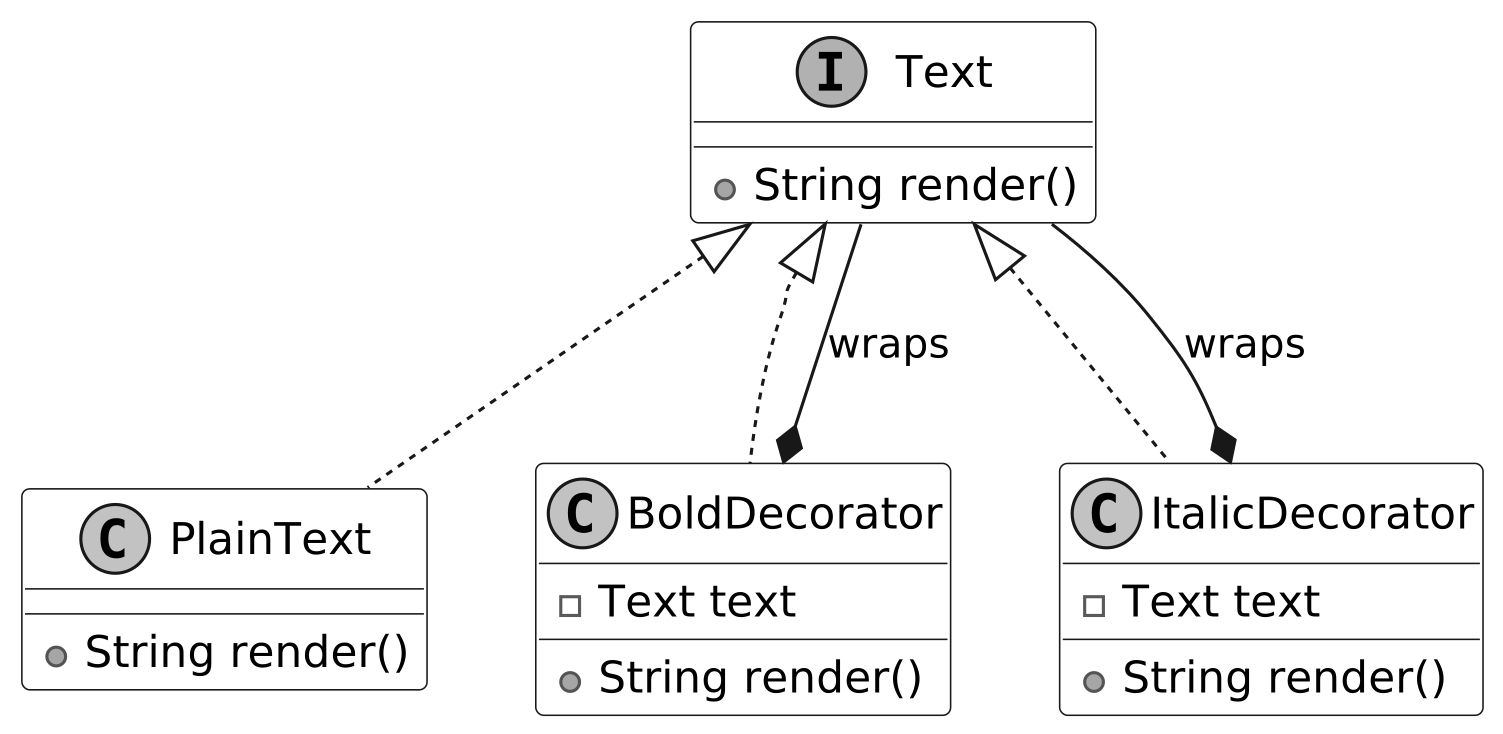
Text is the common interface that PlainText, BoldDecorator, and ItalicDecorator implement. The advantage is that we can treat all objects uniformly through the Text interface, allowing decorators to wrap and enhance text formatting, like bold or italic, without knowing the underlying object’s type.
When to use
The Decorator design pattern is useful in scenarios: