For each zero in an m x n matrix, set its entire row and column to zero in place.
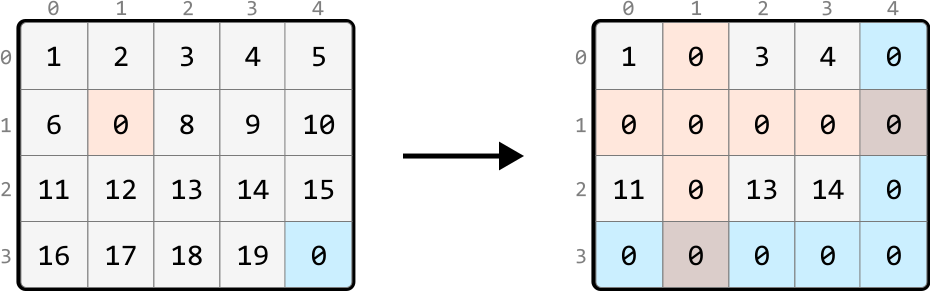
Image represents a transformation of a 4x5 matrix.  The initial matrix on the left displays numerical values from 1 to 19, arranged in a grid with rows labeled 0 to 3 and columns labeled 0 to 4.  One cell in row 1, column 1 contains a 0, highlighted in peach. The bottom-right cell (row 3, column 4) also contains a 0, highlighted in light blue. A thick black arrow points to the right, indicating a transformation. The resulting matrix on the right shows the same numerical values, but with specific cells replaced by 0s.  The cells in row 1, column 1; row 1, column 2; row 2, column 1; row 2, column 2; row 3, column 0; row 3, column 1; row 3, column 2; row 3, column 3; and row 3, column 4 are all replaced with 0s.  These 0s are highlighted with peach, light blue, and light grey shading, indicating a pattern of replacement based on their position within the original matrix.  The row and column labels remain consistent in both matrices.

In Plain English

New to this one? Start here. Below is the core idea in everyday language, plus a real-world analogy—then the sections that follow build on it with the formal reasoning, code, and step-by-step walkthroughs.

🌱 Real-world analogy: a leak on a spreadsheet grid

Picture a grid of offices. Any office with a burst pipe (a 0) forces the whole corridor (row) and the whole stairwell (column) to be evacuated. You first walk the building and jot down which corridors and stairwells are affected, then do one sweep to evacuate them. If you evacuated as you walked, you could not tell an original leak from a room you just emptied.

Intuition - Hash Sets

A brute-force solution involves recording the positions of all 0s initially in the matrix and, for each of these 0s, iterating over their row and column to set them to zero. However, imagine an input array that's filled with many zeros. In the worst case, iterating over every row and column for each zero will take O(mn(m+n))O(m\cdot n(m+n)), where mnm \cdot n denotes the number of 0s, and (m+nm+n) represents the total number of cells in a row and column combined. This approach is quite inefficient, so let’s look for a better solution.

Imagine any cell in the matrix. After the matrix is transformed, this cell will either retain its original value, or become zero. Is there a way to tell if a cell is going to become zero?

The key observation is that if a cell is in a row or column containing a zero, that cell will become zero.

We could search a cell’s row and column to check if they contain a zero, meaning each search would take O(m+n)O(m+n) time. But it would be more efficient if we had a way to check this in constant time, and this is where hash sets would be useful. If we create two hash sets – one to track all the rows containing a zero and another to track all the columns containing a zero – we can determine if a specific cell's row or column contains a zero in O(1)O(1) time.

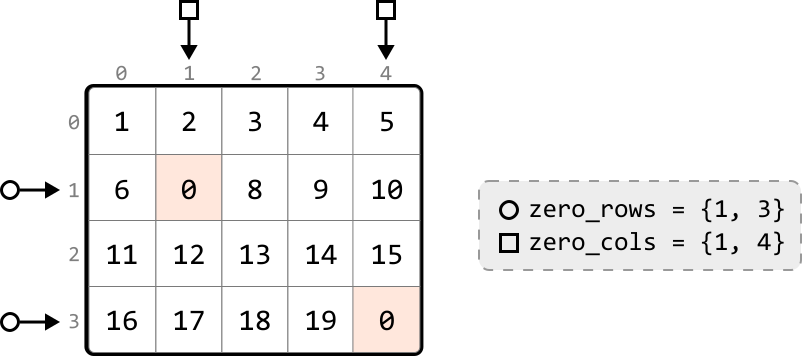
With these hash sets created, the next step is to populate them. As we iterate through the matrix, when encountering a cell containing zero, we:

Image represents a 4x5 matrix with integer values from 0 to 19,  indexed by rows (0 to 3) and columns (0 to 4). Two elements at positions (1,1) and (3,4) have a value of 0 and are highlighted in peach.  Two arrows pointing downwards from above indicate input to the matrix, likely representing the number of rows and columns. Two arrows pointing to the left from the sides represent input to the matrix, likely representing the row and column indices.  To the right of the matrix, a separate box displays two sets: `zero_rows = {1, 3}` and `zero_cols = {1, 4}`, indicating the row indices (1 and 3) and column indices (1 and 4) where the zero values are located within the matrix.  The overall diagram likely illustrates a data structure and the identification of zero elements within it.

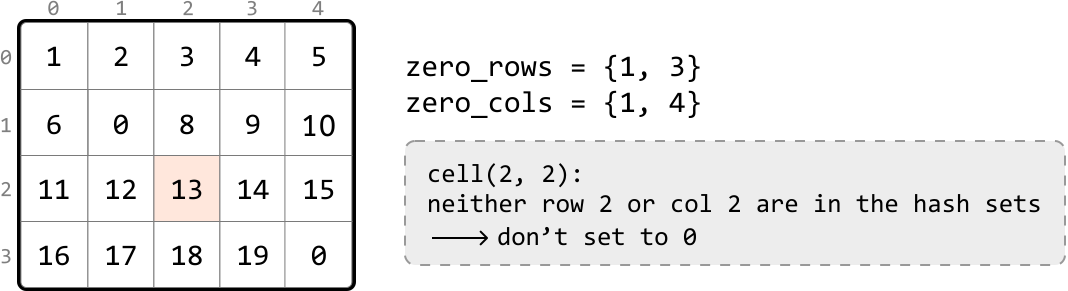
Next, we identify the cells whose row or column indexes are present in the respective hash sets, and change their values to zero. Let’s look at how this works with a few examples:
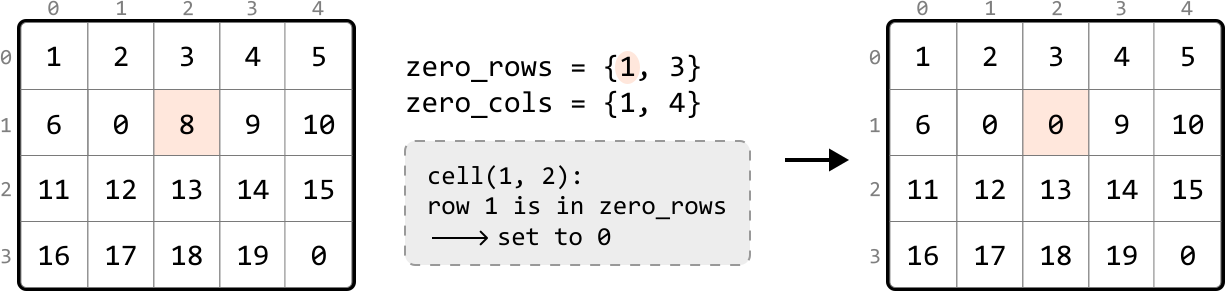
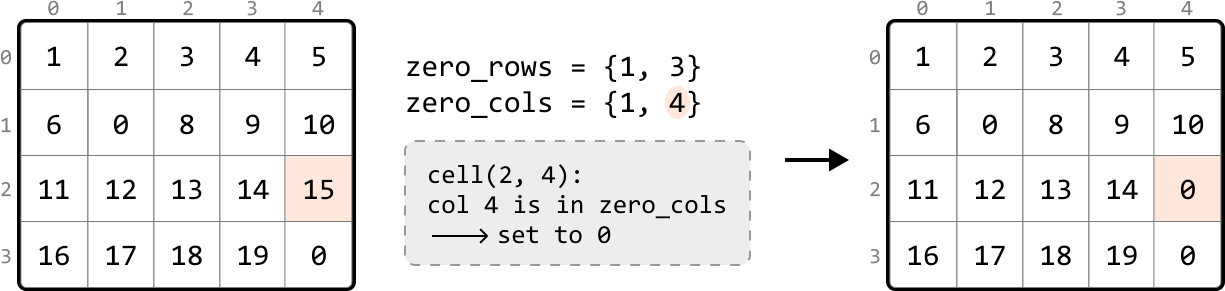
Image represents a step-by-step illustration of a coding pattern, likely related to setting elements of a matrix to zero.  The image shows two 4x5 matrices, labeled with row and column indices from 0 to 3 and 0 to 4 respectively. The left matrix contains numerical values from 1 to 20, with a highlighted cell (1,2) containing the value 8.  To the right of the matrices is a description of two sets: `zero_rows = {1, 3}` and `zero_cols = {1, 4}`, indicating rows 1 and 3, and columns 1 and 4 should be set to zero. A dashed box explains the process: `cell(1, 2): row 1 is in zero_rows → set to 0`, indicating that because row 1 is in `zero_rows`, the value in cell (1,2) is changed to 0. A thick arrow points from the left matrix to the right matrix, which shows the result of this operation: the value in cell (1,2) is now 0, while the other cells remain unchanged.  The right matrix also has the value in cell (3,1) and (3,4) changed to 0 because of the `zero_rows` and `zero_cols` sets.

Image represents a transformation of a 4x5 matrix.  The initial matrix displays numerical values from 1 to 20 arranged in a grid with rows labeled 0-3 and columns labeled 0-4.  A highlighted cell (2,4) containing the value '15' is shown in peach color.  To the right,  `zero_rows` is defined as the set {1, 3} and `zero_cols` as {1, 4}. A separate box explains the operation:  `cell(2, 4): col 4 is in zero_cols → set to 0`. A thick black arrow indicates a transformation from the initial matrix to a modified matrix. The modified matrix is identical to the original, except that the cell (2,4) now contains '0', reflecting the operation described in the box, which sets the value of the cell to 0 because its column index (4) is present in the `zero_cols` set.

Image represents a coding pattern illustration explaining a specific algorithm.  The image features a 4x5 matrix (grid) on the left, with rows and columns numbered from 0 to 3 and 0 to 4 respectively.  Each cell in the matrix contains a numerical value.  A specific cell at row 2, column 2 (containing the value 13) is highlighted in a light peach color. To the right of the matrix, two lines of code define `zero_rows` as a set containing {1, 3} and `zero_cols` as a set containing {1, 4}. Below this, a light gray, dashed-bordered box explains the logic for a cell at coordinates (2, 2):  because neither row 2 nor column 2 are present in the `zero_rows` or `zero_cols` sets respectively, the value of this cell (13) is not set to 0.  An arrow visually connects this explanation to the highlighted cell in the matrix, illustrating the decision-making process within the algorithm.

This provides a general strategy:

  1. In one pass of the matrix, identify each cell containing a zero and add its row and column indexes to the zero_rows and zero_cols hash sets, respectively.

  2. In a second pass, set any cell to zero if its row index is in zero_rows or its column index is in zero_cols.

Implementation - Hash Sets

from typing import List
    
def zero_striping_hash_sets(matrix: List[List[int]]) -> None:
    if not matrix or not matrix[0]:
        return
    m, n = len(matrix), len(matrix[0])
    zero_rows, zero_cols = set(), set()
    # Pass 1: Traverse through the matrix to identify the rows and columns
    # containing zeros and store their indexes in the appropriate hash sets.
    for r in range(m):
        for c in range(n):
            if matrix[r][c] == 0:
                zero_rows.add(r)
                zero_cols.add(c)
    # Pass 2: Set any cell in the matrix to zero if its row index is in 'zero_rows'
    # or its column index is in 'zero_cols’.
    for r in range(m):
        for c in range(n):
            if r in zero_rows or c in zero_cols:
                matrix[r][c] = 0
#include <vector>
#include <unordered_set>
using namespace std;

void zeroStripingHashSets(vector<vector<int>>& matrix) {
    if (matrix.empty() || matrix[0].empty()) {
        return;
    }
    int m = matrix.size(), n = matrix[0].size();
    unordered_set<int> zeroRows, zeroCols;

    // Pass 1: record which rows and columns contain a zero.
    for (int r = 0; r < m; r++) {
        for (int c = 0; c < n; c++) {
            if (matrix[r][c] == 0) {
                zeroRows.insert(r);
                zeroCols.insert(c);
            }
        }
    }

    // Pass 2: wipe every recorded row and column.
    for (int r = 0; r < m; r++) {
        for (int c = 0; c < n; c++) {
            if (zeroRows.count(r) || zeroCols.count(c)) {
                matrix[r][c] = 0;
            }
        }
    }
}
import java.util.*;

public void zeroStripingHashSets(int[][] matrix) {
    if (matrix.length == 0 || matrix[0].length == 0) {
        return;
    }
    int m = matrix.length, n = matrix[0].length;
    Set<Integer> zeroRows = new HashSet<>();
    Set<Integer> zeroCols = new HashSet<>();

    // Pass 1: record which rows and columns contain a zero.
    for (int r = 0; r < m; r++) {
        for (int c = 0; c < n; c++) {
            if (matrix[r][c] == 0) {
                zeroRows.add(r);
                zeroCols.add(c);
            }
        }
    }

    // Pass 2: wipe every recorded row and column.
    for (int r = 0; r < m; r++) {
        for (int c = 0; c < n; c++) {
            if (zeroRows.contains(r) || zeroCols.contains(c)) {
                matrix[r][c] = 0;
            }
        }
    }
}

Complexity Analysis

Time complexity: The time complexity of zero_striping_hash_sets is O(mn)O(m\cdot n) because we perform two passes over the matrix and perform constant-time operations in each pass.

Space complexity: The space complexity is O(m+n)O(m+n) due to the growth of the hash sets used to track zeros: one hash set scales with the number of rows, and the other scales with the number of columns. In the worst case, every row and column has a zero.

Intuition - In-place Zero Tracking

The previous solution was time efficient mainly due to the use of hash sets. However, this came at the cost of extra space used to store the hash set values. Is there an alternate way to keep track of which rows and columns contain a zero?

A key observation is that if a row or column contains a zero, all the cells in that row or column will be eventually replaced by zero. Therefore, there's no need to preserve the values in these rows or columns.

A strategy we can try is to use the first row and column (row 0 and column 0) as markers to track which rows and columns contain zeros.

To understand how this would work, consider the example below. For rows, we can use the first column to mark the rows that contain a zero. Specifically, this means if any cell in a row is zero, we set the corresponding cell in the first column to zero. This zero in the first column serves as a marker to indicate the entire row should eventually be set to zeros.
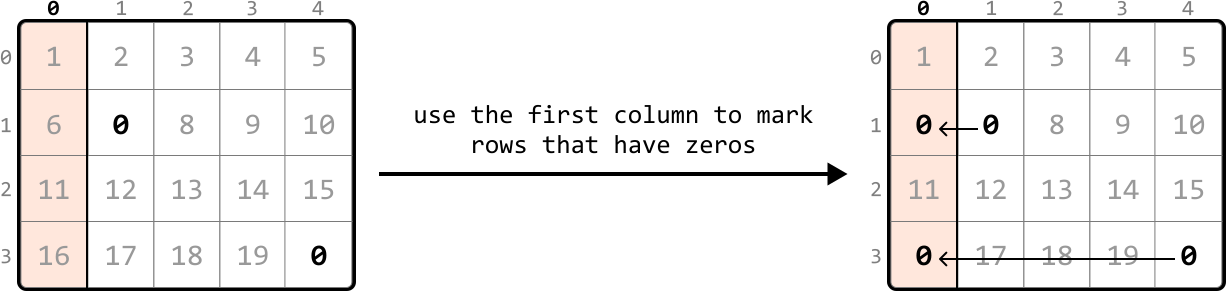
Image represents a visual explanation of a coding pattern.  It shows two 4x5 matrices, before and after an operation. The initial matrix contains numbers 1 through 20 arranged sequentially, with zeros at positions (1,1), (3,1), and (4,5).  Each cell is labeled with its row and column index (0-3, 0-4). The first matrix is transformed into the second matrix by using the first column (index 0) as a marker.  A horizontal arrow connects the two matrices, labeled 'use the first column to mark rows that have zeros'. In the second matrix, the first column cells corresponding to rows containing zeros (rows 1 and 3) are also marked with zeros.  These zeros in the first column act as indicators of rows containing at least one zero in the original matrix.  The remaining elements in the second matrix are identical to the first.

Similarly to how we marked rows, we can mark columns containing zeros using the first row:
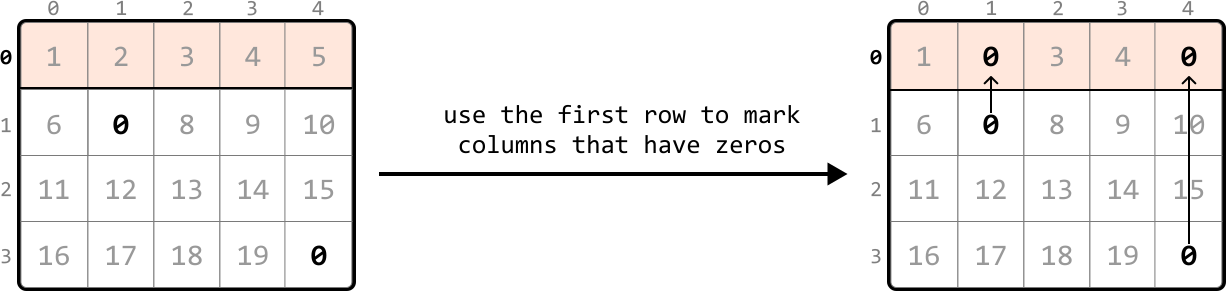
Image represents a visual explanation of a coding pattern.  The image shows two 4x5 matrices. The left matrix contains numerical data from 1 to 20, arranged sequentially, with a 0 in the first row, second column and the last row, last column.  The top row of this matrix is highlighted in a light peach color.  A thick black arrow points from the left matrix to the right matrix, with the text 'use the first row to mark columns that have zeros' written above it. The right matrix is identical to the left, except that the columns corresponding to the zeros in the first row of the left matrix (column 1 and column 4) now also have zeros in all their rows.  Specifically, zeros are added to the second row, first column; and the last row, last column of the right matrix.  The added zeros in the right matrix are visually indicated by upward-pointing arrows originating from the corresponding zeros in the first row.  Both matrices are labeled with row and column indices (0-3 and 0-4 respectively).

To set markers for the first row and first column, we can begin searching the rest of the matrix, excluding the first row and first column, for any zero-valued cells. Let’s refer to this part of the matrix as the ‘submatrix.’ When we find a zero, we set the corresponding cell in the first row and column to zero. Scanning every cell in the submatrix for zeros allows us to set markers in the first row and first column:
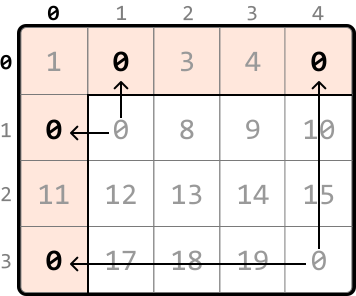
Image represents a 4x5 matrix, visually divided into cells, each containing a numerical value.  The rows and columns are labeled 0 through 3 and 0 through 4 respectively.  Several cells are highlighted in a light peach color, forming a roughly L-shaped region encompassing cells (0,0), (1,0), (2,0), (3,0), and (0,1).  Arrows indicate data flow:  a horizontal arrow points from cell (1,0) to (0,0), another from (3,0) to (0,0), and two vertical arrows point from (1,0) to (0,1) and from (3,0) to (0,4).  The values within the highlighted cells are all '0', while the remaining cells contain numbers ranging from 1 to 19. The arrows suggest a data aggregation or processing pattern where values from specific cells (1,0) and (3,0) are directed towards cells (0,0), (0,1), and (0,4), possibly representing a summation or other operation.

Now, we should start converting cells in the submatrix to zeros based on their corresponding markers. We can assess any cell in the submatrix by checking:

If either of these conditions are met, we should set that cell’s value to zero, as shown below:
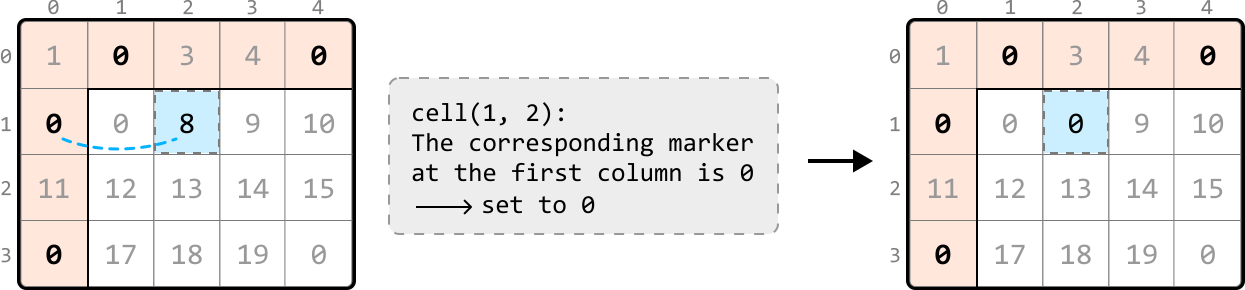
Image represents a visual explanation of a coding pattern, likely related to matrix or array manipulation.  The image shows two 4x5 matrices before and after an operation.  Each matrix is labeled with row and column indices (0-3 and 0-4 respectively).  The cells contain numerical values, with some cells highlighted in light peach.  The initial matrix displays a dashed-line-outlined light-blue cell containing the value '8' at row 1, column 2. A dashed light-blue line connects this cell to the cell at row 1, column 0, which contains a '0'.  A central explanatory box states `cell(1, 2): The corresponding marker at the first column is 0 → set to 0`.  A thick black arrow points from the initial matrix to the modified matrix. The modified matrix is identical to the initial one, except that the cell at row 1, column 0 now contains a '0', visually demonstrating the effect of setting the marker in the first column to 0 based on the value in cell (1,2).

To update this submatrix, we can iterate from the second row and column and update cell values based on the logic we just mentioned:
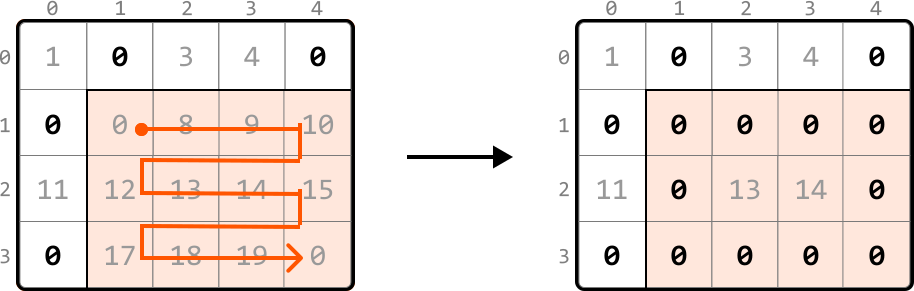
Image represents a transformation of a 4x5 matrix.  The left matrix displays numerical values arranged in a grid with rows labeled 0-3 and columns labeled 0-4.  A peach-colored region highlights a subset of cells containing the values 0, 8, 9, 10, 12, 13, 14, 15, 17, 18, and 19.  A thick orange line traces a path through these highlighted cells, starting at cell (1,1) with value '0' and ending at cell (3,4) with value '0', forming a roughly 'L' shape.  A large black arrow points from the left matrix to the right. The right matrix is identical in structure to the left, but the values within the peach-colored region are all replaced with zeros, while the values outside this region remain unchanged.  The transformation visually demonstrates the removal or zeroing-out of specific elements within a defined subset of the matrix, leaving the rest of the matrix untouched.

Handling zeros in the first row and column
After completing the previous step, there’s just one issue to address. What if the first row or column originally had a zero, like in the example below?
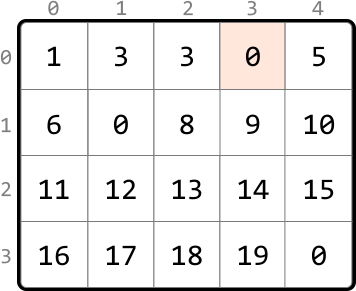
Image represents a 4x5 matrix, or two-dimensional array, of integers.  The matrix is indexed using row and column numbers, displayed along the top and left side respectively, ranging from 0 to 3 for rows and 0 to 4 for columns.  Each cell within the matrix contains a single integer value.  The integers are sequentially increasing, with the exception of several zeros strategically placed within the matrix. Specifically, a zero is located at row 0, column 3; and another at row 3, column 4.  The matrix is visually delineated by bold black lines forming a grid structure, clearly separating each individual cell containing its respective integer value.  No URLs or parameters are present; the image solely displays the numerical data within the matrix structure. The highlighted cell (row 0, column 3) containing '0' is shaded in a light peach or beige color.

Here, we can’t distinguish which zero in the first row was originally present, or resulted from being used as a marker. This means we won’t know if the first row should be zeroed:
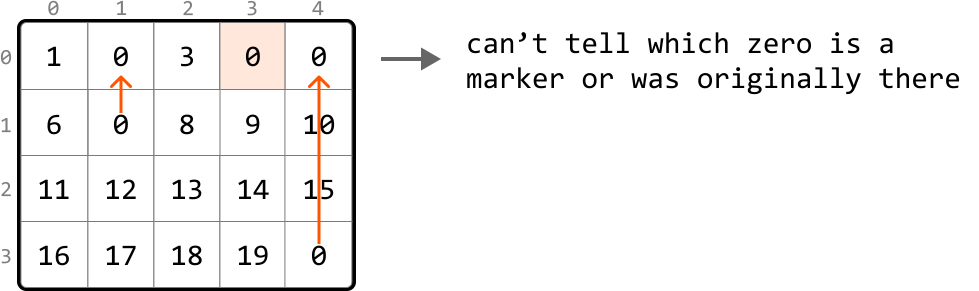
Image represents a 4x5 grid of numbers, labeled with row and column indices from 0 to 3 and 0 to 4 respectively.  The grid contains integers from 0 to 19, arranged sequentially. Two zeros in column 1 and 4 of row 0 are highlighted with a light peach background. Two orange arrows point upwards from the zeros in column 1 (row 1) and column 4 (row 3), indicating movement or a transformation.  To the right of the grid, text states: 'can't tell which zero is a marker or was originally there,' suggesting ambiguity regarding the origin of the zeros, implying that the zeros might be placeholders or part of the original data. The arrows visually represent a potential shift or operation involving these zeros, but the exact nature of this operation remains unclear due to the accompanying text.

The remedy for this is to flag whether a zero exists in the first row or first column before using them as markers.
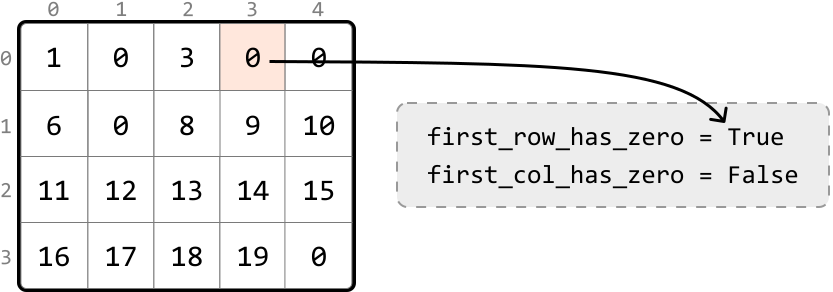
Image represents a 4x5 matrix, indexed from 0 to 3 along both rows and columns, containing integer values.  The matrix's cell at row 0, column 3 contains a highlighted '0' in a peach-colored background.  A horizontal arrow extends from this cell to a rectangular box with a dashed border. This box contains two lines of text representing boolean variables:  `first_row_has_zero = True` and `first_col_has_zero = False`. The arrow indicates that the presence of a '0' in the first row (row 0) results in the `first_row_has_zero` variable being assigned the value `True`, while the absence of a '0' in the first column (column 0) results in `first_col_has_zero` being assigned `False`.  The matrix visually demonstrates the data used to determine the boolean values.

Once we've filled the first row and column with markers, as shown in matrix X below, and set the appropriate cell values in the submatrix to zero, as shown in matrix Y, we then evaluate the first row and column separately. The first row was initially marked as containing a zero, so we convert all cells in the first row to zero (matrix Z). The first column was not flagged for having a zero initially, so it remains unaltered at this step:
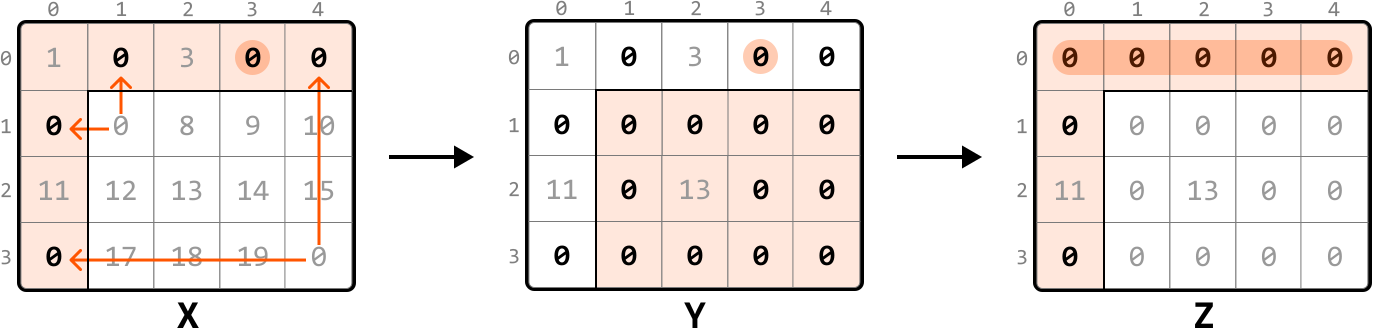
Image represents a step-by-step transformation of a 4x4 matrix.  The initial matrix, labeled 'X', contains numerical values, with some cells highlighted in peach.  Within the peach-colored cells, the values are represented by bold zeros ('**0**').  Orange arrows indicate data movement; two arrows point upwards from the bottom row's peach cells to the top row's peach cells, and two arrows point horizontally from the left column's peach cells to the right column's peach cells.  The matrix 'Y' shows the result of this transformation: the peach-colored cells from 'X' are now grouped together in a 2x2 submatrix within the larger 4x4 matrix, with the remaining cells containing zeros ('0') in gray text.  A rightward arrow connects 'X' and 'Y'.  Finally, matrix 'Z' shows a further transformation where the 2x2 submatrix from 'Y' is compressed into a single row at the top of the matrix, again with the remaining cells filled with zeros ('0') in gray text.  Another rightward arrow connects 'Y' and 'Z'.  Each matrix is labeled with its corresponding letter (X, Y, Z) below it, and the rows and columns are numbered from 0 to 3.

In-place zero-marking strategy
Let's summarize the above approach into the following steps:

  1. Use a flag to indicate if the first row initially contains any zero.

  2. Use a flag to indicate if the first column initially contains any zero.

  3. Traverse the submatrix, setting zeros in the first row and column to serve as markers for rows and columns that contain zeros.

  4. Apply zeros based on markers: iterate through the submatrix that starts from the second row and second column. For each cell, check if its corresponding marker in the first row or column is marked with a zero. If so, set that element to zero.

  5. If the first row was initially marked as containing a zero, set all elements in the first row to zero.

  6. If the first column was initially marked as having a zero, set all elements in the first column to zero.

Implementation - In-place Zero Tracking

from typing import List
   
def zero_striping(matrix: List[List[int]]) -> None:
   if not matrix or not matrix[0]:
       return
   m, n = len(matrix), len(matrix[0])
   # Check if the first row initially contains a zero.
   first_row_has_zero = False
   for c in range(n):
       if matrix[0][c] == 0:
           first_row_has_zero = True
           break
   # Check if the first column initially contains a zero.
   first_col_has_zero = False
   for r in range(m):
       if matrix[r][0] == 0:
           first_col_has_zero = True
           break
   # Use the first row and column as markers. If an element in the submatrix is zero,
   # mark its corresponding row and column in the first row and column as 0.
   for r in range(1, m):
       for c in range(1, n):
           if matrix[r][c] == 0:
               matrix[0][c] = 0
               matrix[r][0] = 0
   # Update the submatrix using the markers in the first row and column.
   for r in range(1, m):
       for c in range(1, n):
           if matrix[0][c] == 0 or matrix[r][0] == 0:
               matrix[r][c] = 0
   # If the first row had a zero initially, set all elements in the first row to
   # zero.
   if first_row_has_zero:
       for c in range(n):
           matrix[0][c] = 0
   # If the first column had a zero initially, set all elements in the first column
   # to zero.
   if first_col_has_zero:
       for r in range(m):
           matrix[r][0] = 0
#include <vector>
using namespace std;

void zeroStriping(vector<vector<int>>& matrix) {
    if (matrix.empty() || matrix[0].empty()) return;
    int m = matrix.size(), n = matrix[0].size();
    bool firstRowZero = false, firstColZero = false;
    for (int c = 0; c < n; c++) if (matrix[0][c] == 0) firstRowZero = true;
    for (int r = 0; r < m; r++) if (matrix[r][0] == 0) firstColZero = true;

    for (int r = 1; r < m; r++)              // 2) mark
        for (int c = 1; c < n; c++)
            if (matrix[r][c] == 0) { matrix[r][0] = 0; matrix[0][c] = 0; }

    for (int r = 1; r < m; r++)              // 3) apply inward
        for (int c = 1; c < n; c++)
            if (matrix[r][0] == 0 || matrix[0][c] == 0) matrix[r][c] = 0;

    if (firstRowZero) for (int c = 0; c < n; c++) matrix[0][c] = 0;   // 4)
    if (firstColZero) for (int r = 0; r < m; r++) matrix[r][0] = 0;
}
public void zeroStriping(int[][] matrix) {
    if (matrix.length == 0 || matrix[0].length == 0) return;
    int m = matrix.length, n = matrix[0].length;
    boolean firstRowZero = false, firstColZero = false;
    for (int c = 0; c < n; c++) if (matrix[0][c] == 0) firstRowZero = true;
    for (int r = 0; r < m; r++) if (matrix[r][0] == 0) firstColZero = true;

    for (int r = 1; r < m; r++)              // 2) mark
        for (int c = 1; c < n; c++)
            if (matrix[r][c] == 0) { matrix[r][0] = 0; matrix[0][c] = 0; }

    for (int r = 1; r < m; r++)              // 3) apply inward
        for (int c = 1; c < n; c++)
            if (matrix[r][0] == 0 || matrix[0][c] == 0) matrix[r][c] = 0;

    if (firstRowZero) for (int c = 0; c < n; c++) matrix[0][c] = 0;   // 4)
    if (firstColZero) for (int r = 0; r < m; r++) matrix[r][0] = 0;
}

Complexity Analysis

Time complexity: The time complexity of zero_striping is O(mn)O(m\cdot n). Here’s why:

Therefore, the overall time complexity is O(m)+O(n)+O(mn)=O(mn)O(m)+O(n)+O(m\cdot n)=O(m\cdot n).

Space complexity: The space complexity is O(1)O(1) because we use the first row and column as markers to track which rows and columns contain zeros, instead of using auxiliary data structures.

Dry Runs

Two step-by-step walkthroughs of the algorithm below: a valid case (the expected happy path) and an invalid / edge case that exercises the tricky parts. Each step shows the program state as the code runs—the same steps apply to Python, C++ and Java.

✅ Dry run 1 (one zero) — a single interior zero at (1,1) → row 1 and column 1 wiped.

original zero wiped in pass 2

Pass 1. Find the 0 at (1,1). Record zeroRows = {1}, zeroCols = {1}.
1
2
3
4
0
6
7
8
9
zeroRows1zeroCols1
Pass 2. Wipe row 1 and column 1. Every cell with r=1 or c=1 becomes 0.
1
0
3
0
0
0
7
0
9

The same run as a math table

Pass 2 rule: set cell to 0 when its row ∈ zeroRows OR its column ∈ zeroCols.
cellr in zeroRows?c in zeroCols?Result
(0,0)nonokeep 1
(0,1)noyesset 0
(1,0)yesnoset 0
(1,1)yesyesset 0
(2,2)nonokeep 9
💥 Dry run 2 (two zeros) — zeros at opposite corners (0,0) and (2,2); their stripes overlap and wipe everything but the center.

original zero wiped in pass 2

Pass 1. Find zeros at (0,0) and (2,2). Record zeroRows = {0, 2}, zeroCols = {0, 2}.
0
2
3
4
5
6
7
8
0
zeroRows02zeroCols02
Pass 2. Wipe rows 0 & 2 and columns 0 & 2. Only (1,1) lies in no dirty row or column, so 5 alone survives.
0
0
0
0
5
0
0
0
0

The same run as a math table

Pass 2 rule: set cell to 0 when its row ∈ {0, 2} OR its column ∈ {0, 2}. Only (1,1) escapes both.
cellr in zeroRows?c in zeroCols?Result
(0,0)yesyesset 0
(1,0)noyesset 0
(1,1)nonokeep 5
(1,2)noyesset 0
(2,1)yesnoset 0

Contrast with Dry run 1: one zero wiped a single row + column (a plus-sign shape). Two corner zeros make two dirty rows and two dirty columns, whose overlap blankets the whole 3×3 grid except the lone interior cell (1,1).

The same steps in each language

Both runs step exactly as the tables above. Python-specific: zero_rows / zero_cols are set()s; pass 2 tests r in zero_rows or c in zero_cols.

Same steps. C++-specific: unordered_set<int> for both; pass 2 tests zeroRows.count(r) || zeroCols.count(c); the matrix is mutated in place.

Same steps. Java-specific: HashSet<Integer> for both; pass 2 tests zeroRows.contains(r) || zeroCols.contains(c); the matrix is mutated in place.