Your resume is not the only thing that can get you to a recruiter call: cover letters, your LinkedIn profile and a few others are worth paying attention to.
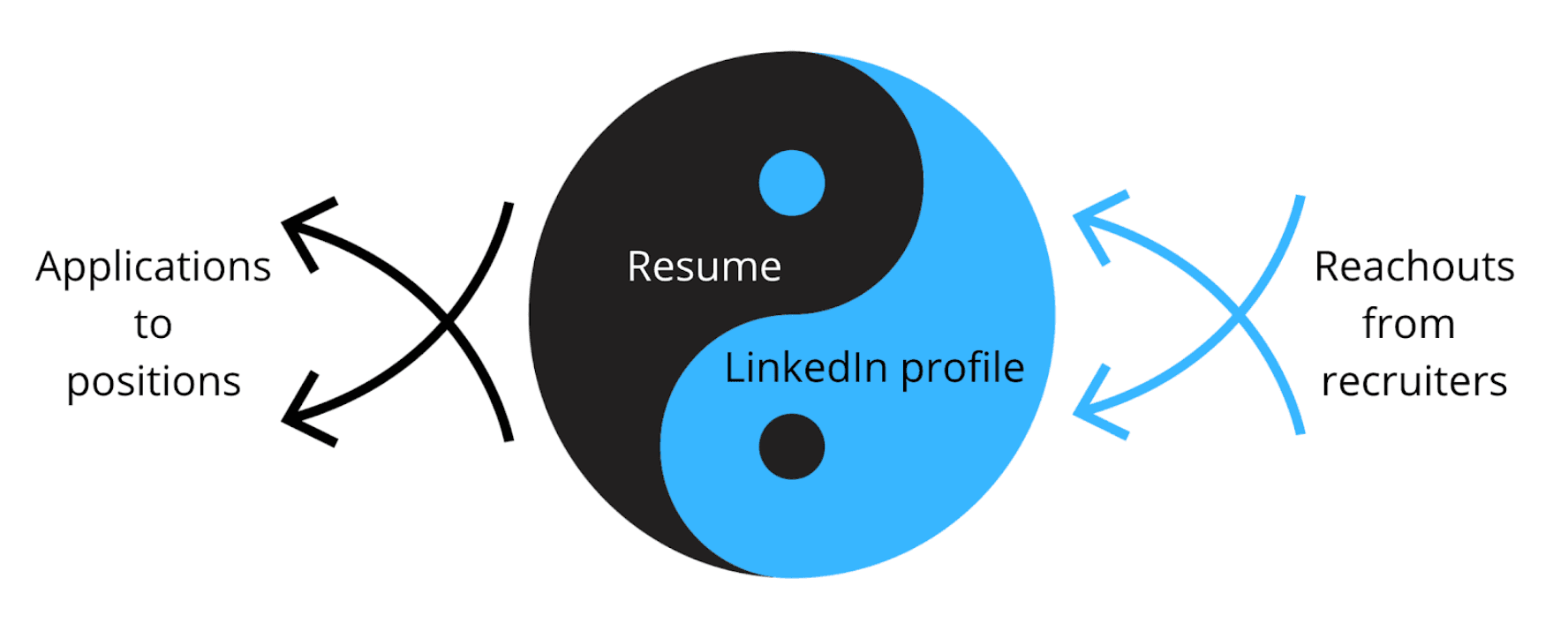
Resumes and LinkedIn profiles are like the yin and yang. You directly apply with a resume, and opportunities can come and find you with your LinkedIn profile. It’s smart to invest equally in both.
The good news is, once you have spent time polishing one, you can reuse much of the content for the other. There are a few differences that are worth keeping in mind with LinkedIn, though.
Most of these differences come from how recruiters use LinkedIn most of the time: by looking at the LinkedIn search view. They set out to find candidates who match a specific skillset, in a certain location, and might narrow down to other filters: companies, schools, and others. Here how recruiters will see your profile in the LinkedIn recruiter search view:
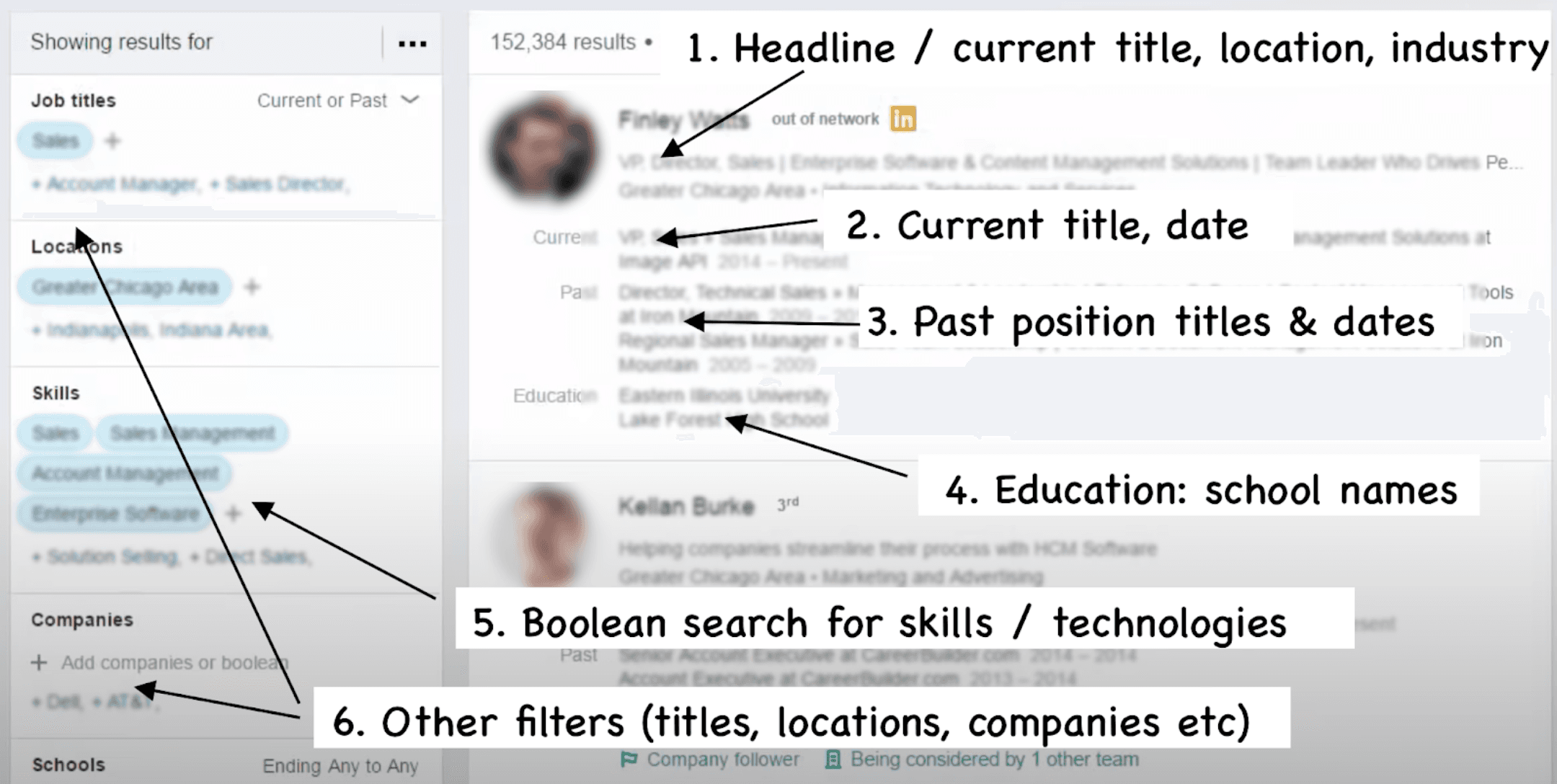
The LinkedIn recruiter search view, and the key details recruiters immediately glance at.
To optimize your “search card", consider following these steps:
How recruiters do Boolean searches
To optimize your LinkedIn profile for recruiter searches, let’s take a look behind the scenes on how recruiters search for candidates. They use the technique called Boolean search, something that should ring familiar to most developers. Using a series of AND, OR, and NOT operators, they filter details. Here are a couple of possible searches recruiters might use:
Recruiters will often Boolean search for keywords that are in the job description that the hiring manager gives them. So taking this example from a job description, highlighting possible keywords:
A recruiter could create these Boolean searches:
If your profile contains these phrases, you’ll appear in the results. The closer the match—for example, when matching in the headline—and the closer you are in your network with the recruiter, the higher you will rank on the search results.
Optimizing LinkedIn when job searching
When you are either actively job searching or are getting ready to start, consider the following:
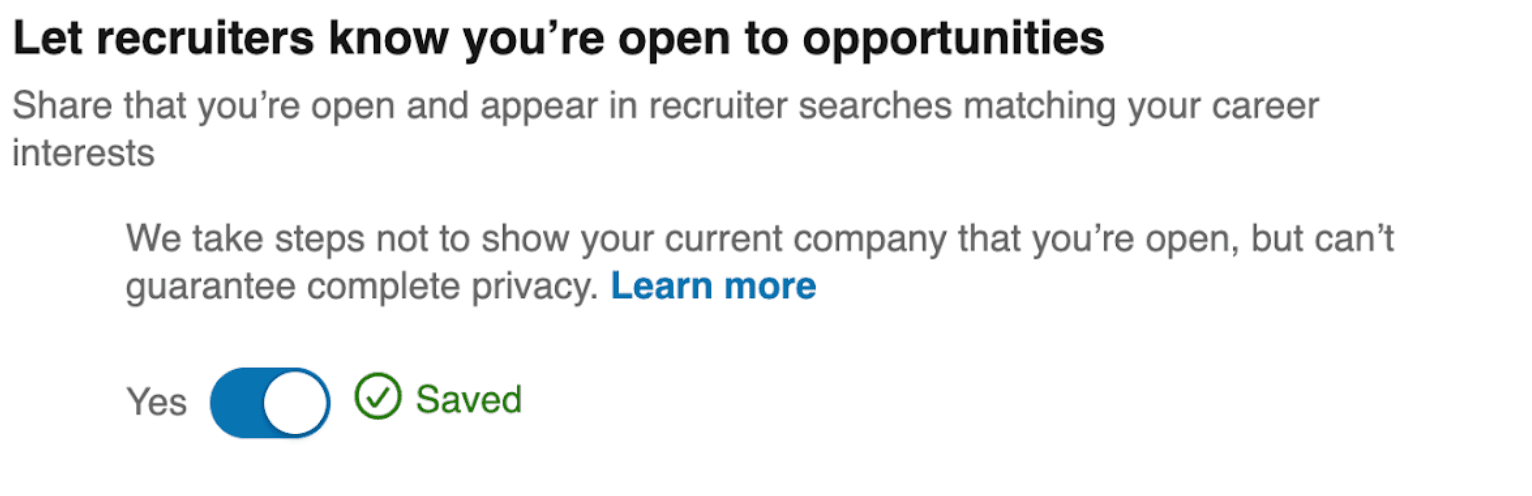
Signaling you’re open for opportunities: don’t do this in your headline. Do not add “Looking for opportunities”, “Open for a new role” or something similar in your Headline. This won’t add much value, and it will take up valuable space that you could use to sell yourself and highlight your skills. Instead, activate the Open to Job Opportunities feature in your LinkedIn profile:
Always have a current position listed, even if you don’t currently have a job. LinkedIn ranks your profile lower when you do not have a current position. Kathy Bernard, who specializes in optimizing LinkedIn profiles, advises to always fill out something as content here—even if you don't have a job right now. As a developer, you can tailor this current position to showcase the technologies and languages you are an expert in. For a few more pointers, see her article: Unemployed? Create a “current” role on LinkedIn.
Add more headline details. Consider using the “|” separator character to add more information to your headline, such as key skills or technologies you’d like to be found for. For example, a headline could be:
Full-stack dev with 5 years experience | Go, Java, JavaScript, React, Swing | Distributed systems, developer tooling & fluid user interfaces.
A tailored headline will rank your profile higher with keyword searches and grab the recruiter's attention better.
Connect with more people on LinkedIn, including recruiters. The closer you are connections-wise to the recruiter doing the search, the higher your profile will rank. As you start your job search, do consider adding current and former colleagues and recruiters who have previously reached out to you.
Consider updating your location when you have a definite destination in mind to move to. Location is often a filter that recruiters use. If you are ready to move to a city or a country, you can update your location, so you show up as a local candidate. Use good judgment, especially for cases when you’d need a visa to move. Updating a location will most likely result in more inbound messages from local companies. Once you have a reachout, you can confirm if the company sponsors visas before investing more time in the process.
Use Boolean search when searching for jobs. It’s not just recruiters who can do Boolean searches: on job sites like LinkedIn, you can do so as well. You can use AND, OR and NOT for phrases, and parenthetical search. For example, you could use the following search string to look for non-senior frontend jobs, for companies not building on top of the Laravel framework:
(frontend OR javascript OR react) AND NOT (senior or laravel)
Narrow your search to fewer opportunities that are a better match for what you are looking for, or your skillset. This will help you apply in a more focused way.
There is no expectation of having GitHub on your resume, regardless of how many resumes and resume templates you might see these included in. As a hiring manager, I never explicitly look for either. It is a nice bonus to see it, though, and as a hiring manager, I frequently click through to check it out.
Other hiring managers confirmed the same: they are more likely to click through and check out these profiles after the first scan. Recruiters are somewhat less likely to do so: though the more technical the recruiter, the more inclined they are to take a look. Should you make it to the onsite, developers who would be interviewing you often click through and bring up the projects as talking points on the interview. Which brings us to the most important rule of linking to GitHub.
Only include a GitHub link if there is something you are proud to show off on these sites. Do not link to an empty Github profile or one that has poor code visible.
Clean up your GitHub profile to describe the work that people will find there if you do link it. Add proper READMEs to your main projects that give context on what the project does, highlighting relevant code, setup, or configuration.
As a hiring manager, here is what I look for when browsing through a GitHub profile:
To optimize your GitHub profile that you are linking on your resume, follow these few steps:
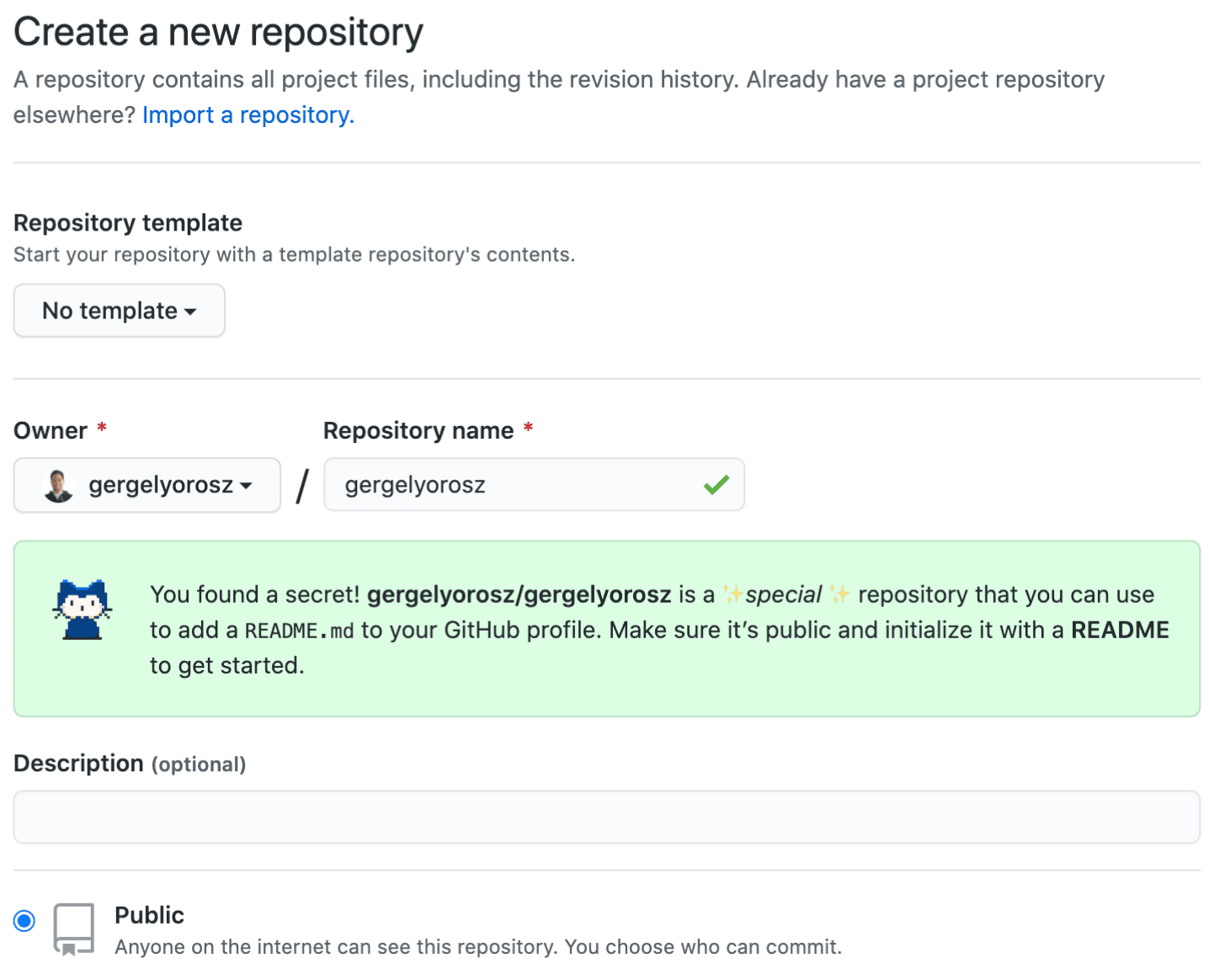
Create a README for your profile and summarize things that a hiring manager should know about you, pointing to standout projects. To create a personal README, create a repo with the same name as your username, and initialize it with a README:
Then take inspiration from other developer READMEs in creating yours from lists like:
Pin the “best” repositories on your profile—up to six of them. You can control which repositories are shown on your profile. Hiring managers will most likely only click on a few of these, so make them count.
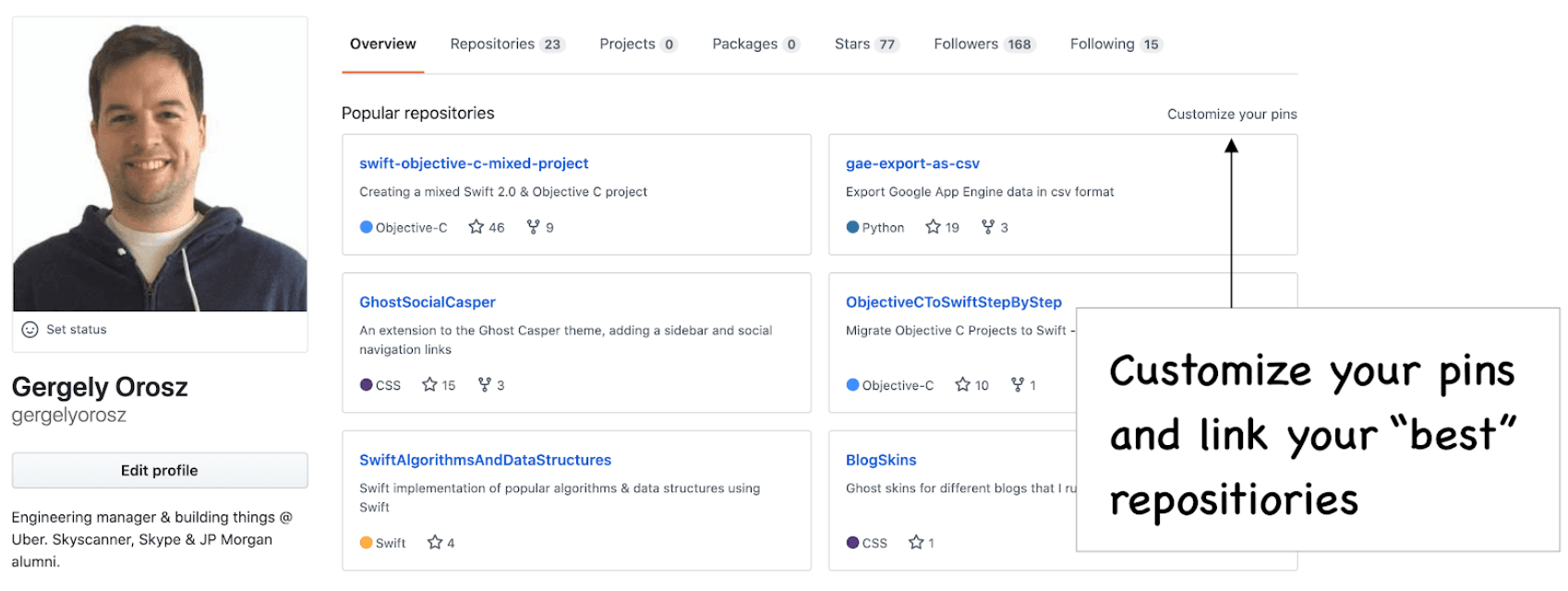
Fill out descriptions for each of the pinned projects in the repo’s description field. The description should make it clear what the project does and why it is interesting. You can make the descriptions fun: your goal is for the person to check out the repository.
Have great READMEs for your pinned projects. At the very least, the README should describe what the project does and how to use it. Better READMEs have code examples, show how to configure, or list further improvements. Browse READMEs of popular projects and consider improving your README to be more similar to them. You can use the README score tool to get feedback on areas you could further improve.
Do you know what percentage of candidates write technical blogs? Only a fraction of all resumes I’ve seen. So if you happen to write one, you’ll already have something to stand out with—assuming you add it to your resume. However, don’t just add your technical blog to your resume. Similar to your GitHub, be deliberate about what the one or two articles you’d want a hiring manager to read.
Before and after: technical blogs
Take these two resume examples. The first example is from a resume where the person is applying for a frontend position that is asking for some experience with Angular.
Before:

After:

In the “before” version, when the hiring manager clicks on the link, they are taken to the linked Dev.to blog. On this page, the last two articles are non-technical posts, and buried many pages down are two solid articles about Angular.
The “after” version does a much better job guiding the hiring manager to the post you want them to read. And they don’t even need to click through to think, “okay, so this person doesn’t only say they know Angular: they’ve proven it, by blogging about it.”
Add links to the most relevant one or two technical articles that you have authored in your resume, describing what they are about, similar to the above example. Doing this over “just” listing your blog will let you control more what you’d like to show. You’ll also guide your reader better, having them start reading some of your best or most relevant content, should they click through.
StackOverflow is the only other piece of content that I’d suggest to include: but only if you are active on the site, and your profile supports the story you want to tell. For example, if you are a JavaScript expert and have many JavaScript-related badges, this can support your credibility as someone who knows this technology. As a hiring manager, I click through far less to StackOverflow links in the resume than I do to GitHub, though.
For other social media like Twitter, Instagram, Quora and others: I discourage linking to these on your resume. These mediums do a poor job conveying professional value to the hiring manager and the recruiter.
Big tech companies rarely ask for cover letters—they will only look at your resume. Small and mid-sized companies allow attaching these, but very few explicitly ask for it. Most tech recruiters I’ve talked with don’t ask for it, and even if sent separately, rarely read them.
Cover letters in tech matter at companies where the hiring manager does the resume screening. These are typically smaller companies, often startups, which see fewer applicants for roles. As such, I suggest prioritizing writing cover letters to smaller companies only, or in cases where you know you can reach the hiring manager directly.
Also, your tailored resume for the position should already be a cover letter. If you follow the advice in the section Write a Resume for That Job, the cover letter will be less relevant. You never know if the cover letter will be read or forwarded, but as long as you progress in the hiring process, your resume will always be.
From the inside out: what matters for a cover letter? While larger tech companies often don’t ask for cover letters due to the large number of applicants, this is not true for smaller ones and for startups. In these environments, cover letters can be a real advantage. Here’s what Monica Lent has to say, who reviewed thousands of CVs while hiring in Berlin for SumUp, a high-growth startup. The advice as part of her seven software developer resume tips. “Even if you think you have a highly relevant CV, you should still consider writing a cover letter. It doesn’t have to be long, but it can only increase your chances of passing the CV screening phase. Companies you’re applying for want to feel a little bit special. Like if they were to offer you a job, there’s a good chance you’d actually accept it. You will stand out if you have a coherent cover letter that demonstrates you’ve read the job ad and the website. It doesn’t have to be long, either. In fact, it shouldn’t be long, because ain’t nobody got time to read a super long cover letter. And don’t forget to spell check. Here are the basic elements that a cover letter for a developer role should have:
Note that some companies may not find the cover letter useful or even read them. This can vary based on the role – for a typical dev job, perhaps not. But for highly competitive junior roles or very senior roles, your motivation is relevant. In the end, a cover letter will never hurt you, and has the possibility to help you stand out. |
Tailor your cover letter style to the company and country that you are applying for. For a young startup in the US, a more casual and outspoken style might work better. For a large company in the UK or Australia, a more reserved approach could work better. For inspiration, see the following cover letter examples:
Personal cover letters over templated ones
When you decide to write a cover letter, an immediate strategy is to find a good template, then use that. If you search for cover letter templates, they all look somewhat similar, something like this one:
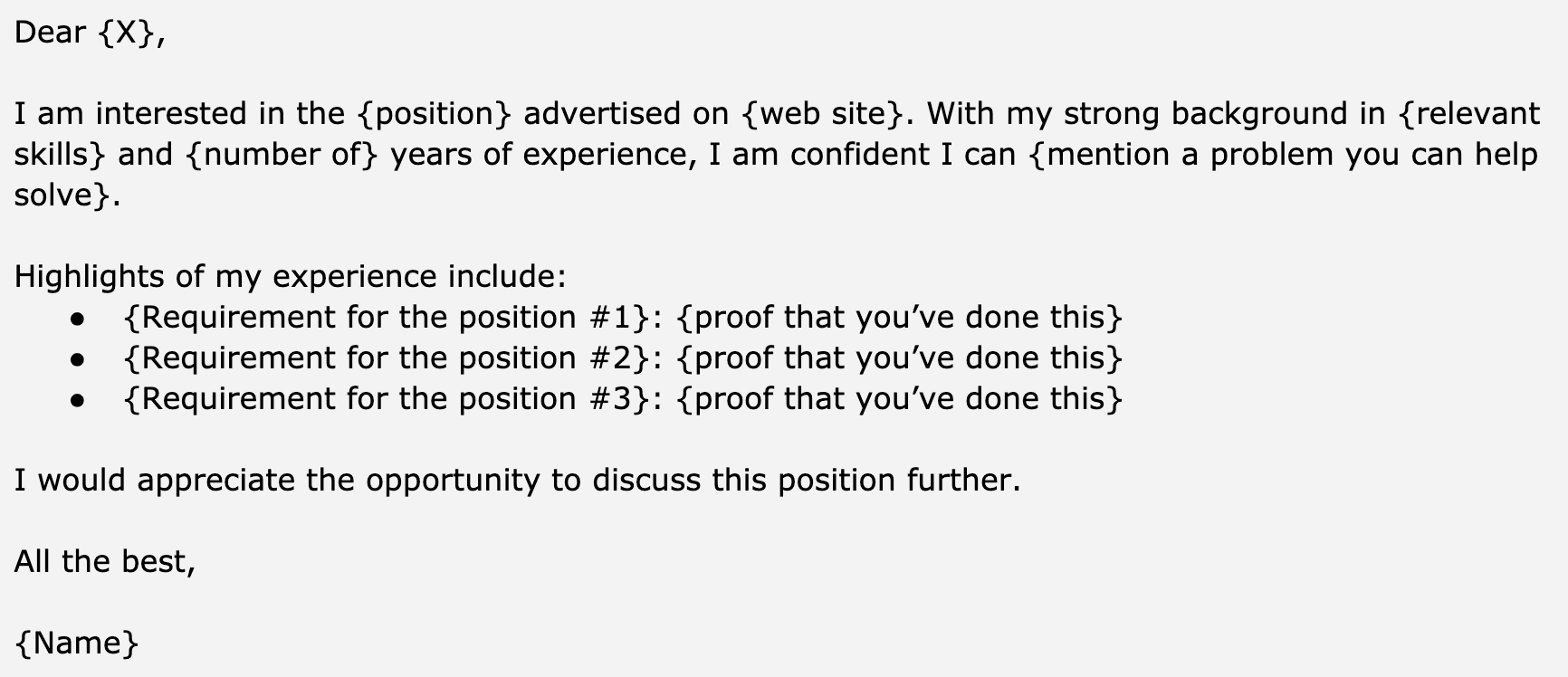
Templated cover letters will frequently get ignored in tech. They don’t give much more information than your resume. In the example above, almost everything listed in the cover letter is probably part of the CV the person submitted.
Instead of a template, consider spending more time to write a highly personalized cover letter for that position and that company. Do this only for cases where there’s a chance the person would read this. So do this when reaching out directly to the hiring manager, or applying for smaller companies.
Consider this highly personalized cover letter, shared by software engineer Santiago Valdarrama, tailored for a US-based startup:
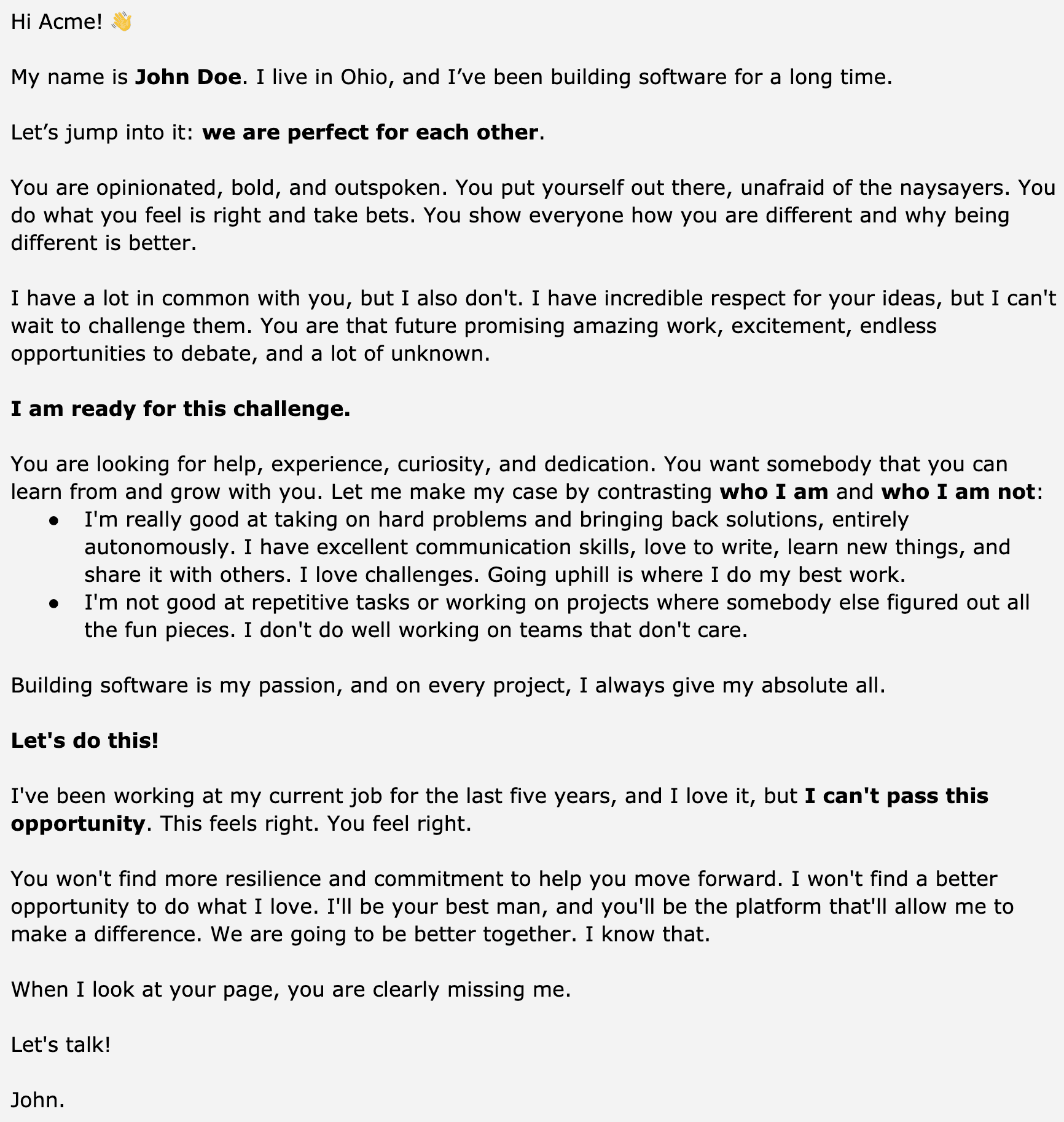
As a hiring manager working at an outspoken company that challenges the status quo, and takes on bold bets, receiving an inbound cover letter like this would immediately want to learn more about this person.
Here’s what this cover letter gets right:
This cover letter also breaks some unwritten rules that many hiring managers are used to.
Use good judgment when writing a cover letter. But don’t forget that your goal is to get your foot in the door - assuming your skills are a good match. For the smaller companies that would read a cover letter, a tactful and personalized approach could make the difference.
In this chapter, we went through why LinkedIn, GitHub, StackOverflow, technical blogs and cover letters can also play a part in your application process. Of all of these, LinkedIn, GitHub and technical blogs are usually the most relevant ones for software developers. To increase the chances of a recruiter call, do the following exercises: